Foundations of AI Prompting
AI prompts are text instructions that tell language models what you want them to create or answer. Understanding how prompts work and why they need careful design helps you get better results from AI tools.
What Is an AI Prompt?
A prompt is a set of instructions or questions you give to an AI model. It tells the system what task to complete or what kind of response you need.
Prompts can be simple or detailed. A basic prompt might be "Write a story about a dog."
A detailed prompt includes more context like "Write a 200-word story about a golden retriever who finds a lost toy in a park." For image generation, prompts work the same way.
You describe what you want to see. The prompt structure typically follows: Subject + Environment + Style + Composition Instructions.
For example, "A mountain cabin in winter fog, oil painting style, wide angle view." The words you choose affect what the AI creates.
If you're new to crafting image prompts or want to learn from existing images, try using an image-to-prompt tool. These tools analyze images and reverse-engineer their prompts, helping you understand what keywords and structures produce specific visual results. This is especially useful for learning composition terminology and style descriptors.
Adding specific details helps the model understand your exact needs.
Role of Prompts in Language Models
Large language models (LLMs) like GPT use prompts to understand what you want. These models learned patterns from huge amounts of text data during training.
When you enter a prompt, the model looks at each word and predicts what should come next. It uses the context you provide to generate relevant responses.
Think of prompts as a recipe for the AI. Clear instructions lead to better results.
Vague prompts create unpredictable outputs. LLMs need your prompt to know the task type, desired format, and specific requirements.
Without good prompts, even powerful AI models produce unhelpful responses.
Why Prompt Engineering Matters
Prompt engineering is the practice of designing and improving prompts to get the best AI outputs. This skill directly affects the quality of what AI tools create for you.
Poor prompts waste time and resources. You might need multiple attempts to get usable results. Good prompt engineering saves effort by getting what you need on the first try.
For text-to-image AI, prompt engineering becomes even more critical. The same subject description produces different results based on composition keywords.
Using "wide angle" versus "close-up" or "negative space" versus "center composition" changes the entire image layout. Image size matters too.
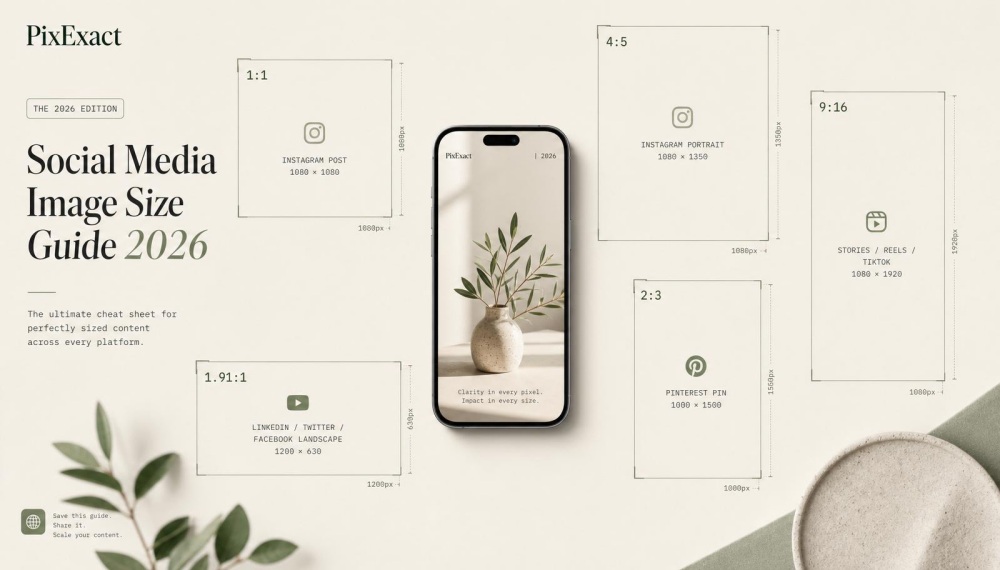
A prompt for "full body portrait" works well on vertical (9:16) formats but fails on widescreen (16:9) layouts. You need to adjust your prompt based on canvas dimensions.
For widescreen, try "full body portrait with negative space on sides" or "wide angle full body shot in landscape." Tools with precise sizing functions require prompts that match the output dimensions.
For banner backgrounds at 16:9, include composition terms like "horizontal layout" or "panoramic view" in your prompts.
Core Elements of an Effective AI Prompt
A strong AI prompt needs four key building blocks to produce quality results. You need clear instructions that tell the AI what you want, specific task boundaries that define the limits, a defined role for the AI to follow, and concrete examples that show the desired outcome.
Clear Instructions and Context
Your instructions must be specific and direct. When you write prompts, avoid vague language like "make it nice" or "create something cool."
Instead, tell the AI exactly what you need: "Create a full-body portrait of a woman standing in a field." Context helps the AI understand your goal.
If you're generating an image for a website banner, mention that the canvas is 16:9 and you need negative space on the right side for text. For a vertical social media post, specify that you need a centered composition in a 9:16 format.
Add environment details to give the AI more information. Write "snow-covered mountain at sunset with orange sky" instead of just "mountain."
The more context you provide, the better your results will be.
Task Definition and Constraints
Define what you want the AI to create and set clear boundaries. Tell the AI the image size, aspect ratio, and composition requirements up front.
A prompt like "wide-angle shot of a cafe interior" works better for a 16:9 banner than a standard square format. Use composition keywords to control layout:
- Wide angle: Shows more of the scene, works well for landscapes and banners
- Negative space: Creates empty areas for text or other elements
- Center composition: Places the subject in the middle of the frame
Specify what you don't want. If you need a widescreen banner but don't want a full-body portrait, write "headshot in a wide-angle format with background extending to edges."
This prevents the AI from generating a complete figure that looks cramped in a horizontal space.
Role Assignment and Persona
Assign the AI a specific role to improve output quality. Tell it to act as a professional photographer, graphic designer, or art director.
This helps the AI understand the level of expertise you expect. For image generation, specify the artistic perspective: "photograph this scene as a commercial photographer would for a product catalog" or "compose this as a minimalist designer creating a tech startup banner."
Role assignment works with style instructions. Combine "as a fashion photographer" with "shooting in natural light with shallow depth of field" to get more professional results.
Providing Examples
Examples show the AI exactly what you want. Describe reference images in your prompt: "similar to a hero banner on modern tech websites, with the subject on the left and empty space on the right."
Use the formula: Subject + Environment + Style + Composition Instructions. For a website banner, write: "Professional woman in business attire (subject) + modern office with large windows (environment) + bright natural lighting (style) + positioned left third of frame with negative space right (composition)."
Include size-specific guidance. For 16:9 compositions, note that "full-body portrait" often fails because the horizontal space creates awkward empty areas.
Instead, write "upper body portrait extended into environmental context" to fill the frame naturally. When using tools with precise sizing like PixExact, match your prompt to the dimensions.
For a 1920x1080 banner, write "wide environmental shot with subject occupying left 40% of frame" to ensure proper composition for the exact output size.
Prompt Engineering Techniques
Effective prompt engineering requires understanding different approaches to communicate with AI models. The main techniques include zero-shot prompting for direct requests, few-shot prompting with examples, and chain-of-thought prompting for step-by-step reasoning.
Prompting Techniques Overview
Prompting techniques are specific methods you use to design instructions for AI models. These methods help you get better results from large language models by structuring your requests in different ways.
Basic prompting techniques focus on how much information you give the AI before asking for results. You can ask questions without any examples, provide a few samples to guide the model, or break down complex tasks into smaller steps.
Each approach works better for different types of tasks. Advanced prompting techniques combine multiple methods to handle complex challenges.
You might use few-shot learning with chain-of-thought prompting to solve arithmetic reasoning problems. The key is matching your technique to what you need from the AI.
Zero-Shot Prompting
A zero-shot prompt asks the AI to complete a task without providing any examples. You simply tell the model what you want, and it uses its training to respond.
This is the simplest form of prompt engineering. Zero-shot prompting works well for common tasks like basic questions or simple instructions.
For example, you might write "Translate this sentence to Spanish" without showing translation examples. The AI understands the task from its existing knowledge.
This technique has limits with specialized or complex tasks. The model might not understand unusual requests or industry-specific needs.
You'll get better results when your request is clear and uses familiar concepts.
Few-Shot Prompting
Few-shot prompting includes examples in your prompt to show the AI what you want. You provide 2-5 samples that demonstrate the pattern or format you're looking for.
The model learns from these examples and applies the same approach to your actual request. This technique improves results for specific formats or unusual tasks.
If you need a particular writing style or data structure, showing examples helps the AI understand your expectations. Few-shot learning is especially useful for custom outputs that don't follow standard patterns.
Here's how you structure few-shot prompts:
- Start with your examples (typically 2-5)
- Keep examples consistent in format
- End with your actual request following the same pattern
Chain-of-Thought Prompting
Chain-of-thought prompting breaks complex problems into steps. You ask the AI to show its work or explain its reasoning before giving a final answer.
This approach helps with tasks that need logic or multi-step solutions. This technique significantly improves arithmetic reasoning and problem-solving tasks.
Instead of asking "What is 15% of 240?", you write "Calculate 15% of 240. Show your work step by step." The AI provides the calculation process, which leads to more accurate results.
You can combine chain-of-thought with few-shot prompting for even better outcomes. Show examples where you write out the reasoning process, then ask the model to follow the same method.
For composition control in image generation, apply these techniques differently. Use zero-shot prompts for simple images: "A red car in a parking lot."
Add composition instructions directly: "A red car in a parking lot, wide angle shot, negative space on left side." Few-shot learning helps when you need consistent layouts across multiple images.
Describe 2-3 examples with specific composition rules, then generate variations. This works well for banner backgrounds or social media templates.
Consider your canvas size when writing prompts. A 16:9 widescreen needs horizontal compositions.
Write "A portrait of a woman, upper body shot, centered, negative space on sides" instead of "full body portrait." The prompt formula becomes: Subject + Environment + Style + Composition Instructions.
For vertical formats like 9:16, adjust your composition keywords. Use "vertical composition" or "tall framing" in your prompts.
Specify where elements should appear: "center composition," "rule of thirds," or "negative space at top." PixExact's sizing tools work with composition-focused prompts.
Set your exact dimensions first, then write prompts that match those proportions. For a 1200x400 banner, include "wide panoramic composition" and "horizontal layout" in your instructions.
Advanced Prompt Strategies

Breaking complex tasks into steps, assigning expert roles, and using AI to optimize prompts are three powerful methods that turn basic requests into professional outputs. These strategies help you control how AI processes information and generates results.
Prompt Chaining
Prompt chaining means breaking one large task into smaller, connected prompts where each step builds on the previous output. Instead of asking for everything at once, you guide the AI through a sequence that produces better results.
Start with research, then analyze, then apply. For example, your first prompt gathers information about your topic. Your second prompt asks the AI to analyze that information for patterns or insights.
Your third prompt uses those insights to create something specific like a strategy or piece of content. The critique-and-improve pattern works especially well.
Generate your initial output, then ask the AI to identify weaknesses in what it created. Finally, have it produce an improved version based on its own critique.
This self-correction approach often delivers dramatically better results than single-shot prompts. Use this for: Long-form content, strategic planning, technical analysis, or any task that benefits from multiple thinking stages.
Role-Based Prompting
Role-based prompting assigns the AI a specific expert identity to access specialized knowledge and thinking patterns. When you tell the AI "You are a senior software architect" or "Act as a financial analyst with 15 years of experience," you activate domain-specific reasoning.
Be specific about expertise. Instead of "You are a marketer," try "You are a B2B SaaS marketing director who specializes in enterprise customer acquisition." The more detailed the role, the more targeted the output.
You can also use multi-perspective prompting to get richer analysis. Ask the AI to evaluate your question from three different expert viewpoints—for example, a technical lead, a product manager, and a UX designer.
This surfaces considerations that single-perspective analysis misses. Expert panel technique: Simulate a panel discussion where different experts debate your question.
This produces surprisingly sophisticated analysis that reveals trade-offs and alternative approaches you might not have considered.
Meta-Prompting
Meta-prompting uses AI to create, improve, or analyze prompts themselves. You're essentially asking the AI to apply its language understanding to optimize the very instructions you give it.
Ask the AI to improve your prompts. Share a prompt you're using and request a more effective version: "Here's my current prompt: [your prompt]. Rewrite it to produce more specific, actionable outputs." The AI will often suggest better structure, clearer constraints, or missing context.
You can also have AI generate prompts for specific goals. Describe what you want to achieve and ask: "Create an optimal prompt that will help me [specific goal] with output that includes [specific requirements]."
This is especially useful when you're unsure how to structure a complex request.
Prompt analysis helps you learn. Take a prompt that worked well and ask: "Why is this prompt effective? What techniques does it use?" Understanding the mechanics behind successful prompts helps you apply those patterns to new situations.
Retrieval-Augmented Generation (RAG) and Hybrid Methods

RAG combines language models with external knowledge retrieval to improve accuracy and reduce errors in AI responses. When you integrate RAG with your prompts, you can access current information and domain-specific data that wasn't included in the model's original training.
Overview of RAG
Retrieval-Augmented Generation connects AI models to external databases or documents. The system first searches for relevant information based on your query, then uses that information to generate accurate answers.
RAG works in two main steps. First, it converts your question into a numerical format and searches a database for similar content.
Second, it feeds the retrieved information to the language model along with your original prompt. This approach helps with question answering tasks because the AI bases its response on actual documents rather than just its training data.
Key components include:
- Vector databases that store document embeddings for quick searches
- Retrieval mechanisms that find the most relevant content
- Generation models that create responses using retrieved information
RAG reduces hallucinations by grounding responses in real data. The system updates easily when you add new documents to the knowledge base.
Integrating RAG with AI Prompts
You need to structure your prompts differently when working with RAG systems. Your prompt should guide both the retrieval and generation phases to get better results.
Basic RAG prompt structure:
- Write clear, specific questions
- Include relevant keywords for retrieval
- Specify the type of information you need
- Request citations or sources when needed
For example, instead of asking "What is machine learning?", you would write "Based on the technical documentation, explain the three main types of machine learning algorithms used in production systems." This helps the retrieval system find precise information.
You can combine RAG with standard prompt engineering techniques. Add role definitions like "You are a technical expert" before your question.
Use few-shot examples that show how to cite retrieved sources. Specify output formats such as "List the key points with document references."
Advanced techniques include:
- Query expansion to search with multiple phrasings
- Hybrid search combining keyword and semantic retrieval
- Reranking results before feeding them to the model
Test different chunk sizes in your knowledge base to balance context and precision. Smaller chunks give specific answers but may lack context.
Larger chunks provide better context but can include irrelevant information. Most systems work well with 500-1000 character chunks.
Platform-Specific Prompting Approaches

Different AI platforms require tailored approaches to get the best results. ChatGPT and GPT-4 work well with system messages that set behavior parameters.
Gemini and other generative AI models need clear structure and specific formatting to understand your intent.
Prompting with ChatGPT and GPT-4
When developing with LLMs like ChatGPT and GPT-4, you should use system messages to establish the AI's role and behavior. System messages act as persistent instructions that guide every response.
For example, you can set the system message to "You are an expert in image composition" before asking about layout techniques.
GPT-4 responds better to structured prompts than casual conversation. Break your requests into clear components: subject, context, and desired output format.
If you want composition advice, specify the image dimensions first.
You can use this formula for image generation prompts:
- Subject: What you want to see (person, object, scene)
- Environment: Where it takes place (studio, outdoors, abstract space)
- Style: Visual approach (realistic, minimalist, painterly)
- Composition Instructions: Layout control (centered, rule of thirds, negative space)
For widescreen formats like 16:9, adjust your composition keywords. Instead of "full body portrait," use "wide angle shot with subject positioned left, negative space right" to fill the horizontal canvas properly.
Prompting for Gemini and Other LLMs
Gemini works best with explicit structure in your prompts. You need to be more direct about composition requirements than with GPT models.
Start with the canvas size, then describe your subject placement.
When working with generative AI for images, specify composition terms clearly:
- Wide angle: Captures more horizontal space, ideal for 16:9 banners
- Negative space: Empty areas that balance your subject
- Center composition: Subject in the middle, works for square formats
- Rule of thirds: Subject positioned at intersecting grid lines
Your prompt should match the output dimensions. A 16:9 banner needs horizontal composition language.
Write "landscape view with subject in left third, open sky fills right two-thirds" instead of generic descriptions.
For precise sizing with tools like PixExact, combine exact dimensions with composition keywords: "1920x1080 banner, mountain range spans full width, centered peak with dramatic negative space in sky."
Learning and Mastering Prompt Engineering
Prompt engineering requires structured learning combined with regular practice. Available courses range from beginner fundamentals to advanced techniques, while hands-on experimentation with AI tools builds practical skills.
Prompt Engineering Courses and Guides
Multiple learning paths exist for prompt engineering courses at different skill levels. IBM offers a 2026 guide that includes tutorials and real-world examples for learners at every stage.
You can find courses that teach how to write better prompts for ChatGPT, Claude, and similar tools. Google Cloud provides guides on designing prompts for AI models, while Microsoft Azure offers documentation on prompt construction techniques.
These resources cover the fundamentals you need to understand how language models interpret your inputs. Most prompt engineering courses teach you to craft clear instructions that get desired responses.
You'll learn to provide context, add examples, and structure prompts for specific tasks like content creation or problem solving.
For composition control in image generation, you need to understand the prompt formula: Subject + Environment + Style + Composition Instructions. This structure helps you generate images that match your intended layout and format.
Hands-On Practice and Resources
Practice with actual AI tools builds your prompt engineering skills faster than theory alone. Start by testing different prompt structures and noting which approaches work best for your specific use cases.
Key composition keywords you should master include:
- Wide angle: Creates expansive scenes with more environmental context
- Negative space: Adds empty areas around your subject for visual balance
- Center composition: Places the main subject in the middle of your frame
The relationship between image size and prompts matters significantly. Writing "full body portrait" for a widescreen 16:9 canvas often produces poor results because the wide format doesn't suit vertical full-body shots.
You should modify your prompt to "wide shot portrait" or "portrait with environmental context" for horizontal formats. When you use tools like PixExact with precise sizing functions, combine specific dimensions with matching composition prompts.
For banner backgrounds at 16:9, include terms like "panoramic view" or "horizontal composition" to generate layouts that fill your canvas properly.
Frequently Asked Questions
Effective prompts combine clear subject descriptions with specific composition instructions and environmental details. Success depends on understanding how AI models interpret language and how different prompt structures affect outputs across various image formats.
How can I effectively use prompts to improve AI-generated content?
Start with a clear prompt formula that includes your subject, environment, style, and composition instructions. This structure gives the AI model a complete picture of what you want to create.
Break your prompt into distinct parts. Name your subject first, then describe where it appears, add any style preferences, and finish with composition keywords like "wide angle" or "center composition."
Be specific about what you want instead of what you don't want. Saying "close-up portrait, shallow depth of field" works better than trying to avoid unwanted elements.
Test your prompts with small changes to see which words produce better results. Models respond differently to "photograph of" versus "digital art of" or "illustration of."
What are the best practices for designing prompts for conversational AI?
Provide context before asking questions. Tell the AI what role it should take or what type of response format you need.
Use clear, direct language without unnecessary words. Short sentences with specific instructions produce more reliable outputs than long, complex requests.
Structure your input with examples when possible. Show the AI the pattern you want it to follow rather than just describing it.
Break complex tasks into smaller steps. Ask the AI to complete one part at a time instead of handling everything in a single prompt.
Which factors should be considered when crafting prompts for AI to ensure unbiased outcomes?
Review your language for loaded terms or assumptions. Words that carry cultural or social biases can influence AI outputs in unintended ways.
Specify diverse characteristics when describing people. Include varied ages, backgrounds, and appearances in your prompts to avoid default patterns.
Test prompts multiple times to check for consistent biases in results. If you see repeated patterns that seem limited or stereotypical, adjust your wording.
Use neutral descriptors that focus on objective qualities. Replace subjective judgments with specific, measurable details.
In what ways can prompt design influence the performance of AI models?
The relationship between image size and prompt content directly affects output quality. A "full body portrait" prompt fails on widescreen 16:9 canvases because the wide format cuts off vertical space needed for full body shots.
Composition keywords guide how AI arranges elements within your chosen dimensions. "Wide angle" works well for landscape formats while "negative space" helps balance subjects in square or vertical layouts.
Match your subject description to your canvas ratio. For 16:9 banners, write "person from waist up, negative space on sides" instead of requesting full body shots.
Tools with precise sizing functions let you pair exact dimensions with composition-specific prompts. This combination prevents cropping issues and creates images that fit your layout perfectly.
What methodologies are available for measuring the success of AI interactions based on prompts?
Compare outputs against your original intent. Check if the AI included all requested elements and arranged them according to your composition instructions.
Track which prompt structures consistently produce usable results. Keep a record of successful formulas for different image types and formats.
Measure technical accuracy by reviewing how well the output matches your specified dimensions and aspect ratios. Banners and backgrounds should fill the space without awkward cropping.
Count how many generations you need before getting acceptable results. Effective prompts reduce the number of attempts required.
Can prompt engineering enhance the creativity of AI outputs, and if so, how?
Composition control opens creative possibilities beyond basic style choices.
Instead of just asking for "Van Gogh style," you can direct where elements appear and how space gets used.
"Center composition" places your subject in the middle with balanced surroundings.
This works for profile pictures and symmetrical designs.
"Negative space" creates breathing room around your subject.
Add this keyword when you need areas for text overlays or want a minimalist look.
Layer multiple composition terms to create unique arrangements.
Combine "wide angle, low perspective, negative space above" for dramatic landscape shots that leave room for headlines.
Experiment with unusual combinations of subject, environment, and composition keywords.
The interaction between these elements produces unexpected creative results that simple style requests cannot achieve.