Free Image to Prompt Generator: Convert Images into Detailed Text Prompts
Unlock the creative vision behind any image. Upload a photo, analyze the visual content, and generate accurate AI prompts in seconds.
What is Image to Prompt Generator?
In the world of AI image generation, the only gap between a visual idea and the final result is the text prompt. PixExact's Image to Prompt tool is designed to bridge this gap by reverse-engineering visual content.
Using advanced AI models, our tool analyzes the pixel data of any uploaded JPEG or PNG and converts it into a high-quality, descriptive prompt. Whether you need to replicate a composition, extract a specific artistic style, or generate a detailed caption, our generator streamlines your workflow. It delivers optimized descriptions that are fully compatible with Midjourney, Stable Diffusion, Nano Banana, Seedream, and other major text-to-image models.
Why Use Our Image to Prompt Tool?
Master Prompt Engineering
Prompt engineering is a skill that takes time to master. By using an image to prompt AI, you can learn how advanced AI interprets visual data. See exactly which adjectives, stylistic terms, and structural elements are required to generate accurate images.
Compatibility with Major AI Models
The prompts generated by PixExact are versatile. Whether you are using Midjourney v6, Stable Diffusion XL, or Flux, the descriptive text provided gives you a solid foundation. You can paste the result directly into these tools to generate AI images.
Streamline Your Creative Workflow
Stop guessing words. Instead of spending hours testing different combinations of words to achieve a look, upload a photo that inspires you and let the AI do the heavy lifting. This significantly increases creative efficiency.
Powered by Advanced Multi-Model AI
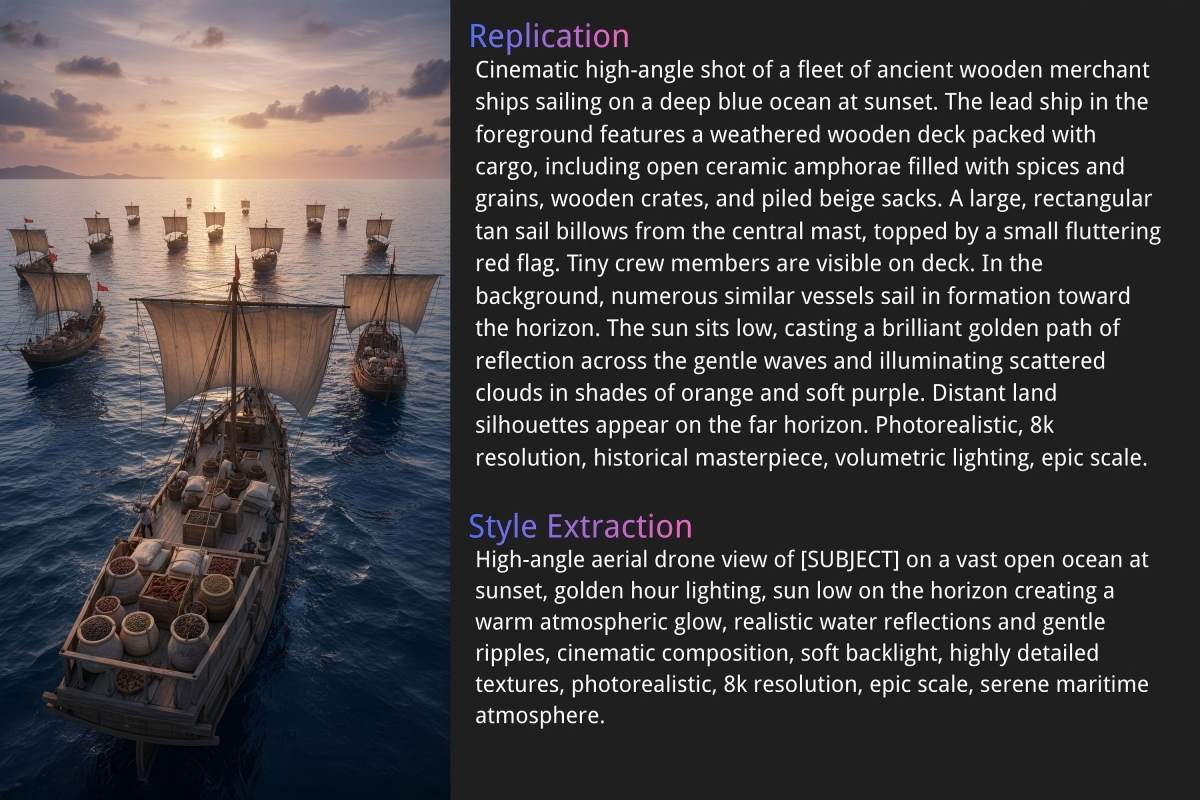
PixExact utilizes advanced AI models across three distinct modes: Replication, Style Extraction, and General. Our image to prompt generator adapts to deliver highly accurate descriptions, perfect for cloning compositions or extracting artistic styles.
How PixExact Image to Prompt AI Works
Using our image to prompt tool is intuitive and fast. We have designed a simple three-step process to help you generate prompts that align perfectly with your creative goals.
Upload Your Image
Click to upload an image from your device. We support common formats like PNG and JPEG. Once uploaded, our AI model prepares to analyze the image content.
Select Your Mode
PixExact offers granular control. Simply choose one of our three specialized modes, Replication, Style Extraction, or General, depending on whether you want to clone the image, steal its style, or just describe it.
Choose Language & Generate
Select your preferred output language. While English is the standard for prompt engineering, we support multiple languages to aid global creators. Click the button, and within seconds, our generator will provide you with a detailed text prompt.
Which Image to Prompt Mode Fits Your Workflow?
To help you decide which mode to use, here is a deeper look at how our image-to-prompt algorithms handle data.
Replication: The Reverse Image Prompt
When you select Replication, the AI model conducts a deep scan of the image's subject, composition, camera angle, and style. It attempts to construct a prompt that, if fed back into an image generator, would result in a "clone" of the upload. This is perfect for images into text prompts where fidelity is key.
Style Extraction: Stealing the Vibe
Sometimes you have a photo of a cat, but you want to generate a photo of a dog in the same style. Style Extraction is the answer. It filters out the "cat" entity and focuses on the brush strokes, lighting, rendering engine (e.g., Unreal Engine 5 render), and artistic influences.
General Description
This utilizes standard image-to-text technology (similar to Hugging Face vision models or Florence2) to provide a literal description. It answers "What is in this picture?" rather than "How do I make this picture?".
Tips for Better AI Image Generation Results
Once you have your prompt from image, you might want to tweak it. Here are some prompt engineering tips to get the perfect result:
Iterate
Use the generated text as a base. Add or remove specific words to change the output.
Weighting
If using external tools like Stable Diffusion or Midjourney, you can assign weights to specific parts of the prompt (e.g., (sunset:1.5)).
Negative Prompts
Don't forget to use negative prompts to exclude elements you don't want (e.g., "blurry", "low quality").
Set Ratio or Size
The prompt describes the content, but the canvas defines the composition. Unlike generic tools that lock you into standard aspect ratios, PixExact allows you to generate specified sizes (custom dimensions). Make sure to set your exact width and height requirements to get a professional-grade result.
Frequently Asked Questions
What is an Image to Prompt Generator?
An Image to Prompt Generator is an AI-powered tool that analyzes an uploaded image and creates a text description (prompt) that matches the visual content. This text can then be used to generate similar images in AI tools.
What is Image to Prompt tool used for?
It is used for discovering the keywords behind an image, creating alt text, overcoming writer's block, and transferring artistic styles between images.
Is this a free Image to Prompt generator?
Yes, PixExact offers free image to prompt trials for new users. Upon registration, you are gifted complimentary credits to analyze any image and generate prompts immediately.
How accurate is the generated prompt?
The accuracy depends on the complexity of the image and the mode selected. Our tool uses advanced AI models to ensure highly accurate descriptions. For the best results, use high-quality images.
Can I get images too after generating a prompt from images?
Yes! PixExact is an all-in-one platform. Once you generate the prompt, you can immediately use our Text to Image or Image to Image features to generate new artwork based on that text.
Which AI models does Image to Prompt support?
The text prompts generated are universal but work exceptionally well with Midjourney, Stable Diffusion, DALL-E, and PixExact's own generation tools.
What types of images are suitable for Image to Prompt?
You can upload almost any image, including digital art, photographs, sketches, and 3D renders. Supported image formats include JPEG and PNG.
Can I use the generated prompts for commercial purposes?
Yes. The prompt itself is just text. However, be mindful of the copyright of the original image you uploaded if you do not own it.
How do I generate AI prompts from an image?
Simply visit PixExact, upload your file, select your desired mode (Replication, Style, or General), and click generate. It takes just a few seconds to convert image to prompt.
Does the tool work for "Text to Image" refinement?
Absolutely. You can take an existing AI generation, run it through our image to prompt tool, edit the text to refine it, and then use PixExact's Text to Image feature to create a new, better version.
Can I generate prompts in different languages?
Yes, our tool supports multiple languages. You can input an image and request the prompt in your native language, or English, which is generally preferred for AI image generation.
More Tools
Explore more AI-powered tools to supercharge your creative workflow.


Start Using Image to Prompt Generator Now
Ready to transform your visual ideas into descriptive text? Whether you are a seasoned prompt engineer or just starting with AI art, PixExact provides the tools you need.