Essential Instagram Post Sizes and Dimensions
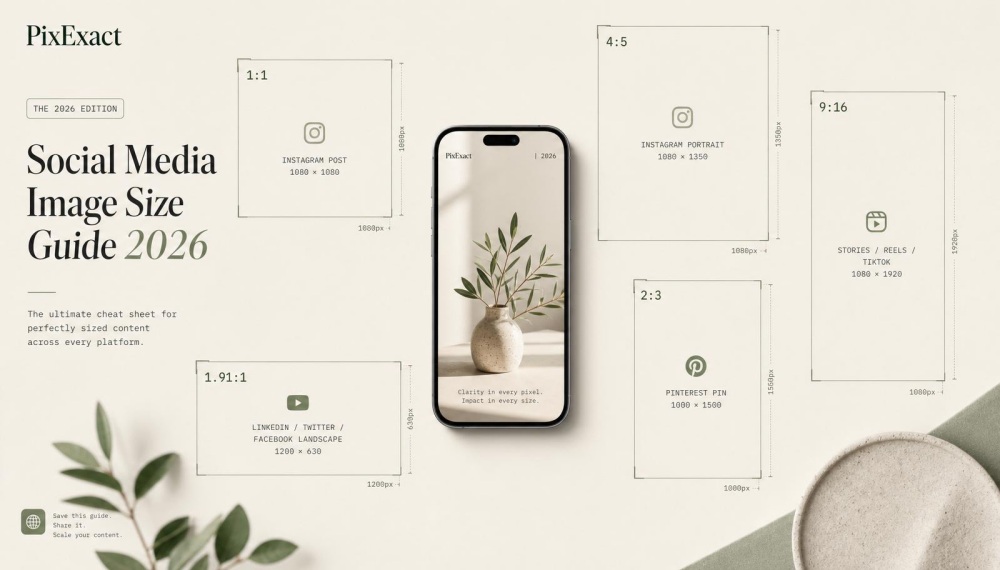
Instagram supports four main post formats, each with specific dimensions that affect how your content appears in the feed and on your profile grid. The right instagram post size ensures your images display clearly without unexpected cropping.
Taller formats occupy more vertical screen space to capture attention as users scroll.
PixExact helps you create Instagram images at exact pixel dimensions, such as 1080×1080, 1080×1350, and 1080×1920 Stories, without resizing or cropping after generation.
Instagram Post Size Quick Reference
| Format | Aspect Ratio | Pixel Dimensions | Best For | Action / Generate |
|---|---|---|---|---|
| Square Post | 1:1 | 1080 x 1080 | Logos, product shots, consistent grid look | Generate 1080 x 1080 Post with PixExact |
| Portrait Post (4:5) | 4:5 | 1080 x 1350 | Standard feed posts, maximum visibility | Generate 1080 x 1350 Post |
| Portrait Post (3:4) | 3:4 | 1080 x 1440 | New standard, matches grid preview exactly | Generate 1080 x 1440 Post with PixExact |
| Landscape Post | 1.91:1 | 1080 x 566 | Wide scenes, cross-posted YouTube/desktop content | Generate 1080 x 566 Post with PixExact |
| Profile Picture | 1:1 | 320 x 320 (upload at 1080 x 1080) | Circular crop, logos, headshots | Generate Profile Picture |
| Stories / Reels | 9:16 | 1080 x 1920 | Full-screen vertical video and images | Generate 1080 x 1920 Post with PixExact |
| Carousel (Portrait) | 4:5 | 1080 x 1350 | Multi-slide posts, step-by-step content | Generate 1080 x 1350 Post Now |
| Carousel (Square) | 1:1 | 1080 x 1080 | Clean, uniform multi-slide grid | Generate Carousel Post with PixExact |
| Carousel (Landscape) | 1.91:1 | 1080 x 566 | Wide multi-slide content | Generate 1080 x 566 Post with PixExact |
| Story / Feed Ads | 9:16 | 1080 x 1920 | Full-screen story ads | Generate Feed Ads with PixExact |
Square Posts (1:1 Aspect Ratio)
Square posts use a 1:1 aspect ratio at 1080 x 1080 pixels. This was Instagram's original format and remains widely recognized across the platform.
Square posts take up the least amount of vertical space in your feed compared to other formats. When users scroll through Instagram on their phones, your square image occupies less screen real estate than taller options.
This means people can scroll past your content faster, potentially reducing engagement time. Square posts still work well for certain content types.
If you're posting logos, product shots, or images that naturally fit a square frame, the 1:1 ratio prevents awkward cropping. They also display consistently across your profile grid without any surprises.
Even though you upload at 1:1, Instagram's profile grid preview now crops to 3:4. The sides of your square image may get trimmed when viewed on your profile page.
Portrait Posts (4:5 Aspect Ratio)
Portrait posts using a 4:5 aspect ratio at 1080 x 1350 pixels have been the recommended instagram feed post size for maximizing visibility. This vertical format gives you 270 extra pixels of height compared to square posts.
The additional height means your image fills more of the screen as users scroll. More screen coverage typically leads to longer viewing time, which Instagram's algorithm favors.
When you design content at 1080 x 1350, leave safe margins on both sides of your image. Instagram's grid now displays a 3:4 preview, so your 4:5 post will get slightly cropped at the edges when viewed on your profile.
Keep important text, faces, and key visual elements centered to avoid them getting cut off. This instagram post ratio works particularly well for photos with vertical subjects like standing people, tall buildings, or full-body product shots.
Your composition naturally fits the frame without wasting space.
Landscape Posts (1.91:1 Aspect Ratio)
Landscape posts follow a 1.91:1 aspect ratio at 1080 x 566 pixels. This horizontal format works best for wide-angle shots, panoramic views, or content originally created for other platforms.
You should use landscape sparingly on Instagram. These images occupy even less vertical space than squares, making them easy to scroll past quickly.
The reduced screen presence can hurt your engagement rates compared to taller formats. Landscape posts make sense in specific situations.
If you're sharing photography that captures expansive scenes like sunsets, cityscapes, or group photos, the wide frame preserves your composition. They also work when you're cross-posting content from YouTube thumbnails or desktop-oriented graphics.
The instagram dimensions for landscape max out at 1080 x 566 to maintain quality while fitting the horizontal frame.
Tall Posts for 3:4 Grid Preview
Instagram now supports a 3:4 aspect ratio at 1080 x 1440 pixels for feed posts. This newer format aligns perfectly with how your profile grid displays content, eliminating cropping issues that affected other ratios.
The 3:4 ratio gives you 90 more pixels of height than the 4:5 format. That extra space helps your posts stand out in the feed while maintaining a clean, consistent look on your profile grid.
This instagram image size is becoming the new standard across Instagram because it matches both feed viewing and grid display. When you design at 1080 x 1440, what you upload is what people see everywhere on the platform.
For creators and brands building a cohesive visual identity, the 3:4 format solves the guessing game. You can plan your grid layout knowing exactly how each post will appear next to others.
Instagram Profile Picture Size and Requirements
Your profile picturedisplays at 320 x 320 pixels on Instagram, but uploading at higher resolution ensures better quality. The platform crops your photo into a circle, so careful composition prevents cutting off important elements.
Best Practices for Profile Photos
The official Instagram profile photo size is 320 x 320 pixels in a 1:1 square ratio. However, you should upload your profile picture at 1080 x 1080 pixels for sharper clarity across devices.
Instagram displays your profile photo as a circle even though you upload a square. This means the corners of your image get cropped automatically.
Keep your logo, face, or brand mark centered within the frame to avoid losing critical details. Your profile picture appears in multiple places across Instagram.
It shows up in comments, direct messages, Stories viewer lists, and suggested accounts. A high-quality image makes your account look professional in all these locations.
Use PNG or JPG file formats for best results. PNG files preserve transparency better, but Instagram converts them to JPG anyway.
Make sure your image has good contrast so it stands out against both light and dark backgrounds in the app.
Tips for Centered Circular Images
Design your profile photo with a safe zone in mind. Keep all important elements within the center 80% of your square image.
Anything near the edges will get cut off when Instagram applies the circular crop. Test your image before uploading by placing a circle template over your design.
Many design tools like Canva offer Instagram profile picture templates with built-in circular guides. This preview shows exactly what your followers will see.
Simple, bold images work better than complex designs. A clean logo or close-up headshot reads clearly at small sizes.
Avoid text or tiny details that become unreadable when your profile picture shrinks to thumbnail size in comments and follower lists. Update your profile picture at the same resolution each time.
Switching between low and high resolution images creates inconsistent quality across your profile. Stick with 1080 x 1080 pixels as your standard upload size for consistent clarity.
Instagram Stories and Reels Sizes
Stories and Reels both use 1080 x 1920 pixels at a 9:16 aspect ratio. Understanding safe zones helps you avoid having your content covered by Instagram's interface elements like buttons and text overlays.
Instagram Stories Dimensions
Instagram Stories use a 1080 x 1920 pixel resolution with a 9:16 aspect ratio. This vertical format fills the entire mobile screen when someone views your story.
Your story content needs to fit within these exact dimensions to avoid cropping. If you upload images or videos that don't match the 9:16 ratio, Instagram will either crop them or add bars to the top and bottom.
You should design your stories with the full-screen mobile experience in mind. The tall vertical format for stories gives you maximum screen space to capture attention.
Any text, logos, or important visual elements need careful placement to avoid Instagram's interface covering them up.
Instagram Reels Size and Specifications
Instagram Reels require the same 1080 x 1920 pixel dimensions as Stories. The 9:16 aspect ratio is the standard for all Reels content.
Your Reels cover image also uses 1080 x 1920 pixels. This cover appears on your profile grid and in feed placements.
Video specifications for Reels include a maximum length of 90 seconds and file sizes up to 4GB. The platform supports MP4 and MOV file formats.
You'll get the best quality when you export at 30 frames per second with H.264 compression.
Safe Zones for Stories and Reels
Safe zones protect your content from being covered by Instagram's buttons, profile pictures, and text fields. For Stories and Reels at 1080 x 1920 dimensions, keep important content at least 250 pixels from the top and bottom edges.
The top 14% of your vertical space can be covered by your username, time stamp, and menu buttons. The bottom 21% holds action buttons like commenting, sharing, and the caption area.
Safe zone guidelines:
- Top margin: 250-300 pixels from the edge
- Bottom margin: 400-420 pixels from the edge
- Side margins: 60-80 pixels from each edge
Your key visual elements, text, and calls-to-action should stay in the center zone. This keeps them visible no matter what interface elements Instagram displays over your content.
Instagram Carousel Post Sizes

Carousel posts let you share up to 10 images or videos in a single swipeable post. Getting the dimensions right for carousel posts ensures consistent cropping across all slides and prevents awkward formatting issues.
Recommended Carousel Image Dimensions
The ideal carousel post size is 1080 x 1350 pixels with a 4:5 aspect ratio. This vertical format takes up more screen space than square posts.
Your content commands more attention as users scroll through their feed. You can also use square carousels at 1080 x 1080 pixels (1:1 ratio) for a cleaner grid appearance.
Landscape carousels work at 1080 x 566 pixels (1.91:1), but they occupy less vertical space and are easier to scroll past.
Key carousel specifications:
- Portrait: 1080 x 1350 px (4:5)
- Square: 1080 x 1080 px (1:1)
- Landscape: 1080 x 566 px (1.91:1)
The 4:5 portrait ratio is your best choice for maximum visibility. It fills nearly the entire mobile screen, giving you more room to showcase products, tell stories, or share step-by-step guides.
Matching Ratios Across Carousel Slides
All images in your carousel must share the same aspect ratio. Instagram automatically crops the first image's ratio to all subsequent slides.
If you upload a 1:1 square as your first slide followed by a 4:5 portrait, Instagram will crop the portrait image to square. This means the top and bottom portions get trimmed.
Mix images and videos freely within a carousel, but keep their aspect ratios identical. Design tools like Canva let you batch-resize multiple images to maintain consistent formatting across all slides.
Plan your carousel layout before uploading. Check that text, faces, and products sit within the safe zone of your chosen ratio so nothing important gets cropped.
Instagram Video and Ads Image Sizes
Video posts and advertisements require specific dimensions to display properly across Instagram's feed, Stories, and ad placements. Using the correct Instagram ad sizes prevents cropping and ensures your content reaches viewers as intended.
Feed Video Dimensions
Your feed videos should use 1080 x 1350 pixels (4:5 ratio) for maximum vertical space. This dimension takes up more screen real estate than square videos, keeping viewers engaged longer.
Square videos at 1080 x 1080 pixels (1:1 ratio) work well if you want a uniform grid appearance. Landscape videos use 1080 x 566 pixels (1.91:1 ratio) for wider cinematic shots.
The newer 1080 x 1440 pixels (3:4 ratio) is now supported for 2026. This tall format gives you even more vertical space while maintaining grid compatibility.
Keep your video length under 60 seconds for feed posts. File size should stay below 4GB, though smaller files load faster on mobile devices.
Instagram Ad Image Specifications
Ad images follow the same dimensions as organic posts. Use 1080 x 1350 pixels for portrait ads, 1080 x 1080 pixels for square ads, or 1080 x 566 pixels for landscape ads.
The Instagram feed ad specifications require images at least 1080 pixels wide. For comprehensive guidance on Facebook ad sizes across all placements, refer to our detailed specifications guide. Lower resolutions appear blurry and reduce engagement.
Video ads support the same aspect ratios as image ads. Keep videos under 60 seconds and maintain at least 1080 pixel width for clarity.
Text overlays must stay within safe zones—keep important elements centered and away from edges where cropping might occur. Your call-to-action buttons and logos need clear visibility without competing with Instagram's interface elements.
Instagram Story Ad Sizes
Story ads require 1080 x 1920 pixels (9:16 ratio) for full-screen vertical display. This matches the standard Instagram Story dimensions and fills the entire mobile screen.
Your safe zone sits within the central 1080 x 1420 pixels. Keep text, logos, and faces inside this area to avoid the top profile icon and bottom interactive elements covering your content.
Story video ads can run up to 15 seconds per segment. Multiple segments create longer story experiences, but shorter content often performs better.
The 1440 x 2560 pixels resolution works for ultra-high-quality uploads, though Instagram compresses it to 1080 x 1920. Most advertisers stick with standard resolution to maintain reasonable file sizes while ensuring fast load times on mobile networks.
Optimizing Image Quality and Aspect Ratios

High-resolution uploads and proper aspect ratios directly impact how Instagram displays your content. Understanding compression helps you maintain visual clarity across all devices.
Image Resolution Guidelines
Always upload images at least 1080 pixels wide for feed posts. If you need to create images at these exact dimensions, use an AI image generator to produce high-quality content tailored to Instagram's requirements. This width is the minimum resolution Instagram recommends to maintain clarity after compression.
The 4:5 aspect ratio at 1080 x 1350 pixels is your best choice for feed posts in 2026. This vertical format takes up more screen space than square posts, which means your content occupies more of a user's mobile display.
For Stories and Reels, stick to 1080 x 1920 pixels at a 9:16 aspect ratio. These dimensions fill the entire screen on mobile devices.
Square posts at 1080 x 1080 pixels work if you want a uniform grid look. However, they occupy less vertical space in the feed compared to 4:5 posts, which can reduce visibility.
Understanding Instagram Compression
Instagram automatically compresses every image you upload to reduce file size and speed up loading times. This compression can reduce your image quality, especially in areas with fine details or gradients.
To minimize quality loss, export your images at 80-90% quality in your editing software. Going higher than 90% often produces files that Instagram will compress more aggressively anyway.
High-contrast images perform better after compression. Photos with clear subjects and distinct color separation maintain their visual impact better than images with subtle tonal variations.
Avoid uploading images smaller than 1080 pixels wide. Instagram will upscale them, which creates blurry, pixelated results that look unprofessional.
File Formats and Maximum Sizes
JPG is best for photographs and images with many colors. This format balances file size and quality well.
PNG works better for graphics, logos, and images with text or solid colors. PNG files preserve sharp edges and transparency better than JPG.
Instagram's maximum file size is 30 MB for photos and 4 GB for videos. Most phones and editing apps export files well below these limits.
| Format | Best For | Max Size |
|---|---|---|
| JPG | Photos, natural images | 30 MB |
| PNG | Graphics, logos, text | 30 MB |
| MP4/MOV | Videos | 4 GB |
Export your images in RGB color mode, not CMYK. Instagram only displays RGB properly, and CMYK images may appear with incorrect colors.
Instagram Post Sizes vs. Other Social Networks
Instagram's vertical-first format differs sharply from platforms like LinkedIn, where landscape images dominate professional feeds. Understanding these differences helps you adapt content efficiently without losing quality or engagement when sharing across multiple platforms.
Comparing with LinkedIn Image Sizes
LinkedIn prefers landscape content while Instagram thrives on vertical posts. The standard LinkedIn image size is 1200 x 627 pixels for shared links and articles, using a 1.91:1 aspect ratio that looks awkward when posted directly to Instagram.
Your Instagram post size of 1080 x 1350 pixels (4:5 ratio) gets severely cropped on LinkedIn. The platform cuts off the top and bottom of vertical images, making them appear as small squares in the feed.
Key dimension differences:
- LinkedIn posts: 1200 x 627 px (landscape)
- Instagram posts: 1080 x 1350 px (vertical)
- LinkedIn profile: 400 x 400 px
- Instagram profile: 320 x 320 px minimum
LinkedIn Stories use 1080 x 1920 px, matching your Instagram story size perfectly. This makes Stories one of the few formats you can repurpose without resizing.
Cross-Posting Considerations
Plan for multiple formats when creating content you'll share across networks. Shooting in 1080 x 1920 px gives you the most flexibility because you can crop down to any smaller size without losing resolution.
Square images (1080 x 1080 px) work moderately well on both platforms but don't maximize screen space on either. You sacrifice Instagram's vertical advantage while settling for a less professional look on LinkedIn.
Smart cross-posting strategy:
- Create original content at 1080 x 1920 px
- Crop to 1080 x 1350 px for Instagram feeds
- Crop to 1200 x 627 px for LinkedIn posts
- Keep important text and faces in the center square
Different social media networks require different aspect ratios, so avoid the "post everywhere" button. Schedule separate uploads with platform-specific dimensions instead.
Maximizing Engagement with the Right Instagram Sizes
Using the correct Instagram post dimensions directly affects how long users view your content and whether they engage with it. The portrait 4:5 ratio outperforms square posts because it takes up 30% more screen space, keeping your content visible longer in the feed.
How Size Impacts Instagram Engagement
Portrait posts at 1080 x 1350 pixels get 23% more likes than square posts. This happens because vertical content dominates the mobile feed and stops scrolling better than smaller formats.
When you upload images at the wrong size, Instagram crops them automatically. This leads to cut-off faces, missing text, and lower-quality visuals that users scroll past quickly.
The 4:5 aspect ratio gives you more room to showcase products, people, and details. Your content stays on screen longer, which tells the Instagram algorithm that your post is worth showing to more people.
Key engagement factors by size:
- Portrait posts (1080 x 1350): Highest engagement, best for vertical subjects
- Square posts (1080 x 1080): Consistent grid look, safe choice
- Stories (1080 x 1920): Full-screen immersion, polls get 2x more engagement
- Reels (1080 x 1920): 67% more engagement than regular posts
Recent Instagram Algorithm Changes
The Instagram algorithm now prioritizes Reels, giving them three times more reach than static posts. Original content gets boosted over reposts, and the algorithm tracks saves and shares more heavily than likes.
Carousel posts now receive 1.4 times more reach than single images. The algorithm also measures completion rate for Reels and how long users view your posts.
Instagram extended Reels to three minutes for some accounts and Stories to 60 seconds per segment. These changes mean you have more time to hold attention, but only if your content fills the screen properly.
Posts with correct dimensions load faster and display sharper. The algorithm factors in technical quality when deciding what to show users.
Frequently Asked Questions
Instagram post size requirements vary by format, with feed photos supporting square, portrait, and landscape orientations. The platform displays content differently across feeds, Stories, Reels, and profile grids based on specific aspect ratios and pixel dimensions.
What are the current dimension requirements for Instagram feed photos?
You can upload feed photos in three main sizes. Square posts work at 1080 x 1080 pixels with a 1:1 aspect ratio.
Portrait posts give you two options. You can use 1080 x 1350 pixels at a 4:5 aspect ratio or 1080 x 1440 pixels at a 3:4 aspect ratio.
Landscape posts display at 1080 x 566 pixels with a 1.91:1 aspect ratio. The 4:5 portrait format takes up more vertical screen space on mobile devices, which can increase engagement time.
How does aspect ratio affect the display of images on Instagram?
Your aspect ratio determines the shape of your image. A 1:1 ratio creates a square, while 4:5 and 3:4 ratios produce vertical images that fill more of the mobile screen.
Instagram displays all posts in 3:4 dimensions on your profile grid. This means the platform automatically crops images to fit this format when viewed from your profile page.
You should keep important visual elements centered within the 3:4 safe zone. This prevents key details from getting cut off when someone views your grid.
What is the maximum resolution for uploading images to Instagram without losing quality?
Instagram compresses files above certain thresholds. Your best bet is to upload at the platform's recommended dimensions rather than exceeding them.
For feed posts, stick to 1080 pixels as your width. This gives you the highest quality without triggering additional compression.
The platform supports PNG, JPG, BMP, and non-animated GIF formats for photos. High-contrast images with clear details perform better on mobile screens.
Can you explain the different size specifications for Instagram Stories versus feed posts?
Instagram Stories require 1080 x 1920 pixels with a 9:16 aspect ratio. This vertical format fills the entire mobile screen.
Feed posts offer more flexibility. You can choose square, portrait, or landscape orientations depending on your content.
Stories also have safe zones you need to consider. Leave about 310 pixels of space at the top and bottom clear to avoid covering your content with profile information and buttons.
What are the ideal dimensions for Instagram profile pictures?
Your profile picture should be 320 x 320 pixels with a 1:1 aspect ratio. Instagram displays this image as a circle across the entire app.
Keep your subject centered and leave space around the edges. Anything too close to the corners gets cropped out when the platform converts your square image to a circle.
Your profile photo appears in multiple locations. You'll see it on your profile page, in the Stories tray, on the feed when you post, and in direct messages.
How do carousel post dimensions vary from regular Instagram post sizes?
Instagram takes sizing cues from the first image in your carousel.
You can set all images to follow the first photo's dimensions, display in their original mixed dimensions, or convert everything to squares.
If you upload videos to a carousel, Instagram switches everything to portrait dimensions.
This happens even if your first post is landscape or square.
The platform adds white bands above and below landscape and square photos when you choose the mixed option.
You can't adjust the crop after upload.
Resize your images before posting to maintain control over composition.