When you generate AI images for social media, ads, or even pixel art game assets, choosing “16:9” or “1:1” might feel convenient. But an aspect ratio is only a proportion — it is not the final size, and it rarely matches what platforms like Google, Facebook, or app stores actually require.
If you want high-quality images, stable performance in campaigns, and a workflow you can scale, you need an exact pixel AI generator, not just a generic ratio-based AI image generator. That is exactly the problem PixExact is built to solve: it is an AI image generator that lets you set a precise pixel image size and then generates AI images that are already ready for upload.
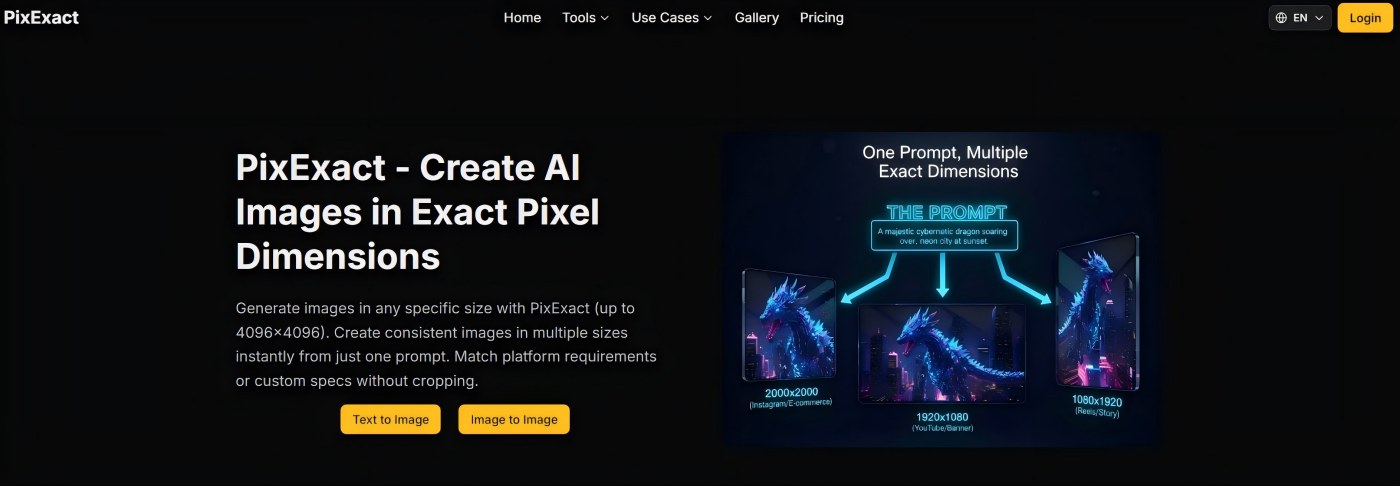
In this article, we'll look at why exact pixel dimensions beat vague aspect ratios, how an AI pixel art generator or general image generator fits into your workflow, and why professionals are moving from “aspect ratio vs pixel” debates to a simple rule: start from exact pixels.
Is That 16:9 AI Image Really What You Want?
A typical workflow looks like this:
You type a text prompt, select 16:9 in a free AI image generator, and instantly create a “nice” banner. But as soon as you upload it:
-
Facebook or Google Ads crops it differently.
-
The platform compresses it heavily.
-
Important elements — logo, headline, product — no longer sit where you planned.
In other words, the AI-generated image you loved in your browser is not the same image your audience sees in their feed.
For professionals running campaigns or building brands, “16:9” is not a finished asset. It's just a rough draft. Platforms, ad accounts, app stores, and game engines care about specific pixel dimensions, not theoretical ratios:
-
1200x628 or 1200x600 for common ad placements.
-
1080x1350 and 1080x1920 for social media posts and Stories.
-
1280x720 for YouTube thumbnails.
-
256x256, 512x512, or 1024x1024 for sprites and texture atlases.
If you ignore these and rely only on aspect ratios, you fall into a trap of endless manual edits and unpredictable results.
The “Trap” of Aspect Ratios in AI Image Generation
Aspect ratios are important, but they are not enough. Here are the three main problems a ratio-only workflow creates for AI image generation.
1. Secondary Manual Adjustments Are Inevitable
An aspect ratio is just a ratio. The same 16:9 can be:
-
1920x1080
-
1280x720
-
1200x675
-
3840x2160 (4K resolution)
Generic AI tools let you generate AI images at “16:9” but don't guarantee the exact pixel size you actually need. For social campaigns, websites, and pixel art game assets, this leads to:
-
Manual image editing in Photoshop, Figma, or Canva.
-
Extra cropping and image scaling to force-fit platform specs.
-
Re-exporting the same artwork in multiple sizes.
If your workflow is “aspect ratio + manual cropping,” your AI generator is not really saving you time; it is just shifting the work from prompt engineering to image editing.
2. Quality Loss from Platform Resizing and Compression
When you upload mismatched sizes, platforms will “fix” them for you. For example, if your AI image is 1600x900 but the recommended size is 1200x628:
-
The platform downscales the image.
-
It applies aggressive compression.
-
It may auto-crop parts of the frame.
Consequences:
-
Text becomes less sharp.
-
Logos and brand marks lose crisp edges.
-
Pixel art styles turn from sharp, nostalgic pixel textures into muddy blobs.
This is especially painful if you're using an AI pixel art generator or generating pixel art with AI: every pixel matters. Random rescaling destroys the “pixel perfect” look that makes retro and 16-bit art work.
An exact pixel AI generator avoids this. When you generate AI images at the final display resolution, platforms do minimal or no extra processing, so your high-quality images remain high quality.
3. Uncontrollable Composition and Broken Layouts
Composition is where aspect ratios really show their limits. Platforms often:
-
Crop from the center, top, or bottom to fit different placements.
-
Mask parts of the image behind UI (buttons, overlays, gradients).
-
Display thumbnails differently on web vs mobile.
If your headline, logo, or key subject sits near the edge of a “safe area,” automatic cropping can cut it off. For game assets, misaligned sprites inside a texture atlas cause visual glitches.
Because aspect ratio alone doesn't account for exact boundaries and safe regions at a given pixel size, your composition becomes fragile. You keep redesigning images after upload just to “make it fit.”
The Advantage of Exact Pixel Dimensions
Now, let's look at what changes when you generate images at exact pixel dimensions using an AI image generator built for precision, like PixExact.
1. A Faster, Cleaner, and More Scalable Workflow
With an exact pixel AI generator:
-
You enter your text prompt.
-
You specify the exact width and height: for example, 1200x628, 1080x1920, or 512x512.
-
You get generated images that are already the correct size.
No extra cropping, no resizing, no guessing.
For performance marketers, social media managers, and designers, this means:
-
Less time in image editing tools.
-
Fewer back-and-forths between creative and media teams.
-
A process you can hand off to non-technical teammates using simple, copy-paste instructions.
PixExact is designed exactly for this: it is an AI image generator that behaves like a professional tool, not just a playground. You get a generator that produces ready-to-use AI images in the exact pixel sizes your campaigns and designs require.
2. Better Quality and Platform-Friendly Files
When the AI image has the right resolution from the start:
-
Platforms don't need to rescale or heavily compress it.
-
Text remains legible; logos stay sharp.
-
Pixelated or pixel art styles retain their crisp, nostalgic look.
This is true whether you are:
-
Creating pixel art using AI for sprite sheets and game assets.
-
Designing high-resolution images for landing pages.
-
Generating product image sets or thumbnails for e-commerce.
By respecting exact dimensions, you create platform-native assets instead of “one-size-fits-none” files that each platform must “fix” in its own way.
3. Consistent Composition Across Sizes and Platforms
Exact pixels also make it easier to maintain visual consistency:
-
You know exactly how much space your logo and headline have.
-
You can define clear safe zones and keep key elements inside them.
-
You can generate multiple sizes that align in style and layout.
For example, with PixExact you can:
-
Generate a 1200x628 hero banner for an ad.
-
Create a 1080x1080 post using the same subject and art style.
-
Produce a 1080x1920 Story version where composition is adjusted, not randomly cropped.
The AI is composing for a specific pixel canvas each time, rather than leaving composition to platform algorithms. This is true for realistic AI art, pixel art, and hybrid styles.
Exact Pixels for Pixel Art, Sprites, and Retro Styles
The same logic applies beyond social media and ads. If you use an AI pixel art generator to create retro or pixelated graphics, exact pixel control is critical:
-
Sprites and sprite sheets must be aligned to exact sizes to work in animation.
-
Texture atlases rely on consistent, predictable blocks of pixels.
-
Isometric pixel art scenes look wrong if rescaled without care.
An online pixel art generator that respects exact pixel dimensions helps you:
-
Generate unique pixel art at 16x16, 32x32, 64x64, 256x256, and other common sizes.
-
Convert a photo into pixel art or transform your ideas into high-quality pixel art with a simple text description.
-
Make nostalgic pixel images that remain pixel perfect when integrated into your game or application.
PixExact itself is not positioned only as a “free pixel art generator,” but as a flexible AI image generator that can support many art styles, including pixel art AI and more detailed, high-resolution images — all under strict pixel control.
How PixExact Fits into a Professional AI Workflow
PixExact is built as a text-to-image and image-to-image tool with exact pixel control:
-
You enter a text prompt (text prompt or simple text description) describing the AI art or pixel art you want.
-
You can optionally upload an original image for image-to-image generation or reference images.
-
You choose exact pixel dimensions instead of just a ratio.
-
The AI generator creates stunning images at the correct size in a single click.
Key benefits for professional use:
-
AI-generated images ready for commercial use: no watermark, correct resolution, clear license.
-
Supports many use cases: social media content, product images, pixel art game assets, UI icons, thumbnails, branding.
-
Free credits to try it: you can try it free, test different prompts, and see how exact pixels improve your workflow before scaling up.
This is what turns PixExact from “just another AI tool” into a production-grade exact pixel AI generator.
Comparison: Aspect Ratio + Manual Cropping vs Exact Pixel Generation
Here is a side-by-side look at the two approaches.
| Workflow | Aspect Ratio + Manual Cropping | Exact Pixel Generation with PixExact |
|---|---|---|
| Setup | Choose 1:1 or 16:9 in a generic AI generator | Enter exact pixel size (e.g., 1200x628, 1080x1920, 512x512) |
| Image Generation | Generate AI art based only on ratio | Generate AI images tailored to a specific pixel canvas |
| Fit to Platform Requirements | Requires extra resizing and cropping in an image editor | Ready to upload to platforms with no extra edits |
| Quality After Upload | Platform resizes and compresses, risking blur and artifacts | Minimal platform processing; high-quality images preserved |
| Composition Control | Composition may break when auto-cropped | Composition optimized for each exact pixel size |
| Consistency Across Sizes | Hard to maintain; each size is a separate manual edit | One prompt → multiple exact sizes with consistent style and layout |
| Use Cases | OK for experimentation, less ideal for real campaigns | Designed for campaigns, branding, game assets, and commercial use |
| Scalability | Time-consuming and error-prone at scale | Scales easily across campaigns, clients, and platforms |
For experimentation, free AI tools and simple ratio-based generators are fine. But once you care about brand, conversions, and visual standards, exact pixels win.
Frequently Asked Questions About Exact Pixels and AI Generators
Is Exact Pixel Control Only for Pixel Art?
No. Exact pixel control is important for all AI image generation that will be used in real products or campaigns. It is essential for pixel art and sprites, but also for:
-
Social media banners and posts.
-
Product images and thumbnails.
-
Email headers and website hero sections.
-
Mobile app and iOS icons.
Can I Still Use Creative Art Styles with Exact Pixels?
Yes. Exact pixels don't limit creativity. You can generate:
-
Realistic AI art in high resolution.
-
Stylized illustrations with bold colors.
-
Pixelated, retro, or 16-bit art styles.
The difference is that all of this AI-generated art is created at the right image resolution from the start.
Does PixExact Support Text-to-Image and Image-to-Image?
Yes. PixExact supports:
-
Text-to-image: Enter a text-to-image prompt and generate AI images from scratch.
-
Image-to-image: Upload an image and use AI tools to transform, extend, or convert it (for example, turning a photo into pixel art or adjusting art style).
In both cases, you define the exact pixels, and the AI respects that canvas.
Conclusion: Exact Pixels Are the Professional Standard
The debate of aspect ratio vs pixel is easy to settle when you look at real workflows.
-
Aspect ratios are a starting point, not a finished asset.
-
Platforms, game engines, and design systems care about exact pixels.
-
Relying on “16:9” or “1:1” alone leads to manual cropping, quality loss, and broken layouts.
A modern, professional exact pixel AI generator like PixExact lets you:
-
Generate AI images and pixel art at precise dimensions.
-
Protect quality and composition across every platform and device.
-
Scale your image generation process from experiments to real, commercial use.
If you want pixel-perfect, high-quality images — whether for social media, ads, UI, or game assets — start from exact pixels, not just aspect ratios. Let the AI handle the art, while you stay in control of every single pixel.