Understanding Facebook Ad Dimensions
Facebook ad dimensions define the width and height requirements for images and videos across different placements. Each ad format has specific size requirements and aspect ratio tolerances that affect how your ads display to users.
PixExact helps you create Facebook ad images at exact pixel dimensions, such as 1440×1440, 1440×1800, and 1080×1920 Stories, without resizing or cropping after generation.
What Are Facebook Ad Dimensions?
Facebook ad dimensions refer to the pixel measurements that determine how your ad images and videos appear across placements. Each placement requires specific width and height measurements.
For example, Facebook feed ads need 1440 x 1440 pixels for a 1:1 ratio or 1440 x 1800 pixels for a 4:5 ratio. Dimensions include both minimum and recommended sizes.
Feed image ads require a minimum width of 600 pixels and a minimum height of 600 pixels for square formats. Video ads have different minimums, starting at 120 x 120 pixels.
File size limits also apply to your creative assets. Image files can be up to 30MB in PNG or JPG format.
Video files accept MP4, MOV, or GIF formats with a maximum size of 4GB.

Why Correct Ad Sizes Matter
Using correct dimensions prevents your ads from getting cropped or stretched. When you upload images that don't match the required specs, Facebook automatically adjusts them, which can cut off important parts of your creative or make text unreadable.
Properly sized ads load faster and display better on both desktop and mobile devices. This affects your click-through rates and conversion performance.
Meta's system may reject ads that don't meet basic technical requirements. You'll need to revise and resubmit your creative, which delays your campaign launch and wastes time.
Aspect Ratios and Tolerance
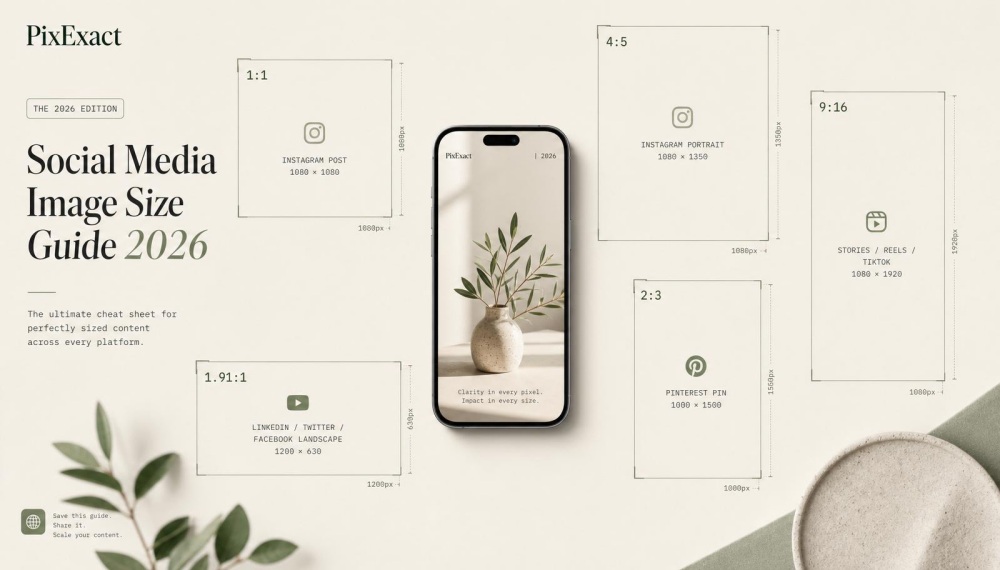
Aspect ratios express the relationship between width and height as a numerical ratio. Common Facebook ad ratios include 1:1 (square), 4:5 (vertical), 9:16 (full vertical), and 16:9 (horizontal).
Facebook allows some tolerance in aspect ratios for certain placements. Feed ads accept both 1:1 and 4:5 ratios.
Reels image overlays work with ratios from 1.91:1 to 1:1. Stories require a strict 9:16 ratio with minimal flexibility.
Common Aspect Ratios by Placement:
- Feed ads: 1:1 or 4:5
- Stories: 9:16
- Reels: 9:16 for video, 1.91:1 to 1:1 for image overlays
- Right column: 1:1 only
- In-stream video: 16:9 or 1:1
When your image falls outside the accepted tolerance range, Facebook crops it to fit. This happens automatically during upload in Ads Manager.
Facebook Feed Ad Sizes
Facebook feed ads appear as the second item in a user's feed and throughout their scroll. These ads support both square and vertical formats, with 1:1 and 4:5 aspect ratios performing best for mobile and desktop feeds.
Image Ad Dimensions
Your feed image ads need a display size of 1440 x 1440 pixels for the 1:1 aspect ratio or 1440 x 1800 pixels for the 4:5 ratio. The minimum width is 600 pixels, with a minimum height of 600 pixels for square images or 750 pixels for vertical images.
Facebook accepts PNG or JPG file formats with a maximum file size of 30MB. The 4:5 aspect ratio gives you more screen space on mobile devices.
For best results, use high-quality images that don't require text overlays. If you do include text, keep it minimal since feed ads already display your ad copy separately.
Feed Video Ad Specs
Feed video ads use the same display sizes as image ads: 1440 x 1440 pixels for 1:1 or 1440 x 1800 pixels for 4:5. The minimum video dimensions are 120 x 120 pixels.
Use 1:1 for both desktop and mobile, or choose 4:5 for mobile-only campaigns. You can upload MP4, MOV, or GIF files up to 4GB.
Facebook recommends H.264 compression with square pixels, a fixed frame rate, progressive scan, and stereo AAC audio compression at 128kbps or higher. The maximum video length is 241 minutes, but shorter videos perform better.
Add video captions since most users watch with sound off.
Best Practices for Feed Ads
Choose the 4:5 aspect ratio for mobile-focused campaigns since it takes up more vertical space than 1:1. Test both ratios using Advantage+ placement to see which drives better ad performance for your audience.
Keep your file sizes reasonable even though Facebook allows up to 30MB for images and 4GB for videos. Smaller files load faster, which improves user experience and ad performance.
Use 1080 x 1080 as your minimum production size for both images and videos to maintain quality across placements. Higher resolutions like 1440 x 1440 or 1440 x 1800 ensure your ads look sharp on all devices.
Stories and Reels Ad Dimensions
Stories and Reels ads use vertical 9:16 formats designed for full-screen mobile viewing. These placements require 1080 x 1920 pixels for optimal display and support both image and video content with specific file size and length requirements.
Facebook Stories Ad Sizes
Facebook Stories ads appear between organic Stories as users scroll through content. The display size is 1080 x 1920 pixels with a 9:16 aspect ratio.
For image ads, you need a minimum width of 500 pixels. Use PNG or JPG file types with a maximum file size of 30MB.
Image ads display for five seconds unless a user swipes away. Video ads require the same 1080 x 1920 pixel dimensions.
Your video files can be MP4, MOV, or GIF format with a maximum size of 4GB. Facebook recommends H.264 compression with square pixels, fixed frame rate, progressive scan, and stereo AAC audio compression at 128kbps or higher.
The maximum video length is two minutes. Facebook fully displays video ads that are 10 seconds or less.
Longer videos break into multiple Stories cards, up to three cards total.
Reels Video Ad Specs
Facebook Reels ads use a 1440 x 2560 pixel display size with a 9:16 aspect ratio. You can promote an existing Reel or create one specifically for ads.
Video files must be MP4, MOV, or GIF format. The maximum file size is 4GB.
Unlike Stories ads, Reels have no maximum video length limit. Use the same recommended video settings as Stories ads: H.264 compression, square pixels, fixed frame rate, progressive scan, and stereo AAC audio at 128kbps or higher.
Reels ads include a call to action button that links to your landing page. Image overlay ads can also appear at the bottom of Reels.
These require 1080 x 1080 pixels or larger with a 1.91:1 to 1:1 aspect ratio. Maximum file size is 30MB for PNG or JPG files.
Tips for Vertical and Immersive Formats
Keep important content in the center of your vertical ads. Some phone models crop the top and bottom edges of the screen.
Add video captions to your Stories and Reels ads. Most users watch vertical video content without sound.
Captions make your message clear even when muted. Design for mobile first since these placements only appear on mobile devices.
Avoid small text or detailed visuals that become hard to read on smaller screens. Test your ads on different phone sizes before launching your campaign.
Use the full 9:16 vertical space to create an immersive experience. Horizontal 16:9 content will appear with black bars on the sides and waste valuable screen space.
Carousel Ad Specs and Sizes
Carousel ads let you display 2 to 10 scrollable cards in a single ad, with each card containing its own image or video, headline, and call to action. The format requires square or vertical aspect ratios across Facebook, Instagram, and Messenger placements, with specific file size limits and resolution standards you need to follow for each card.
Carousel Image Card Dimensions
Facebook carousel ads support three aspect ratios for image cards: 1:1 (square), 4:5 (vertical), and 9:16 (full vertical). The square 1:1 format works across all placements and requires a minimum resolution of 500 x 500 pixels.
Facebook recommends 1024 x 1024 pixels for better quality. The 4:5 aspect ratio is available only for Advantage+ catalog ads using product images from your catalog.
This format needs at least 600 x 750 pixels, with 1080 x 1350 pixels recommended. The 9:16 format requires 500 x 888 pixels minimum or 1080 x 1920 pixels for best results.
Each image card has a maximum file size of 30 MB. You can use .jpg or .png file formats.
Facebook allows a 3% aspect ratio tolerance, but Instagram only permits 1% variance. For the most up-to-date technical specifications and requirements, refer to Facebook's official ad specifications guide.
Instagram-specific requirements:
- Feed: 2-10 cards, 1:1 or 4:5 aspect ratio, 1080 x 1080 pixels
- Stories: 2-3 cards, 9:16 aspect ratio, 1080 x 1920 pixels
Carousel Video Card Guidelines
Video cards in carousel ads can run up to 240 minutes long, but Facebook recommends keeping them to 15 seconds or less. The maximum file size for each video card is 4 GB across all placements.
Videos under 30 seconds automatically loop for about 90 seconds. Videos longer than 30 seconds play once without looping.
All videos autoplay by default as users swipe through your carousel cards, but sound starts muted until someone turns it on. Instagram Stories carousel ads limit videos to 15 seconds per card.
Instagram Feed allows videos up to 2 minutes long. You must use the same aspect ratios as image cards: 1:1, 4:5, or 9:16 depending on your placement.
Your video resolution should match the recommended pixel dimensions for images in each aspect ratio. Use the same file formats (.jpg and .png for thumbnails) to maintain consistency across your carousel cards.
Design and CTA Recommendations
Your carousel ad copy has strict character limits. Facebook, Messenger, and Meta Audience Network allow 125 characters for text, 40 characters for headlines, and 25 characters for link descriptions.
Instagram permits up to 125 characters for text plus 30 hashtags. Each carousel card can have its own headline, description, and call to action button.
This lets you feature different products, highlight multiple benefits, or tell a story across cards. Keep your headlines short and direct since you only have 40 characters per card.
The carousel format requires a minimum of 2 cards and supports up to 10 cards on Facebook Feed and Messenger. Instagram Feed also allows 10 cards, but Instagram Stories limits you to 3 cards maximum.
Best practices for carousel cards:
- Use high-quality images at recommended resolutions
- Keep videos under 15 seconds for better engagement
- Test different card orders to find what drives clicks
- Make each card valuable on its own
- Use consistent branding across all cards
Collection Ad and Instant Experience Dimensions
Collection ads use a cover image or video at the top with a grid of smaller product images below, designed specifically for mobile placements. These ads open into a fullscreen Instant Experience when users tap them, requiring at least 4 products in your catalog product set.
Collection Ad Image Recommendations
The cover image for collection ads should use a 1:1 aspect ratio at 1080 x 1080 pixels for optimal display. You can also use a 1.91:1 aspect ratio, though the square format tends to perform better on mobile devices.
Your cover image takes up the primary space in the ad, appearing above the product grid. The smaller product images below automatically pull from your catalog and display in a grid layout that adjusts based on placement.
Facebook collection ads appear only on mobile placements, including Facebook Feed and Instagram Feed. On Facebook Feed, your primary text shows above the cover image, while the headline appears between the cover image and product grid.
On Instagram Feed, only the primary text displays, so you should include key information there if running across both placements. Select Order dynamically in Ads Manager to let the system choose which products from your catalog to display.
This helps optimize performance across different placements. For a comprehensive breakdown of all Facebook ad sizes and placement-specific requirements, check out this detailed Facebook ad sizes guide.
Collection Video Ad Requirements
Collection video ads use the same dimensions as image-based collection ads, with a 1:1 aspect ratio at 1080 x 1080 pixels recommended. Videos can also use 1.91:1 aspect ratio depending on your creative needs.
Your video file should be in MP4 or MOV format with a maximum file size of 4GB. Keep videos between 15 seconds and 120 seconds for best results, though videos can be up to 240 minutes long.
Use H.264 compression for video and AAC audio at 128 kbps or higher. The minimum resolution is 600 x 600 pixels, but higher resolutions display better on modern mobile devices.
When users tap your cover video, the fullscreen Instant Experience opens to showcase your products. The video continues playing within the Instant Experience, creating a smooth transition from discovery to browsing.
Right Column and Marketplace Ad Sizes
Right column ads and Marketplace ads serve different purposes on Facebook, with right column ads appearing only on desktop while Marketplace ads work across both desktop and mobile. Both formats use square images, but they have distinct size requirements and placement rules.
Right Column Image Guidelines
Right column ads appear on the right side of Facebook when users browse on desktop computers. These ads work best for driving traffic to your website or building brand awareness.
The display size is 1080 x 1080 pixels or larger. Your image must be at least 254 pixels wide and 133 pixels tall.
The aspect ratio needs to be 1:1, which means a perfect square. You can only use PNG or JPG file types for these ads.
Facebook does not allow video in this placement. Facebook recommends against adding text or copy directly on your image file because the ad space is small.
The image pairs with a headline and link that appear next to it. Keep your visual simple and clear so it stands out in the limited space.
Marketplace Image and Video Specs
Facebook Marketplace ads help you reach people who are already looking to buy products. These ads show up in the Marketplace tab and across Facebook feed placements using automatic placement algorithms.
The display size is 1080 x 1080 pixels or larger with a 1:1 aspect ratio. You can use PNG or JPG files up to 30MB in size.
Marketplace Ad Requirements:
- Aspect ratio: 1:1
- File types: PNG or JPG
- Maximum file size: 30MB
- Placements: Desktop and mobile
Marketplace ads are image-only. You cannot use video in this format.
These ads always include a "sponsored" label so users know they are paid content.
Advanced Ad Formats and Placement-Specific Specs
In-stream video ads play during organic content, Audience Network extends your reach beyond Facebook, and Messenger or search results placements require specific technical requirements for optimal display across different Facebook environments.
In-Stream Video Ad Specs
In-stream video ads appear before, during, or after video content that users are already watching. These ads play automatically as part of the viewing experience.
Your video must use a 16:9 or 1:1 aspect ratio. The display size should be 1080 x 1080 pixels or larger.
Facebook supports MP4, MOV, and GIF file types with a maximum file size of 4GB.
Desktop vs Mobile Requirements:
- Desktop ads run 5 to 15 seconds
- Mobile ads run 5 seconds to 10 minutes
You need H.264 compression with square pixels and a fixed frame rate. Your audio should use stereo AAC audio compression at 128kbps or higher.
Use progressive scan for the best video quality. The first five seconds matter most because users can skip longer ads after this point.
Make sure your key message appears early in the video.
Audience Network Ad Requirements
Audience Network places your ads on partner apps and websites outside of Facebook. This placement uses the same creative assets you create in Meta Ads Manager.
Your images should be 1200 x 628 pixels with a 1.91:1 aspect ratio for most placements. Videos work best at 1080 x 1080 pixels with a 1:1 aspect ratio.
The maximum file size is 30MB for images and 4GB for videos. Rewarded video ads are unique to Audience Network.
These ads play when users choose to watch them in exchange for an in-app reward. Rewarded videos must be 15 to 60 seconds long and use vertical (9:16) or square (1:1) formats.
Advantage+ placement automatically includes Audience Network when you create campaigns. This option helps your ads reach more people across Meta's partner network.
You can opt out if you want to limit ads to Facebook only.
Messenger and Search Results Ads
Search results ads appear when people search for content on Facebook. These ads match user intent based on their search terms.
Search results ads use 1080 x 1080 pixels with a 1:1 aspect ratio. Your minimum width is 600 pixels with a matching height for images.
Videos need at least 120 x 120 pixels. Both PNG and JPG files work for images, with a 30MB maximum file size.
Messenger ads appear in the Chats tab of the Messenger app. These ads link directly to your landing page URL or open a conversation with your business.
Messenger placement specs:
- Image ads: 1080 x 1080 pixels minimum, 1:1 aspect ratio
- Video ads: Same size as images, MP4 or MOV format
- File limits: 30MB for images, 4GB for videos
Search results and Messenger placements work well when you target specific user behaviors. These formats help you connect with people who are actively looking for products or services like yours.
Frequently Asked Questions
Facebook ad dimensions vary by format and placement, with most ads using 1:1 or 4:5 aspect ratios and resolutions starting at 1080 x 1080 pixels. File size limits, aspect ratio requirements, and minimum dimensions differ based on whether you're using images or videos.
What are the recommended pixel dimensions for Facebook ads in 2026?
For single image ads, you should use 1440 x 1440 pixels for a 1:1 aspect ratio or 1440 x 1800 pixels for a 4:5 aspect ratio. These dimensions work across most placements.
Video ads follow the same resolution guidelines. Use 1440 x 1440 pixels for square videos or 1440 x 1800 pixels for vertical videos.
Carousel ads need at least 1080 x 1080 pixels per card. Collection ads also require a minimum of 1080 x 1080 pixels for each image or video.
The minimum width for any Facebook ad image is 600 pixels. For a 1:1 ratio, the minimum height is 600 pixels, and for a 4:5 ratio, it's 750 pixels.
What aspect ratio should be used for images in Facebook ads?
The most common aspect ratios for Facebook ads are 1:1 (square) and 4:5 (vertical). Single image ads support aspect ratios from 1.91:1 to 4:5.
A 1:1 ratio works well for both desktop and mobile placements. The 4:5 ratio is better for mobile-only campaigns because it takes up more screen space.
Carousel ads and collection ads work best with 1:1 or 4:5 ratios. Facebook allows a 3% aspect ratio tolerance for most ad formats.
How wide is a standard Facebook ad in centimeters?
Facebook ad dimensions are measured in pixels, not centimeters. The actual physical size depends on the screen viewing the ad.
A 1440 pixel wide ad appears at different physical sizes on different devices. On a phone, tablet, or computer monitor, the same pixel dimensions will display at different centimeter measurements based on screen size and resolution.
You should focus on pixel dimensions rather than physical measurements when creating Facebook ads. This ensures your ads display correctly across all devices.
Are 16:9 images compatible with Facebook's advertising platform?
Facebook does not recommend using 16:9 images for most ad formats. This wide aspect ratio doesn't fit well in mobile feeds where most users view ads.
Single image ads support aspect ratios from 1.91:1 to 4:5. A 16:9 ratio (approximately 1.78:1) falls within this range but will appear very small on mobile devices.
For better performance, stick to 1:1 or 4:5 aspect ratios. These ratios take up more screen space and get better engagement on mobile devices.
What are the dimensions for a Facebook ad when displayed on mobile devices?
Mobile devices display the same pixel dimensions as desktop, but the physical appearance differs. A 1:1 ratio works across both desktop and mobile.
The 4:5 aspect ratio is designed specifically for mobile placements. This vertical format fills more of a mobile screen and typically performs better on phones.
Your ad dimensions don't change between devices, but placement matters. Facebook Stories, Reels, and mobile feed placements favor taller aspect ratios like 4:5 or 9:16.
What is the maximum file size allowed for Facebook ad images?
The maximum file size for Facebook ad images is 30MB. This limit applies to JPG and PNG files.
Video files can be up to 4GB in size. This applies to MP4, MOV, and GIF video formats.