
Free AI Halloween Flyer Generator for Parties & Events
Describe your Halloween party, trunk or treat, haunted house, or seasonal sale in plain language and get a print-ready flyer in seconds. Spooky or family-friendly, our AI Halloween Flyer Generator delivers six standard print sizes at 300 DPI, no design skills, no template editing required.

Explore our flyer generators
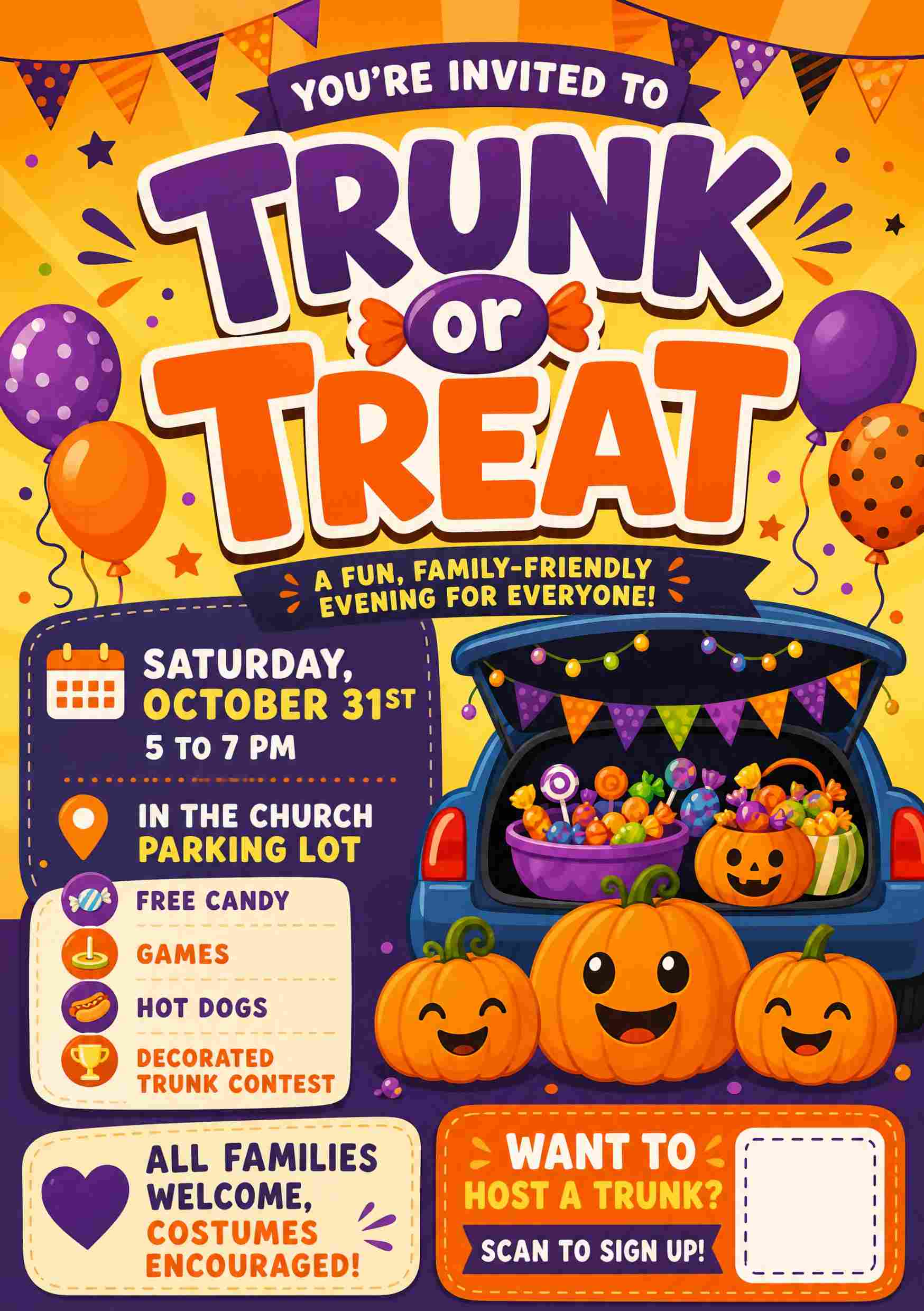
Halloween Flyers for Every Kind of Night
Halloween is two seasons at once: late-night parties and haunted houses on one side, trunk or treats and fall festivals on the other. PixExact designs for both — just describe the occasion and the AI matches the mood:
- Bar, club & house Halloween parties
- Trunk or treat & safe candy events
- Haunted houses, ghost tours & hayrides
- Costume & pumpkin carving contests
- Church fall festivals & harvest parties
- School, PTA & kids Halloween parties
- Halloween sales & seasonal promotions
- Restaurant specials & spooky drink menus
Whatever you are throwing this October, describe it in a sentence and get a flyer in seconds — no design skills required.
Key Features of Our AI Halloween Flyer Generator
Text to Halloween Flyer
Describe your Halloween party, trunk or treat, or seasonal sale in plain language. Our AI Halloween flyer generator turns your prompt into a complete design, with headline, layout, imagery, and typography generated in a single pass.
Image to Halloween Flyer
Upload your logo, a venue photo, or last year's flyer as a reference image. PixExact analyzes the visual style and works it into your design, so the final Halloween flyer matches your brand or your event's theme.
QR Code for Tickets & Sign-Ups
The AI places a QR code placeholder in the right spot on your flyer. After generation, click the edit button to swap in your real scannable code linking to ticket sales, RSVPs, a trunk host sign-up form, or your online store.
Scary or Family-Friendly Layouts
Tell the AI which side of Halloween you are on. It builds a blood-red horror layout for a haunted house, or a bright, no-ghosts design with pumpkins and hay bales for a church trunk or treat — with the details readable either way.
Print-Ready Halloween Flyer Sizes
Generate flyers in six standard print sizes at 300 DPI: Postcard (4"×6"), A6, Half Letter (5.5"×8.5"), A5, US Letter (8.5"×11"), and A4; or set custom dimensions for table tents, door hangers, and handouts.
Flyers for Every Halloween Event
From bar parties, haunted houses, and costume contests to trunk or treats, fall festivals, school parties, pumpkin patches, and storewide sales, our AI Halloween flyer maker adapts its style to match your occasion.
The Best AI Halloween Flyer Generator for Every Occasion
See how PixExact handles late-night costume parties, church trunk or treats, haunted house attractions, and seasonal sales.
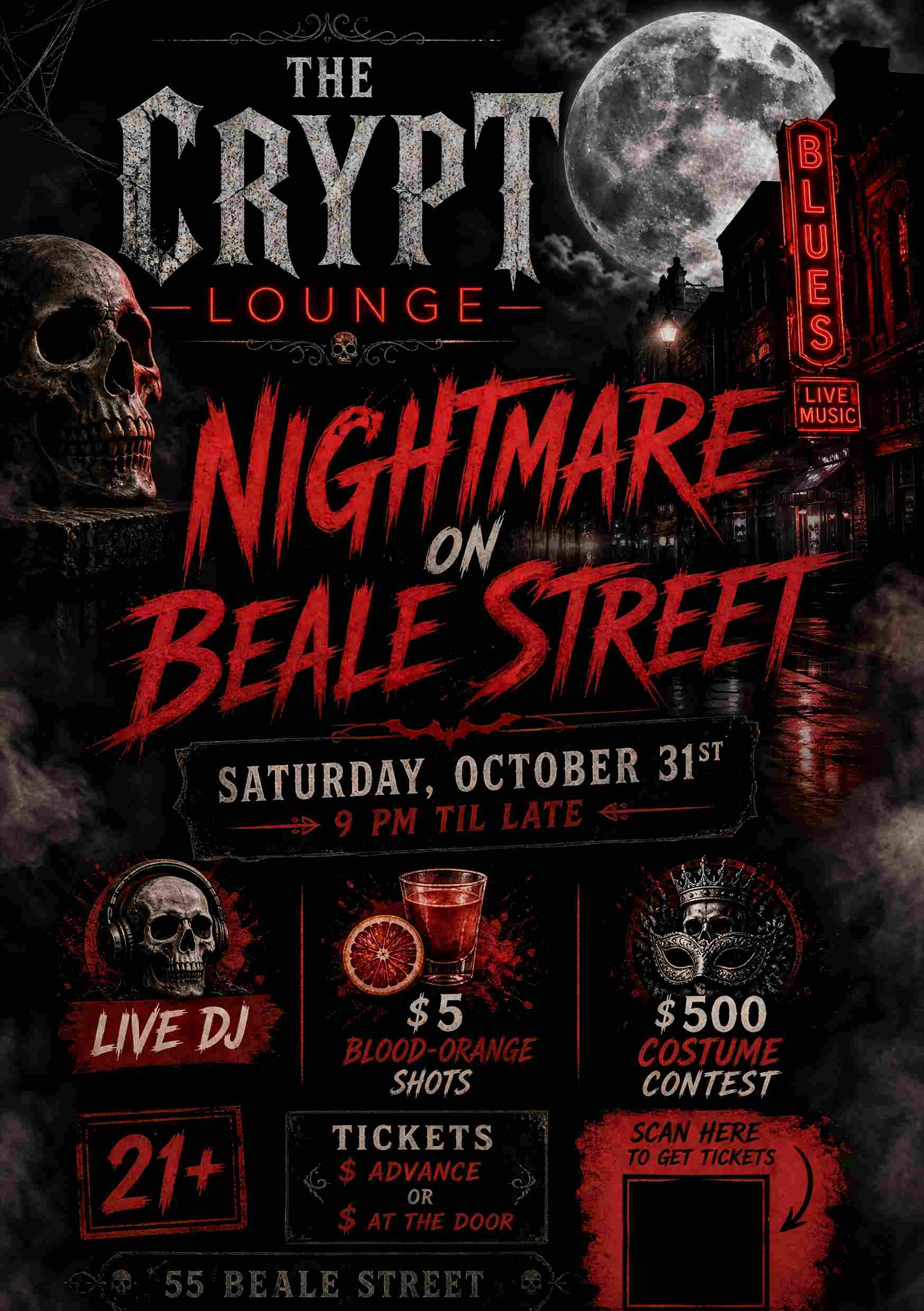
Perfect for bars, clubs, and house parties. Describe your DJ, drink specials, and costume contest prize, and get a dark, high-contrast flyer that fills the room on October 31st.
Prompt
Design an adult Halloween party flyer for "The Crypt Lounge". Headline: "Nightmare on Beale Street". Details: "Saturday, October 31st, 9 PM til late. Live DJ, $5 blood-orange shots, and a $500 costume contest. 21+, tickets $15 advance or $20 at the door". Address: "55 Beale Street". Dark, high-contrast nightlife design with blood red and charcoal, a full moon, drifting fog, and bold horror display typography, space for a QR code to buy tickets.
How to Write the Best Halloween Flyer Prompts
The quality of your AI-generated Halloween flyer depends on your prompt. Here is how to write prompts that work with our Halloween flyer creator:
- Define the Occasion: Is this a bar party, a trunk or treat, a haunted house, a school festival, or a retail sale?
- Target Audience: Tell the AI who the flyer is for — young adults, families with small kids, thrill-seekers, or shoppers.
- Specify Content: Venue name, date, time, address, ticket price, age limit (21+ or all ages), costume rules, rain date, or QR code. Don't make the AI guess.
- Set the Mood — this matters most at Halloween: say "scary", "gothic", or "horror" for adult events, or "family-friendly, no ghosts or gore" for church, school, and kids events. The AI will pick very different imagery.
How to Make a Halloween Flyer with AI in 3 Steps
No design experience? No problem. PixExact helps any bar owner, church volunteer, PTA parent, or event organizer instantly create eye-catching Halloween flyers without advanced design skills.
Describe Your Halloween Event
Describe your party, trunk or treat, haunted house, or sale. Include the details you want on the flyer, like the venue name, date, time, address, ticket price, age limit, or QR code. Say "family-friendly" or "scary" so the AI sets the right tone.
Select the Flyer Size
Choose the exact dimensions for your project. We support a wide range of common flyer formats, including: US Letter & Half Letter, A4, A5, & A6, Postcard, ideal for windows, counters, bulletin boards, and handouts.
Add QR Code and Download
PixExact produces your Halloween flyer in seconds. Click the edit button to add your real scannable QR code for tickets or sign-ups, then download the print-ready flyer.
Why Choose our AI Halloween Flyer Design Tool?
For years, organizers relied on a library of free Halloween flyer templates. While useful, templates look generic, the same jack-o'-lantern shows up on every flyer in town, and customizing them takes time you don't have in October.
Fast Enough for October
Generate Halloween flyers in seconds, not hours. There is no need to manually adjust the layout, font, or background. The AI handles the heavy lifting, so your flyers are posted and printed well before October 31st.
Unique Designs, Not Recycled Templates
Every flyer created by PixExact is unique. Your Halloween party won't be advertised with the same stock design as the bar down the street or the church across town.
Print-Perfect Halloween Flyers
PixExact is purpose-built for print. Whether you need a compact A6 table tent for the bar, a Postcard for a mailer, or an 8.5 x 11 flyer for the church bulletin board, your Halloween flyer is print-ready at 300 DPI.
On-Brand with Your Logo
With our image to image feature, you can upload your venue logo, church logo, or a photo from last year's event. This keeps your Halloween promotions on-brand and gives you the power to match your style exactly.
Frequently Asked Questions
When is Halloween 2026, and can the flyer show the date?
Halloween 2026 falls on Saturday, October 31st. Because it lands on a weekend, expect parties, trunk or treats, and haunted house nights to spread across the whole final weekend of October. Just include your date in the prompt and the AI places it clearly on your flyer — and you can edit it afterward if your event runs on a different night.
Can I make a family-friendly Halloween flyer without ghosts or gore?
Yes, and it is one of the most common requests we see. Churches, schools, and PTAs run trunk or treats, fall festivals, and harvest parties that deliberately avoid scary imagery. Add "family-friendly, no ghosts or horror elements" to your prompt and the AI uses pumpkins, hay bales, autumn colors, and playful rounded fonts instead of skulls, blood, and distressed horror type.
Can it make a trunk or treat flyer that also recruits trunk hosts?
Yes. A trunk or treat flyer usually has two audiences: families coming for candy, and volunteers who decorate a trunk. Mention both in your prompt — for example "add a second call to action for trunk host sign-ups" — and the AI leaves room for a separate line and a QR code pointing to your registration form. It is also worth including free admission, the parking lot location, and a rain plan.
Can I add a QR code for tickets, RSVPs, or sign-ups?
Yes. The AI adds a QR code placeholder in the right spot on your flyer. After generating, click the edit button to swap in your real scannable code linking to ticket sales, an RSVP page, a volunteer sign-up form, or your online Halloween sale.
What Halloween events can I create flyers for?
Anything happening in October — bar and club costume parties, house parties, haunted houses, ghost tours and hayrides, costume and pumpkin carving contests, trunk or treats, church fall festivals and harvest parties, school and PTA parties, pumpkin patches and corn mazes, outdoor movie nights, restaurant and cocktail specials, and storewide Halloween sales.
Is PixExact a free Halloween flyer maker?
Yes, you can start for free. Every new user receives complimentary credits upon registration, so you can create your first Halloween flyers at no cost — ideal for small venues, churches, schools, and volunteer organizers on a budget.
Can I print my flyer or share it online?
Both. Flyers are generated at 300 DPI in print-ready sizes — US Letter and A4 for windows, doors, and bulletin boards, A5 and Half Letter for handouts, and Postcard for mailers — and you can also download and share them on social media, in group chats, or in email invitations.
More Tools
Explore more AI-powered tools to supercharge your creative workflow.


Ready to Create Eye-Catching Halloween Flyers?
Don't let a lack of design resources hold your event back. Join the revolution of AI design and streamline how you promote your Halloween parties, trunk or treats, haunted houses, and seasonal sales. With PixExact, you can create the perfect Halloween flyer yourself using advanced AI.