




Pixel Animation Maker: Create and Export Animated Pixel Art Sprites Online
Generate game sprites and animated gifs from a text prompt — pixel-perfect and ready to export as an animated GIF or PNG spritesheet in seconds. Free online pixel art animation powered by AI, no drawing experience required.

How to Animate Pixel Art in 3 Steps
Write a Text Prompt
Describe the character or effect you want to animate. Our AI understands pixel art aesthetics, retro game styles, and animation context — so a phrase like "a warrior walking in RPG style" is all you need to get started.
Choose Your Animation Style
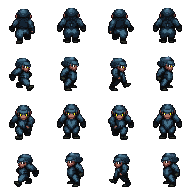
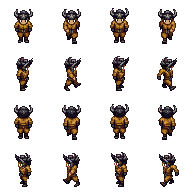
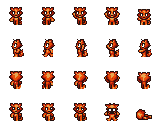
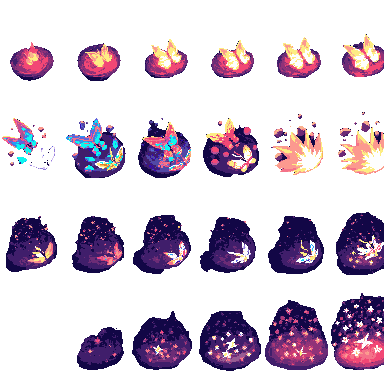
Pick from Four Angle Walking, Walking & Idle, Small Sprites, or VFX. Each style generates a specific set of animation frames at its optimal canvas size, with pixel-perfect consistency across every frame.
Export and Download
Select your output format — animated GIF or PNG spritesheet — then download. Both are export-ready for any 2D game engine. Generate up to 4 animations per run to explore variations and find the look that fits your game.
Why Use the PixExact Pixel Animation Maker?
AI generation meets game-ready output — no drawing skills, no software to install.
AI-Powered Frame Generation
Our AI algorithm dynamically generates every animation frame from scratch. No manual drawing required — get consistent, pixel-perfect character motion from a simple text description.
Four Specialized Animation Modes
Choose the mode that fits your project: four-angle walking cycles, walking & idle combos, compact 32×32 small sprites, or VFX effects like fire and explosions — each pre-tuned for game development.
GIF and Spritesheet Export
Toggle between animated GIF and PNG spritesheet before generating. Both are ready for direct use in various game engines. Download up to 4 animations per run and use them as pixel art assets immediately.
Runs in Your Browser — No Install Needed
This free online tool runs entirely in your browser. No software to download or update, no account tier required to try. Works on Windows, Mac, Linux, and mobile without any setup.

What Is a Pixel Animation Maker?
A pixel animation maker is a tool for creating movement in pixel art by composing a series of frames. Traditionally, animators use an animated sprite editor to draw each frame by hand — but our AI creates the animation in real time from a text prompt, generating all frames at once with consistent style and proportions. It's the fastest animation tool for developers who want to make pixel art characters and effects without spending hours on artwork.
- →
Walking & idle cycles — 4-direction character animations for RPGs and top-down games.
- →
Multi-action small sprites — 32×32 sprites with walking, attacking, and more in one generation.
- →
VFX & effect animations — Fire, explosions, lightning — looping cleanly for in-game use.
- →
Game sprites for any genre — Retro or modern pixel art, ready to create animated characters instantly.
Pixel Art Animation Use Cases
Create pixel art animation, VFX effects, and complete character sprite sets — all from a text prompt.

RPG & Platformer Walking Cycles
Generate 4-direction walking and idle animations for humanoid pixel art characters. The four-angle walking and walking & idle styles produce consistent motion across all directions — turning hours of frame-by-frame artwork into a single AI generation. The output is game-ready pixel art you can use directly without post-processing.

Small Sprites with Multiple Actions
Use small sprites mode to create compact 32×32 pixel art with multiple built-in actions: walking, arm raising, attacking, looking around, surprised, and laying down — all generated from a single prompt. These versatile sprite animations are ideal for top-down RPGs, platformers, and any game that needs expressive characters at a small canvas size.

VFX, Fire & Explosion Effects
Bring fire, explosions, lightning, and other visual effects to life with the VFX animation style. Generate eye-catching looping animated gifs perfect for UI highlights, particle effects, hit flashes, and scene transitions. The 32×32 output size is ideal for in-game effects that need to scale without losing their pixelated charm.

Complete Pixel Art Game Asset Pipeline
Combine animated character sprites with matching tilesets using our Pixel Tileset Generator. Together, these two tools form a full pixel art asset workflow — covering characters, tile objects, and scene objects for top-down, platformer, and isometric 2D worlds. Create a complete visual foundation for your game without switching between multiple applications.
Pixel Animation Maker — Frequently Asked Questions
Is this Pixel Animation Maker free?
Yes. PixExact's Pixel Animation Maker is free to try. All new accounts receive free credits to generate pixel art animations immediately — no credit card required. For higher usage, paid plans provide additional credits and priority generation.
What animation frames does each style produce?
Each style generates a specific frame set. Four Angle Walking produces 4-direction, 4-frame walking animations for humanoid characters at 48×48 px. Walking & Idle adds idle cycles on top of the walking frames at the same size. Small Sprites creates multi-action 32×32 animations — walking, attacking, looking around, and laying down. VFX generates looping effect animations for fire, explosions, and lightning at 32×32 px.
How do I export my animation as a GIF or PNG sprite sheet?
Before clicking Generate, use the Output Format toggle to choose between Animated GIF and Spritesheet PNG. Selecting GIF gives you a ready-to-play animated file. Selecting Spritesheet PNG gives you all animation frames laid out in a single PNG — a sprite sheet format compatible with Godot, Unity, and other 2D game engines. Download either format directly from the results area once generation is complete.
Is there a tutorial for first-time users?
No tutorial is needed to get started. Select an animation style, write a short prompt describing your character or effect, and click Generate. Your animation will be ready within about 30 seconds. The "How to Animate Pixel Art" section above walks through each step in detail if you want a primer before generating.
Can I customize the color palette?
Palette selection is handled automatically by the AI based on your prompt and chosen animation style. You can influence the palette by including color descriptions in your prompt — for example, "a red armored knight" or "a glowing blue mage". For precise palette editing at the pixel level, export the PNG spritesheet and refine it in Aseprite or your preferred sprite editor.
What is onion skinning and does PixExact support it?
Onion skinning is a feature in traditional pixel art editors that shows a semi-transparent preview of adjacent animation frames while you draw, helping you judge motion continuity. Because PixExact uses AI generation rather than manual frame-by-frame drawing, onion is not part of the generation workflow. Instead, you can preview the final animation as a GIF after generating and re-run with an adjusted prompt if the motion needs refining.
Does it support tileset or isometric art creation?
The Pixel Animation Maker specializes in character sprites and VFX animations. For tileset and isometric scene object creation — including a single tile, tile objects, and scene assets — visit our companion Pixel Tileset Generator. The two tools are designed to work together as a complete pixel art asset system for any 2D game world.
Can I import a reference image?
Yes. You can import a reference image into the input area to guide the AI. Upload a character sketch, a photo, or an existing sprite, and the model will use it as visual context when generating the animation — making it easier to match your existing pixel art assets and maintain a consistent style across your game.
How is this different from Aseprite or Piskel?
Aseprite is a professional animated sprite editor with full manual control — brush tools, eraser, onion skinning, frame-by-frame editing, palette management, rotation, scaling, duplicate frame commands, a playback slider, rgb color mixing, vector-style outline tools, font rendering, shortcut customization, and more. It supports exporting to gifs, pngs, and mp4 via an extension, and receives free updates. Piskel is a free and open-source sprite editor with a simpler ui — ideal for beginners learning manual frame-by-frame animation without downloading desktop software. PixExact is a different category: you write a text prompt and AI generates the animation for you. There is no canvas, no brush to configure, and no shortcut to assign. Use PixExact to rapidly generate base animations, then import and tailor each frame in Aseprite to achieve production-quality pixel art assets.
Can I use the generated animations in commercial game projects?
Yes. All pixel art animations generated on PixExact can be used in commercial games, apps, and other products. You retain full ownership of the output artwork. There are no royalties or licensing restrictions on the generated animations.
More Tools
Explore more AI-powered tools to supercharge your creative workflow.


Start Creating Pixel Art Animations Today
No drawing skills needed. Generate animated game sprites in seconds — free to try, no credit card required.