
Free AI Restaurant Flyer Generator for Menus & Events
Describe your special, event, or grand opening in plain language and get an appetizing, print-ready restaurant flyer in seconds. Our AI Restaurant Flyer Generator delivers six standard print sizes at 300 DPI, no design skills, no template editing required.

Explore our flyer generators
Restaurant Flyers for Every Occasion
From daily specials to your biggest events of the year, PixExact creates a print-ready flyer for any moment on your restaurant's calendar. Just describe the occasion and let the AI design it:
- Grand openings & launch parties
- Happy hour & drink specials
- New & seasonal menu launches
- Weekend brunch & bottomless deals
- Valentine's, Thanksgiving & holiday dinners
- Live music & trivia nights
- Catering & private events
- Food festivals & tasting events
Whatever your restaurant is serving up, describe it in a sentence and get a flyer in seconds — no design skills required.
Key Features of Our AI Restaurant Flyer Generator
Text to Restaurant Flyer
Describe your special, menu launch, or event in plain language. Our AI restaurant flyer generator turns your prompt into a complete design, with headline, layout, food imagery, and typography generated in a single pass.
Image to Restaurant Flyer
Upload your restaurant logo, a photo of a signature dish, or an existing menu as a reference image. PixExact analyzes the visual style and incorporates it into your flyer, so the final design matches your brand.
QR Code for Menu & Reservations
The AI places a QR code placeholder in the right spot on your flyer. After generation, click the edit button to swap in your real scannable code linking to your online menu, reservation page, or ordering app.
Appetizing Flyer Layouts
Every restaurant flyer follows a clear, mouth-watering layout: a bold headline, the offer or event details, and a tempting call to action. Your message is easy to read in the window, on a table tent, or shared online.
Print-Ready Restaurant Flyer Sizes
Generate flyers in six standard print sizes at 300 DPI: Postcard (4"×6"), A6, Half Letter (5.5"×8.5"), A5, US Letter (8.5"×11"), and A4; or set custom dimensions for table tents and menu inserts.
Flyers for Every Restaurant Event
From grand openings, daily specials, and happy hour to brunch, live music, holiday dinners, and catering, our AI restaurant flyer maker adapts its style to match the vibe of your venue.
The Best AI Restaurant Flyer Generator for Every Occasion
See how PixExact handles grand opening flyers, daily specials, weekend brunch, happy hour, live music nights, and more.
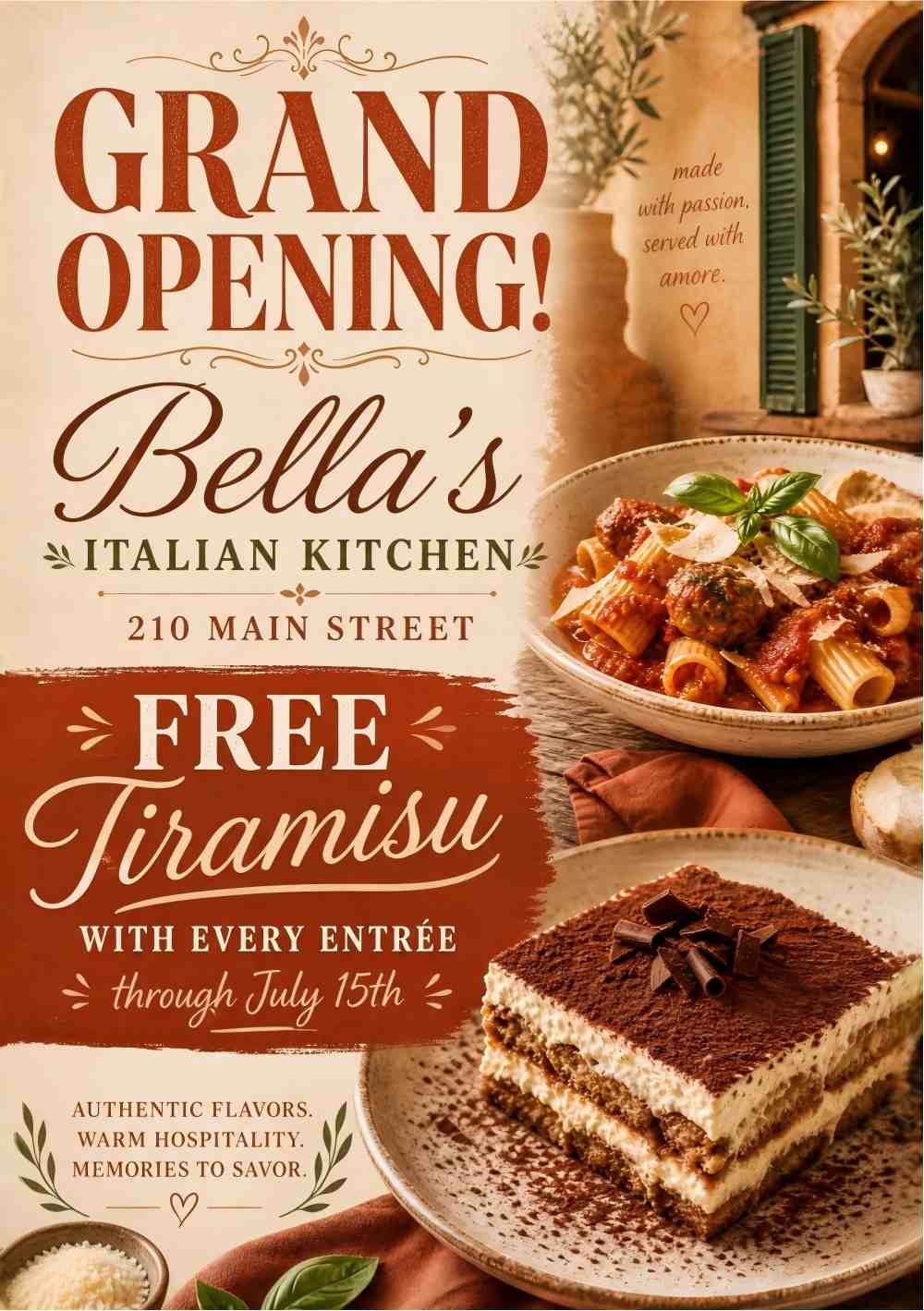
Perfect for grand openings, launch parties, and ribbon cuttings. Describe your opening offer and get a warm, appetizing flyer that brings in the crowds.
Prompt
Make a grand opening flyer for "Bella's Italian Kitchen" at "210 Main Street". Offer "Free Tiramisu with Every Entrée through July 15th". Warm and appetizing tone with terracotta and cream colors, food photography style, space for a QR code linking to the menu.
How to Write the Best Restaurant Flyer Prompts
The quality of your AI-generated restaurant flyer depends on your prompt. Here is how to write prompts that work with our restaurant flyer creator:
- Define the Occasion: Is this a grand opening, a daily special, a happy hour, or a live music night?
- Target Audience: Tell the AI who the flyer is for, regulars, families, foodies, or the after-work crowd.
- Specify Content: Restaurant name, date, time, address, price, contact info, QR code, or call to action. Don't make the AI guess.
- Set the Mood: Use words like "appetizing", "cozy", "upscale", or "festive". Mention preferred colors, cuisine, or your brand's palette.
How to Make a Restaurant Flyer with AI in 3 Steps
No design experience? No problem. PixExact helps any owner, manager, or staff member instantly create eye-catching flyers for specials and events without advanced design skills.
Describe Your Restaurant Event
Describe your special, menu launch, or event. Include the details you want on the flyer, like the restaurant name, date, time, address, price, or QR code. Optionally upload your logo for style guidance.
Select the Flyer Size
Choose the exact dimensions for your project. We support a wide range of common flyer formats, including: US Letter & Half Letter, A4, A5, & A6, Postcard, ideal for windows, table tents, and handouts.
Add QR Code and Download
PixExact produces your restaurant flyer in seconds. Click the edit button to add your real scannable QR code for your menu or reservations, then download the print-ready flyer.
Why Choose our AI Restaurant Flyer Design Tool?
For years, restaurants relied on a library of free flyer templates. While useful, templates look generic, every venue uses the same ones, and customizing them takes time busy owners don't have.
Speed for Busy Kitchens
Generate restaurant flyers in seconds, not hours. There is no need to manually adjust the layout, font, or background. The AI handles the heavy lifting, so you can promote tonight's special between the lunch and dinner rush.
Unique Designs for Your Restaurant
Every flyer created by PixExact is unique. You won't find the same design at the diner down the street. Create custom, appetizing flyers that reflect your menu and make your venue stand out.
Print-Perfect Restaurant Flyers
PixExact is purpose-built for print. Whether you need a compact A6 table tent, a Postcard for a mailer, or an 8.5 x 11 flyer for the window, your restaurant flyer is print-ready at 300 DPI.
On-Brand with Your Restaurant Logo
With our image to image feature, you can upload your restaurant logo or a dish photo. This keeps your specials and event flyers on-brand and gives you the power to match your venue's style exactly.
Frequently Asked Questions
Can I add my menu items or prices to the flyer?
Yes. Just include the items and prices in your prompt — for example, "$2 street tacos and $5 margaritas" — and the AI places them cleanly within the design. If you want something moved or styled differently, regenerate or refine your prompt until it looks right.
Can I add a QR code for my menu or reservations?
Yes. The AI adds a QR code placeholder in the right spot on your flyer. After generating, click the edit button to swap in your real scannable code linking to your online menu, reservation page, or ordering app.
Can I use my restaurant's logo and brand colors?
Yes. Upload your restaurant logo or a dish photo with the image-to-image feature, and mention your colors in the prompt. PixExact keeps every special and event flyer on-brand, so your venue looks consistent.
What restaurant events can I create flyers for?
Anything on your calendar — grand openings, daily and weekly specials, happy hour, weekend brunch, new menu launches, holiday dinners, live music, trivia nights, catering, and food festivals. Just describe the occasion and the AI designs a fitting flyer.
Is PixExact a free restaurant flyer maker?
Yes, you can start for free. Every new user receives complimentary credits upon registration, so your restaurant can create its first flyers at no cost — ideal for small venues and new owners on a budget.
Can I print my flyer for the window or share it online?
Both. Flyers are generated at 300 DPI in print-ready sizes — US Letter and A4 for windows and posters, A5 and Half Letter for handouts, and Postcard for table tents and mailers — and you can also download and share them on social media or in email campaigns.
Does it work for any cuisine or type of restaurant?
Yes. Describe your cuisine and vibe — a cozy cafe, an upscale steakhouse, a vibrant taqueria, or a casual brunch spot — and the AI matches the style. It works for any restaurant, bar, food truck, or catering business.
More Tools
Explore more AI-powered tools to supercharge your creative workflow.


Ready to Create Eye-Catching Restaurant Flyers?
Don't let a lack of design resources hold your restaurant back. Join the revolution of AI design and streamline how your venue promotes specials and events. With PixExact, you can create the perfect restaurant flyer yourself using advanced AI.