
Kling 3.0 AI Video Generator: Native 4K Video with Sound

Kling 3.0 is the third-generation video model from Kling AI, the video team at Kuaishou. Released in February 2026, it brought native 4K video to Kling and creates sound, dialogue and lip-sync in the same pass as the picture. It also understands multi-shot prompts, letting a single generation cut between camera angles like an edited scene. Its successor, Kling 4.0, followed in October 2026 with 30-second takes, keyframes and stereo sound.
On PixExact you can use Kling 3.0 in your browser with a text prompt or a start and end frame. Choose 720p, 1080p or 4K, set any length from 4 to 15 seconds, and turn sound on or off. No API key, no Kling subscription, and new accounts get free credits.
More Tools
Explore more AI-powered tools to supercharge your creative workflow.


Kling 3.0 Specs at a Glance
The full capabilities of the Kling 3.0 video model family, including Kling 3.0 Omni.
| Spec | Kling 3.0 |
|---|---|
| Developer | Kling AI (Kuaishou) |
| Released | February 2026 |
| Versions | Kling Video 3.0 and Kling Video 3.0 Omni |
| Modes | Text to video, image to video, plus reference to video and in-video editing (3.0 Omni) |
| Length per generation | 3 to 15 seconds |
| Resolution | 720p, 1080p and native 4K |
| Dynamic range | 8-bit SDR |
| Aspect ratios | 16:9, 9:16, 1:1 |
| Audio | Native single-channel audio: dialogue, narration, sound effects, ambience, lip-sync |
| Speech languages | English, Chinese, Japanese, Korean, Spanish, with American, British and Indian accents |
| Multi-shot | Up to 6 shots per generation, with per-shot storyboard control in Omni |
| Frame control | Start frame and end frame |
| References | Up to 7 images or subjects, or 1 video of up to 15 seconds plus 4 images or subjects (3.0 Omni) |
What You Can Make with Kling 3.0
Kling 3.0 shines on short, polished clips where picture quality, sound and camera work all matter.
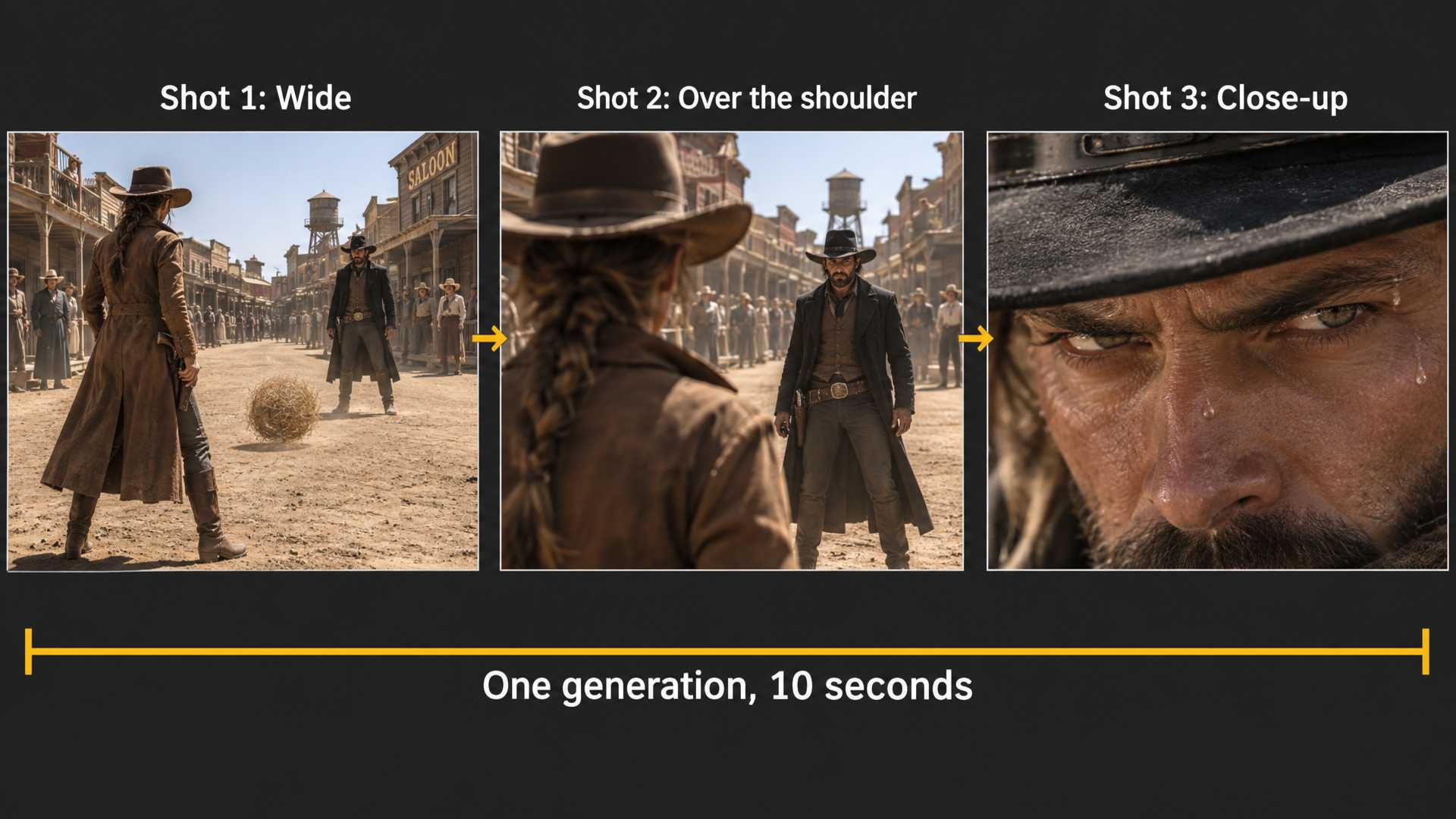
Multi-Shot Scenes from One Prompt
Kling 3.0 reads multi-scene, multi-shot instructions and cuts between camera angles on its own, including shot-reverse-shot for conversations. Write the scene as Shot 1, Shot 2 and Shot 3 with framing and camera moves, and you get an edited sequence instead of one static angle. With Kling 3.0 Omni's storyboard, each shot can have its own length, framing, perspective and camera movement, up to 6 shots in one generation.
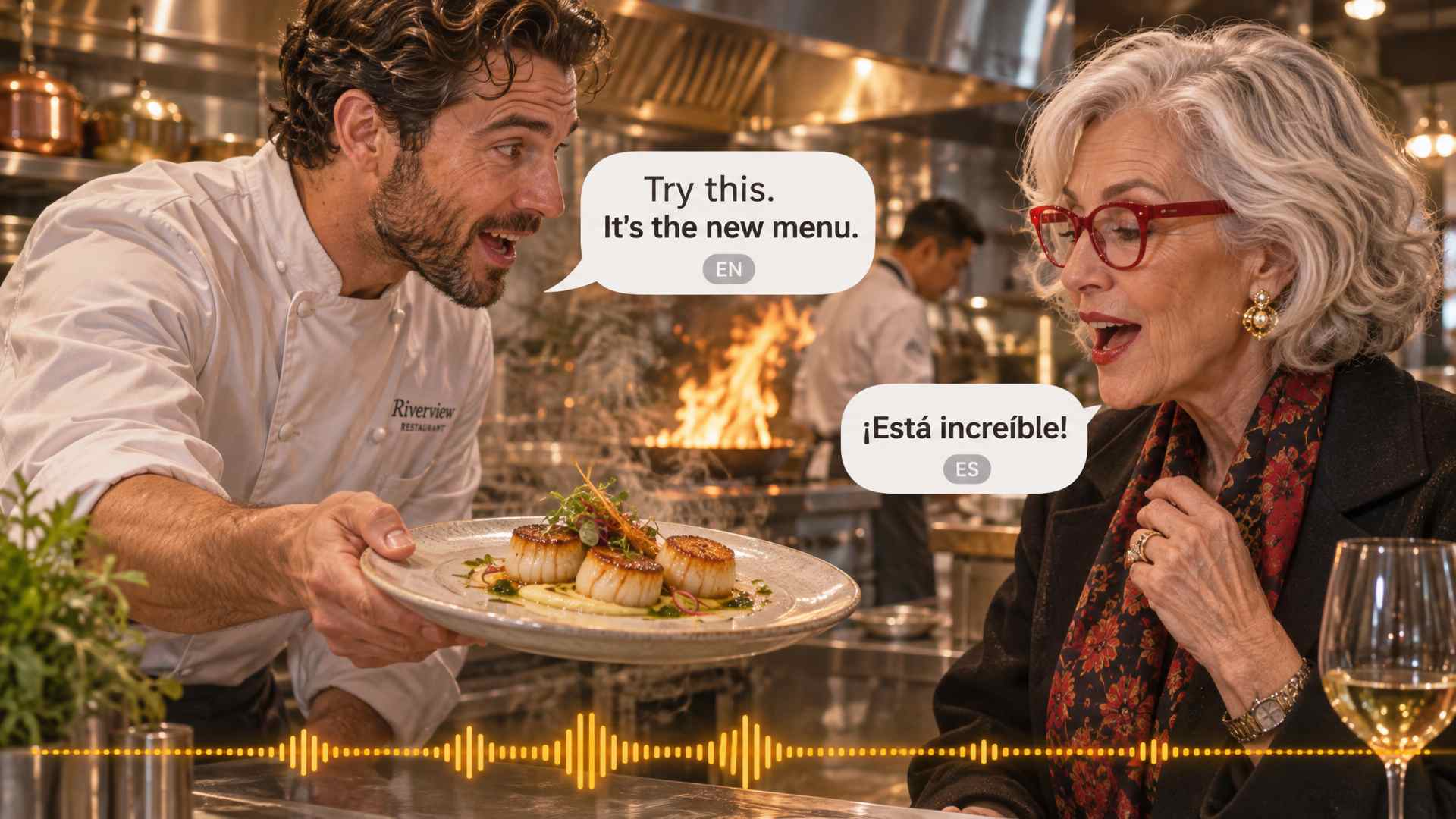
Talking Characters with Lip-Sync
Kling 3.0 generates speech, sound effects and ambience together with the video, keeping mouths in sync with the words. It speaks English, Chinese, Japanese, Korean and Spanish, with American, British and Indian accents, and it can stage a conversation where each character speaks a different language. You decide what each person says, how they say it and in what order.
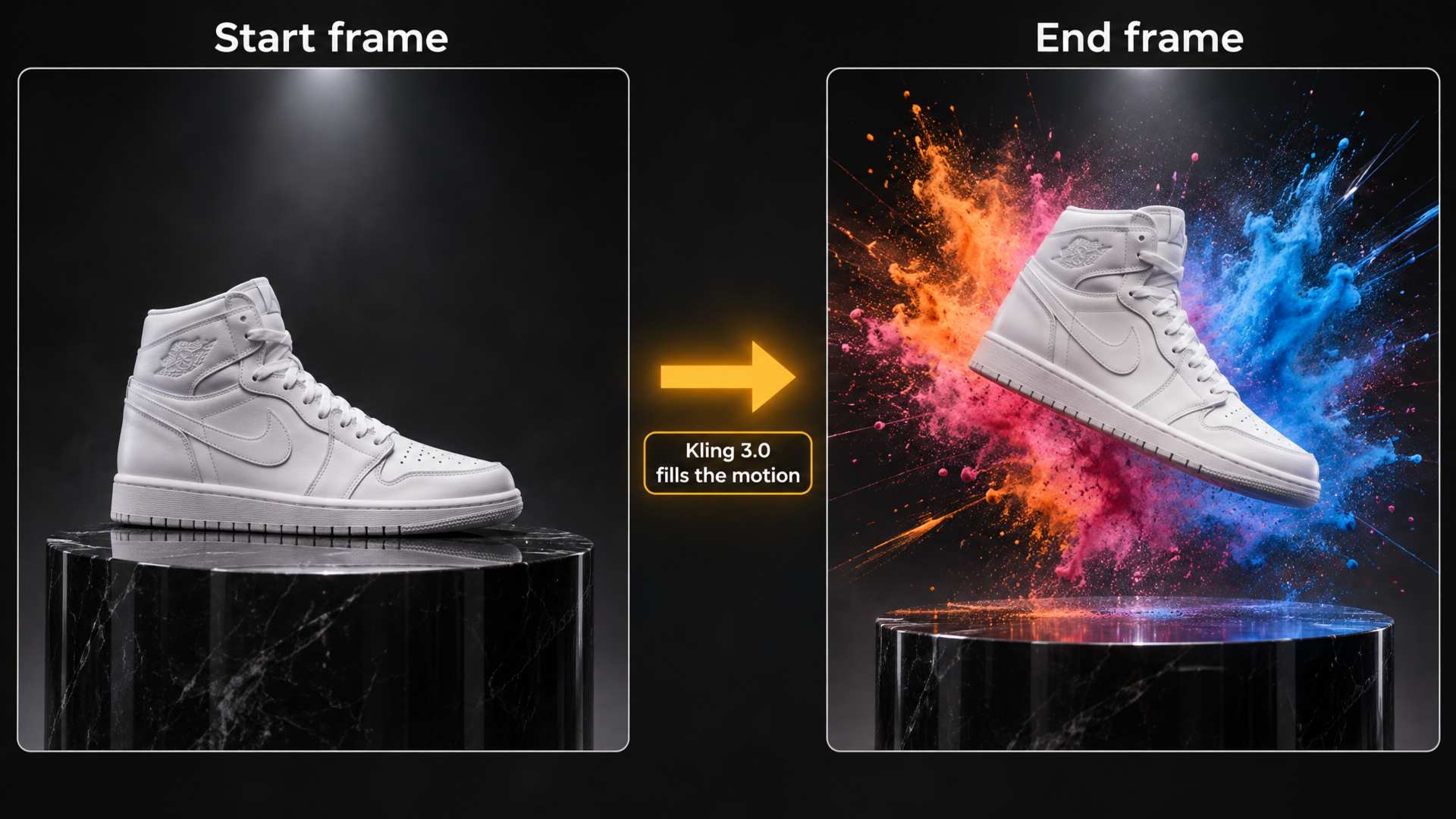
Image to Video with Start and End Frames
Upload a photo as the start frame and Kling 3.0 brings it to life while keeping the face, product or artwork intact. Add an end frame and the model plans the motion between the two, which works well for product reveals, before and after transitions and seamless loops. Text such as signs, captions and logos stays readable in motion.
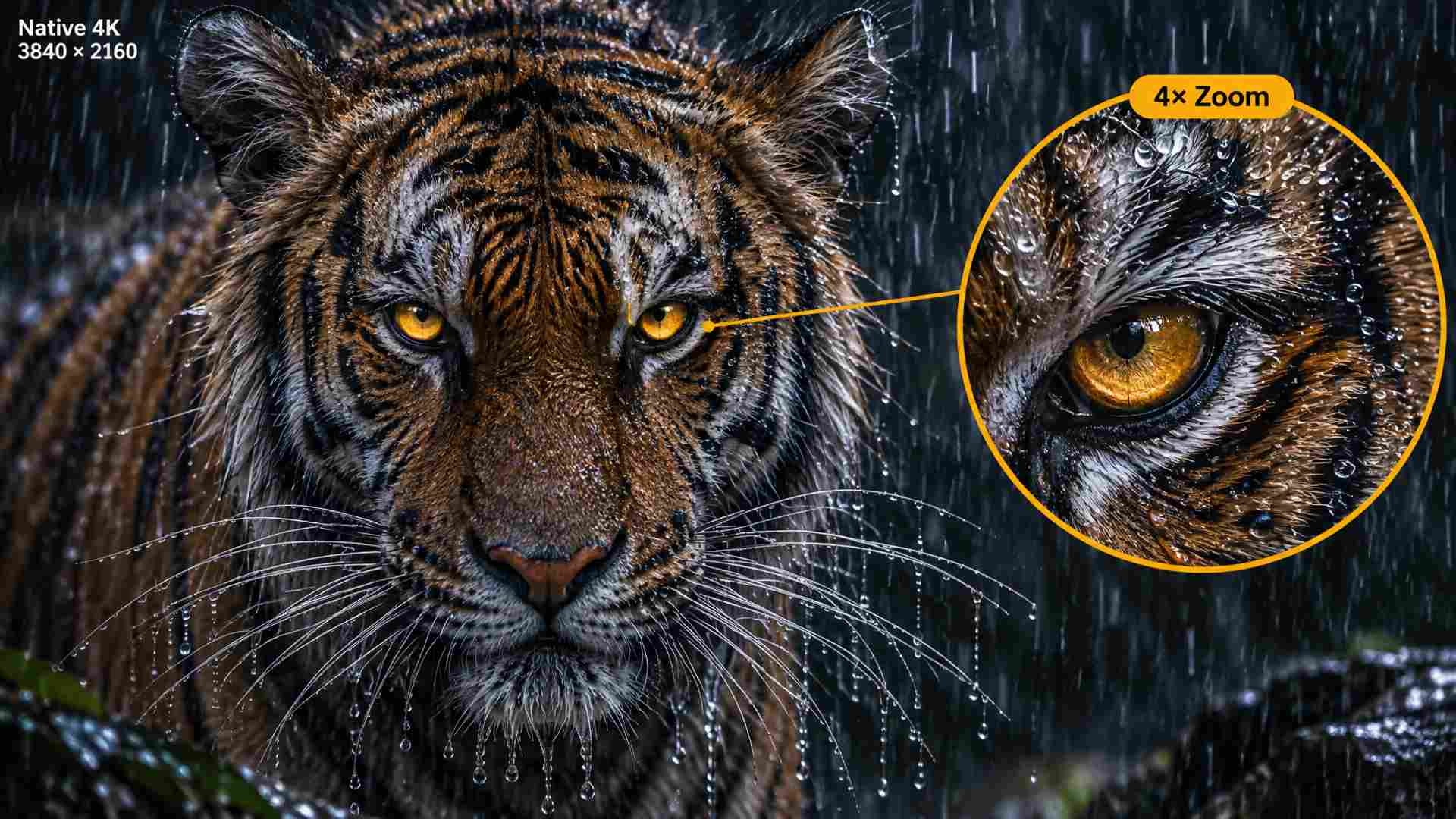
Native 4K for Ads and Big Screens
Kling 3.0 renders 4K directly instead of upscaling a smaller video. Fine textures like hair, fabric and product surfaces stay sharp. Use 720p for quick drafts and switch to 4K for the final version of a commercial, a website hero video or anything shown on a large screen.
Kling 3.0 Features
What the Kling 3.0 model family brings to AI video.
Native Audio in One Pass
Dialogue, narration, sound effects and background ambience are generated with the video and stay in sync with every frame. No separate voice or sound tool needed.
AI Director Camera Work
Kling 3.0 picks shot sizes and camera angles from the story in your prompt, with smooth, film-like transitions, long takes and expressive, dynamic performances.
Element Consistency
Upload reference images or a reference video and characters, objects and settings stay the same from shot to shot. Kling 3.0 Omni can even pick up a character's look and voice from a video clip.
Accurate Text and Logos
Signs, captions and branded elements, such as a logo on a shirt, are kept or generated accurately, which matters for ads and product videos.
Kling 3.0 Omni
The Omni version adds a storyboard with per-shot control, reference to video from images and video, and in-video editing, all in one model.
Flexible Length and Formats
Choose a length from 3 to 15 seconds, in 16:9 for YouTube, 9:16 for TikTok, Reels and Shorts, or 1:1 for feeds.
Kling 3.0 Pricing on PixExact
Kling 3.0 is billed per second of video. Sound is optional: save credits on silent drafts and switch it on for the final cut.
| Resolution | Without sound | With sound | 10-second clip with sound |
|---|---|---|---|
| 720p | 5 credits/sec | 7 credits/sec | 70 credits |
| 1080p | 6 credits/sec | 8 credits/sec | 80 credits |
| 4K | 25 credits/sec | 25 credits/sec | 250 credits |
Need takes longer than 15 seconds, keyframes or up to 15 references? Try Kling 4.0.
Kling 3.0 Prompt Tips
Small changes to how you write the prompt make a big difference.
Label Your Shots
For multi-shot videos, label each shot as Shot 1, Shot 2, Shot 3, with the framing for each (wide, medium, close-up) and the camera move. Two or three shots fit well in a 10-second clip.
Quote the Dialogue
Put spoken lines in quotes and name the speaker, language and tone. Keep lines short enough to fit the length of the clip.
Describe the Sound
Mention the sounds you want, like rain on a window, crowd noise or a car engine. When you only need visuals, turn sound off to save credits at 720p and 1080p.
Draft at 720p, Finish in 4K
Test prompts at 720p, the cheapest option. When the motion and framing look right, run the same prompt at 4K for the final video.
How to Use Kling 3.0 on PixExact
Three steps, all in your browser.
Write a Prompt or Upload a Frame
Select Kling 3.0 in the model list. Describe the scene, camera and sound, or upload a start frame, plus an optional end frame, to animate.
Choose Resolution, Length and Sound
Pick 720p, 1080p or 4K, a length from 4 to 15 seconds, and 16:9, 9:16 or 1:1. Switch sound on for dialogue and effects.
Generate and Download
Click Generate. When the video is ready, preview it and download the MP4.
Kling 3.0 FAQ
What is Kling 3.0?
Kling 3.0 (also called Kling Video 3.0) is an AI video model from Kling AI, owned by Kuaishou. It creates 3 to 15 second videos from text or images, with native audio, multi-shot camera work and output up to native 4K.
When was Kling 3.0 released?
Kling 3.0 launched in February 2026, first as early access for Kling's top-tier subscribers and then for everyone. Its successor, Kling 4.0, followed in October 2026.
What is the difference between Kling 3.0 and Kling 3.0 Omni?
Kling Video 3.0 is the main generation model: text to video and image to video with native audio and multi-shot scenes. Kling 3.0 Omni adds reference-driven features: it can take a character's look and voice from a reference video, gives you a storyboard with per-shot length, framing and camera control, and supports in-video editing.
Does Kling 3.0 support 4K?
Yes. Kling 3.0 introduced native 4K video generation, which means the model renders at 4K instead of upscaling a smaller video. On PixExact you can choose 720p, 1080p or 4K.
How long can Kling 3.0 videos be?
Kling 3.0 makes clips of 3 to 15 seconds per generation. On PixExact you can pick any length from 4 to 15 seconds. For longer single takes, Kling 4.0 goes up to 30 seconds.
Can Kling 3.0 generate audio and dialogue?
Yes. It generates dialogue, narration, sound effects and ambience in the same pass as the video, with lip-sync. Speech languages are English, Chinese, Japanese, Korean and Spanish, with accents such as American, British and Indian English. Several characters can talk in one scene, each in a different language if you want.
How does multi-shot work in Kling 3.0?
Describe several shots in one prompt and Kling 3.0 cuts between them, including shot-reverse-shot for conversations, up to 6 shots in one generation. Kling 3.0 Omni's storyboard mode lets you set the length, framing, perspective and camera movement of each shot.
Kling 3.0 vs Kling 4.0: which should I use?
Choose Kling 3.0 for clips of 15 seconds or less, for native 4K, and when you want a lower price per second or the option to turn sound off. Choose Kling 4.0 for takes up to 30 seconds, keyframe control, up to 15 references, stereo audio and more speech languages.
How much does Kling 3.0 cost on PixExact?
Kling 3.0 is billed per second. Without sound it costs 5 credits per second at 720p and 6 at 1080p. With sound it costs 7 at 720p and 8 at 1080p. At 4K it costs 25 credits per second, and sound costs nothing extra. New accounts get free credits to try it.
Can I use Kling 3.0 videos commercially?
Yes. Videos you create with Kling 3.0 on PixExact can be used in ads, social media, product pages and client work, subject to our Terms of Service. Make sure you have the rights to any image you upload as a frame.
Is Kling 3.0 open source?
No. Kling 3.0 is a closed model owned by Kuaishou. It cannot be downloaded or run locally. You can use it on PixExact with no API key or Kling subscription.
Create Native 4K Video with Kling 3.0
Get free credits when you sign up and make your first Kling 3.0 video with sound in minutes.