
Kling 4.0 AI Video Generator: 30-Second Videos with Sound

Kling 4.0 is the newest video model from Kling AI, the video team at Kuaishou. Released in October 2026, it makes clips of up to 30 seconds in a single pass, with stereo sound, dialogue and lip-sync built in. You can guide it with up to 10 keyframes and up to 15 reference images, videos, characters and voices, then edit the result or extend it to as long as 2 minutes.
On PixExact you can use Kling 4.0 right in your browser. Type a prompt, add a start frame, keyframes or references, choose the length and aspect ratio, and download an MP4 with sound. No API key, no Kling subscription, and new accounts get free credits.
More Tools
Explore more AI-powered tools to supercharge your creative workflow.


Kling 4.0 vs Kling 3.0: What Changed
Kling 3.0 already had native 4K, native audio and multi-shot scenes. Kling 4.0 keeps all of that and adds longer takes, keyframes, stereo sound and far more reference inputs. Here is how the two models compare.
| Capability | Kling 4.0 | Kling 3.0 |
|---|---|---|
| Released | October 2026 | February 2026 |
| Length per generation | 3 to 30 seconds | 3 to 15 seconds |
| Video extension | Forward and backward, up to 2 minutes in total | Not part of the 3.0 model |
| Resolution | 720p, 1080p, native 4K | 720p, 1080p, native 4K |
| Dynamic range | 10-bit HDR at 1080p and 4K | 8-bit SDR |
| Aspect ratios | 16:9, 9:16, 1:1, 21:9 | 16:9, 9:16, 1:1 |
| Audio | Native two-channel stereo | Native single-channel (mono) |
| Speech languages | English, Chinese, Japanese, Korean, Spanish, plus Portuguese, German, French, Hindi and more | English, Chinese, Japanese, Korean, Spanish |
| Frame control | Start frame, end frame and up to 10 keyframes | Start frame and end frame |
| Reference images and subjects | Up to 10 images and 7 subjects | Up to 7, or 4 when a video is used (3.0 Omni) |
| Reference videos | Up to 5 clips, 30 seconds combined | 1 clip, up to 15 seconds (3.0 Omni) |
| Total references | Up to 15 assets, including voice references | Up to 7 images or subjects, or 1 video plus 4 images or subjects (3.0 Omni) |
| Video editing | Built into the main model, plus Creative Recreation | Through Kling 3.0 Omni |
| Multi-shot | Multi-shot sequences inside one 30-second take | Multi-shot scenes, with per-shot storyboard in Omni |
| Prompt length | Up to 8,000 tokens | Standard prompt length |
| Price on PixExact | 8 credits/sec at 720p, 12 at 1080p, sound included | From 5 credits/sec (720p) to 25 (4K) |
| Best for | Long takes, keyframed shots, recurring characters, multi-product ads, edits | Short clips, native 4K, prompt-led multi-shot scenes, lower cost per second |
Want shorter clips, native 4K or the option to turn sound off? See the Kling 3.0 page.
What You Can Make with Kling 4.0
Kling 4.0 is built for longer, more controlled video. These are the jobs where it pulls ahead of earlier Kling models.
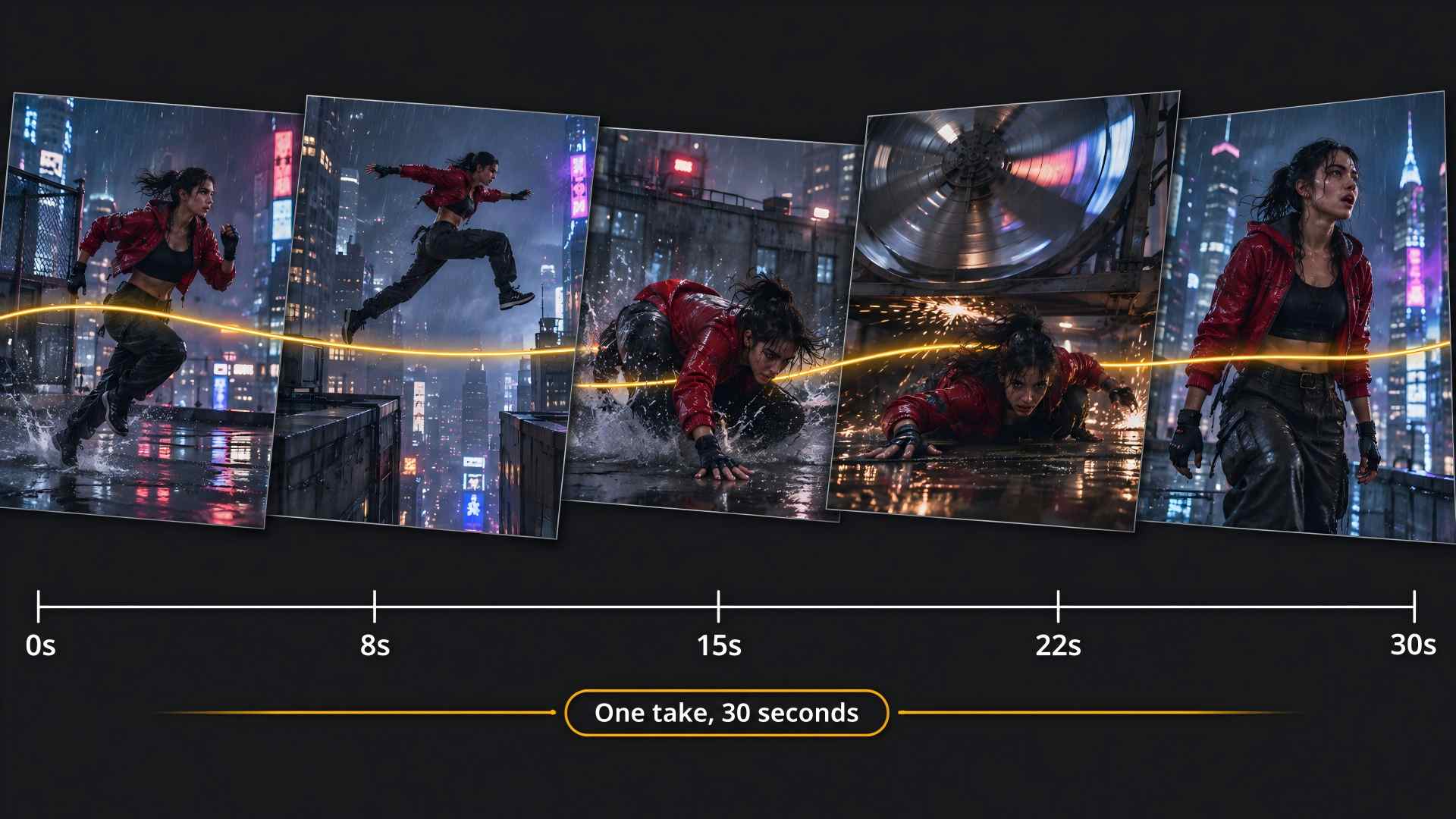
30-Second Long Takes in One Generation
Most text to video models stop at 10 or 15 seconds. Longer scenes have to be stitched from separate clips. Kling 4.0 generates up to 30 seconds natively, as one continuous take. Motion, lighting and characters stay consistent from the first frame to the last, which suits product walkthroughs, short story scenes, music video sections and ads that need room to breathe. Need more? Video extension continues a clip forward or backward, up to 2 minutes in total.
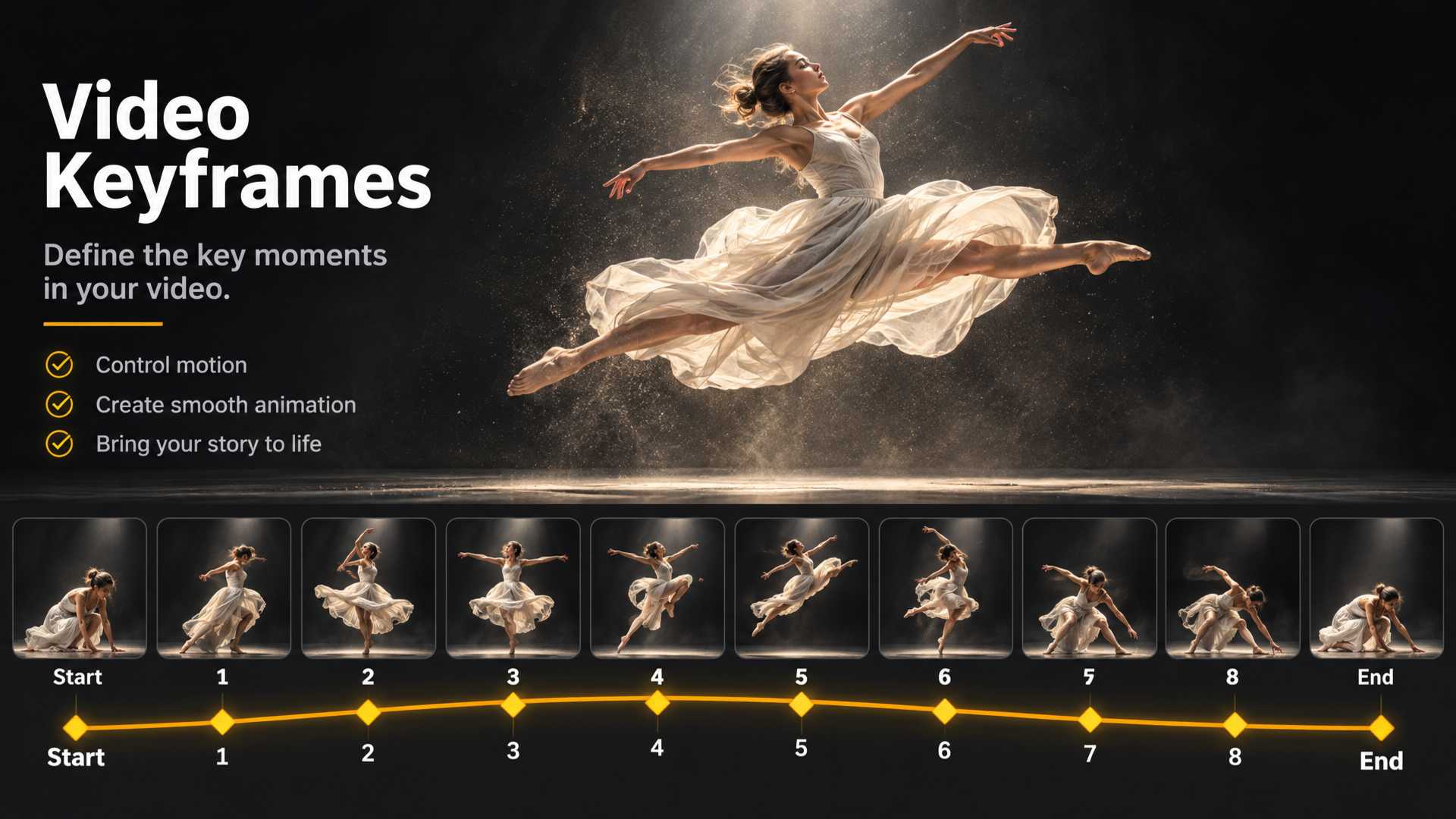
Up to 10 Keyframes: Plan the Shot Frame by Frame
In standard image to video, start and end frames only tell a model where a shot begins and ends. Kling 4.0 lets you place up to 10 keyframe images along the timeline and generates the motion between them. Use it to hit exact poses in a dance, show a product from set angles, or move a character through several locations in one continuous shot. On PixExact, upload your frames in order: the first is the start frame, the ones in between become keyframes, and the last can be the end frame.
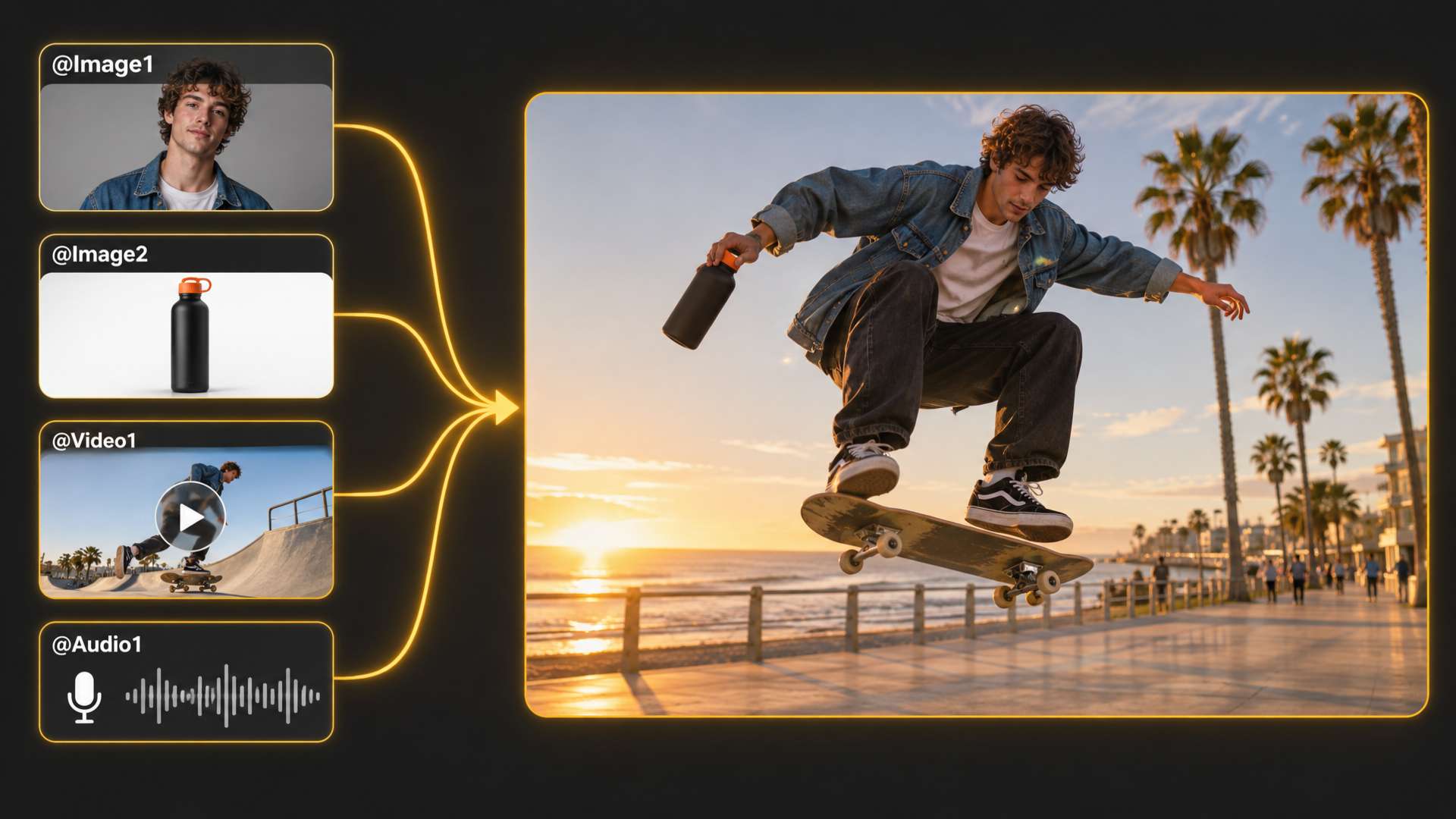
15 References: Keep Characters, Products and Voices Consistent
For reference to video, Kling 4.0 accepts up to 15 reference assets in one generation: up to 10 images, up to 5 video clips (30 seconds combined), up to 7 subjects and voice references. Mention each one in your prompt, like @Image1 or @Video1, to tell the model who and what goes where. A character keeps the same face, outfit and voice across scenes, and products keep their shape and label, which matters for series content, brand mascots and multi-product ads.
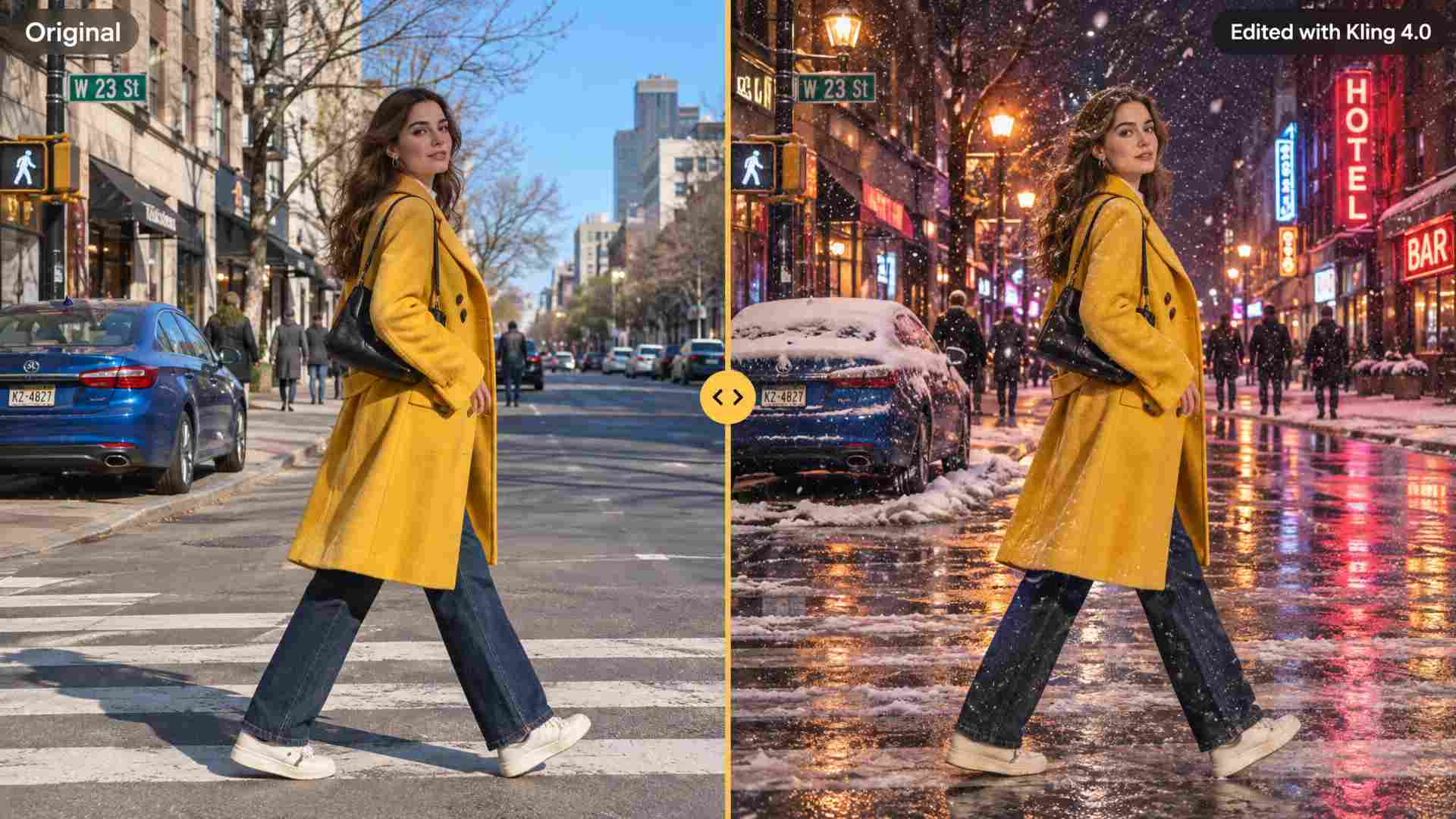
Video Editing and Creative Recreation
Kling 4.0 edits existing footage too. Change a character's expression or body movement, add, remove or swap objects and backgrounds, move the camera, or restyle the weather, colors and materials, using up to 5 input clips (30 seconds combined) in one edit. Creative Recreation goes a step further: it reuses the pacing, shot structure and presentation of a video you like and swaps in your own characters or products.
Kling 4.0 Features
Everything the Kling 4.0 model can do, from sound and motion to color and on-screen text.
Stereo Sound, Dialogue and Lip-Sync
Kling 4.0 generates two-channel stereo audio together with the picture: dialogue, sound effects, ambience and music. Lip-sync is more accurate than in Kling 3.0, and speech now covers Portuguese, German, French and Hindi on top of English, Chinese, Japanese, Korean and Spanish, with accents such as American, British and Indian English, Cantonese and Sichuanese.
Native 4K and 10-Bit HDR
The model outputs up to native 4K and adds 10-bit HDR at 1080p and 4K, for brighter highlights, deeper shadows and smoother color gradients than the 8-bit SDR of Kling 3.0. Aspect ratios include 21:9 ultrawide for cinematic shots, plus 16:9, 9:16 and 1:1.
Better Motion and Physics
Fast fights, sports, dance and large action scenes hold together better. Kling 4.0 improves body mechanics, spatial consistency and the way people and objects interact, and it keeps tracking and orbit camera moves stable from start to finish.
Video Extension up to 2 Minutes
Continue any clip forward or backward across several passes, up to 2 minutes in total, while keeping the same characters, setting and style.
Readable Text, Logos and Emojis
Signs, captions, packaging, logos and even emojis stay readable and stable as the camera moves, in multiple languages. Useful for ads, product videos and anything with a brand on screen.
Long, Detailed Prompts
Prompts can run as long as 8,000 tokens. That's room for a full shot list with timing, camera moves, dialogue and sound cues for a 30-second take, and the model follows the order.
Kling 4.0 Prompt Tips
A few habits that get better results from longer, multi-reference videos.
Write the Take as a Timeline
For clips over 10 seconds, break the prompt into beats with rough timing, for example 0 to 8s, 8 to 20s and 20 to 30s. Say what happens and how the camera moves in each beat.
Tag Every Reference
Refer to uploads by name, like @Image1 for the main character, @Image2 for the product and @Video1 for the camera move. Untagged references are harder for the model to place.
Put Spoken Lines in Quotes
Write dialogue in quotes and say who speaks, in which language and with what tone, for example: the woman says in French, calmly, "We are almost there."
Draft Short, Then Go Long
Test the look with a 5-second clip at 720p first. Once the style and characters are right, generate the full 30-second take at 1080p.
How to Use Kling 4.0 on PixExact
From prompt to finished video in three steps. No editing skills or API key needed.
Describe the Video
Pick Kling 4.0 in the model list and write your prompt. Describe the action, camera moves, mood and sound, and put any dialogue in quotes.
Add Frames or References
In Frames mode, upload a start frame, up to 8 keyframes and an end frame. In Reference mode, add up to 15 images, videos and audio clips, then tag them in your prompt.
Set Length and Generate
Choose 3 to 30 seconds, 720p or 1080p, and 16:9, 9:16, 1:1 or 21:9. Click Generate and download the MP4 with sound.
Kling 4.0 FAQ
What is Kling 4.0?
Kling 4.0 (also called Kling VIDEO 4.0) is the fourth-generation AI video model from Kling AI, part of the Chinese tech company Kuaishou. It turns text, images, keyframes and reference videos into clips of up to 30 seconds with native stereo audio, and it can also edit and extend existing videos.
When was Kling 4.0 released?
Kling opened early access to Kling 4.0 Flash on September 28, 2026, and the full Kling 4.0 model launched globally in October 2026. You can use it on PixExact now.
What is the difference between Kling 4.0 and Kling 3.0?
Kling 4.0 doubles the clip length from 15 to 30 seconds, adds up to 10 keyframes, raises references to 15 assets (including up to 5 videos and voice references), moves from mono to stereo audio, adds 10-bit HDR and more speech languages, and builds video editing into the main model. Kling 3.0 is still a good pick for shorter clips, native 4K at a lower price per second, and multi-shot scenes. See the comparison table above for every difference.
How long can Kling 4.0 videos be?
Each generation can be 3 to 30 seconds long, as one continuous take. With video extension, a clip can be continued forward or backward over several passes, up to 2 minutes in total. On PixExact you can pick any length from 3 to 30 seconds.
Does Kling 4.0 support 4K and HDR?
Yes. The Kling 4.0 model supports output up to native 4K, with 10-bit HDR at 1080p and 4K, while Kling 3.0 used 8-bit SDR. On PixExact you can choose 720p or 1080p for Kling 4.0.
How do keyframes work in Kling 4.0?
Keyframes are images you place along the video timeline. Kling 4.0 accepts up to 10 and animates the path between them. You control poses, angles and locations at set points instead of only the first and last frame. On PixExact, use Frames mode: the first image is the start frame, the images in between are keyframes, and the last one can be the end frame, up to 10 images in total.
How many references can I use with Kling 4.0?
Up to 15 reference assets per generation. The model takes up to 10 images, up to 5 reference videos with 30 seconds combined, up to 7 subject elements and voice references. In PixExact's Reference mode you can add up to 10 images, 5 videos and 3 audio clips, 15 in total, and tag them in the prompt as @Image1, @Video1 or @Audio1.
What languages can Kling 4.0 speak?
Kling 4.0 generates speech in English, Chinese, Japanese, Korean and Spanish, and adds Portuguese, German, French, Hindi and more. It also handles accents and dialects such as American, British and Indian English, Cantonese and Sichuanese. Write the lines in quotes and name the language in your prompt.
What is Kling 4.0 Flash?
Kling 4.0 Flash is a lighter, faster version of Kling 4.0 that opened for early access before the full model. It is meant for quick drafts and high-volume work, while the full Kling 4.0 model gives the best quality, the longest takes and the most control.
How much does Kling 4.0 cost on PixExact?
Kling 4.0 is billed per second of video, with sound always included: 8 credits per second at 720p and 12 credits per second at 1080p. A 10-second 1080p clip costs 120 credits. When you add reference videos, the rate is 5 credits per second at 720p or 8 at 1080p, and the length of the reference videos is billed as well. The generator shows the exact cost before you start, and new accounts get free credits.
Can I use Kling 4.0 videos commercially?
Yes. Videos you create with Kling 4.0 on PixExact can be used in ads, social media, product pages and client work, subject to our Terms of Service. Make sure you have the rights to any images, videos or voices you upload as references.
Is Kling 4.0 free or open source?
Kling 4.0 is not open source. Its weights belong to Kuaishou and it cannot be run locally. You can try it on PixExact with the free credits new accounts receive, with no Kling subscription or API key.
Make Your First 30-Second Video with Kling 4.0
Sign up, get free credits, and turn a prompt, a few keyframes or a set of references into a video with sound.