
Create 2560x1440 YouTube Banner — YouTube's Recommended Size
2560x1440 is the size YouTube officially recommends for channel banners. It delivers the sharpest quality on all screens — including Smart TVs. Upload your logo, preview on every device, and download in seconds.

What Is a 2560x1440 YouTube Banner?
A 2560x1440 pixel banner is YouTube's officially recommended channel art size. At this resolution, your banner looks sharp and professional on every screen — from smartphones to large Smart TVs. It's the only banner size where the full image is displayed on television screens, giving your channel maximum visual presence and brand real estate.
Safe Zone: 1546x423px
The center 1546x423px area is the only region guaranteed to display on every device. Our AI automatically keeps your channel name, logo, and key text within this zone — so nothing important ever gets cropped.
Complete banner visible — exclusive to this size
Full-width horizontal band across the top
Keep key content here — visible on all devices
Gaming or Vlog Channel? Try 2048x1152
2048x1152 is YouTube's minimum accepted size — smaller file, faster upload, and fully compatible with all YouTube requirements. It's the go-to choice for gaming channels, vloggers, and creators who update their banner frequently.
Why Create Your YouTube Banner at 2560x1440
Ready in Seconds
Type a description of your channel and get a professional 2560x1440 banner instantly. No design tools, no templates, no waiting — just results.
Upload Your Logo or Profile Pic
Add your own logo or profile picture — our AI naturally integrates it into the banner design, placing it within the safe zone for perfect visibility across every device.
Safe Zone Guaranteed by AI
Our AI ensures all important elements — channel name, logo, and tagline — automatically land within the 1546x423px safe zone. Your key content is always visible, no matter the screen.
Preview on TV, Desktop & Mobile
Before downloading, see exactly how your 2560x1440 banner looks on a Smart TV, desktop browser, and mobile. What you see is what your audience sees.
Boost Channel Credibility
Professional banners at YouTube's recommended resolution increase perceived channel quality. First impressions matter — a sharp 2560x1440 banner builds trust and drives subscriptions.
YouTube's Recommended Resolution
2560x1440 is the dimension YouTube officially recommends. Our AI generates banners at this exact specification — pixel-perfect, upload-ready, and optimized for every display.
2560x1440 YouTube Banner Examples
See how professional channels use the full 2560x1440 canvas to create stunning, device-optimized channel art.

Business & Corporate YouTube Banners at 2560x1440
Professional business channels benefit most from the full 2560x1440 canvas. The wider edges can showcase brand imagery, office environments, or abstract brand patterns that reinforce corporate identity — content that only appears on desktop and TV, creating a premium layered experience.
Design Tips:
- Place logo and tagline in the 1546x423px safe zone center
- Use edge areas (outside safe zone) for brand background and atmosphere
- Stick to 2–3 brand colors for a polished, consistent look
- Include your website or a key call-to-action within the safe area

Educational Channel Banners at 2560x1440
Educational channels thrive at 2560x1440. The full canvas allows instructors and course creators to communicate expertise visually — with subject matter imagery extending to the edges on TV, while the safe zone cleanly presents channel name, teaching niche, and upload schedule.
Design Tips:
- Feature your subject matter or course topic prominently
- Use clean, readable typography for your channel name
- Credentials or teaching niche can appear within the safe zone
- Extend background imagery to fill the TV canvas edges

Tech Review Channel Banners at 2560x1440
Tech channels and gadget reviewers make the most of 2560x1440's full width. Product imagery, circuitry patterns, or futuristic backgrounds can span the entire 2560px width on TV screens, creating a premium immersive effect while the safe zone communicates the channel identity.
Design Tips:
- Use high-contrast tech imagery across the full canvas
- Place channel name and niche keyword in the safe zone
- Dark backgrounds with accent colors create a premium tech feel
- Consider asymmetrical layouts for dynamic visual interest

Lifestyle & Beauty Channel Banners at 2560x1440
Lifestyle and beauty channels use 2560x1440 to create immersive visual experiences. The full canvas supports rich background photography — travel scenes, product flat lays, or aesthetic color stories — that draw viewers in on every screen size.
Design Tips:
- Use warm, inviting color palettes that reflect your brand
- Feature aspirational lifestyle imagery across the full width
- Keep your name and schedule within the safe zone
- Soft gradients or overlays help text stay readable
The Complete Guide to 2560x1440 YouTube Banners
Everything you need to know about creating, optimizing, and uploading YouTube banners at YouTube's recommended size
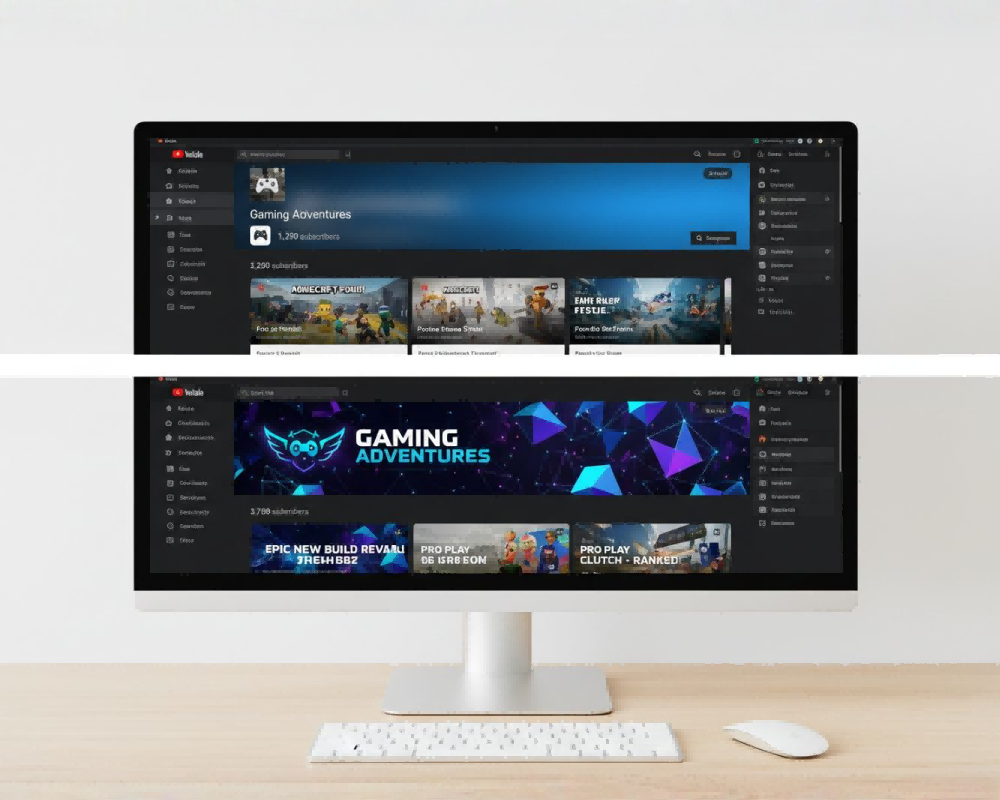
Why 2560x1440 Is YouTube's Best Banner Size
YouTube officially recommends 2560x1440 as the ideal banner size because it provides the best viewing experience across all devices. While your channel's safe zone content (1546x423px) is the same at any accepted size, only 2560x1440 delivers a complete, uncompromised image on Smart TV displays — an increasingly important screen for YouTube viewers.
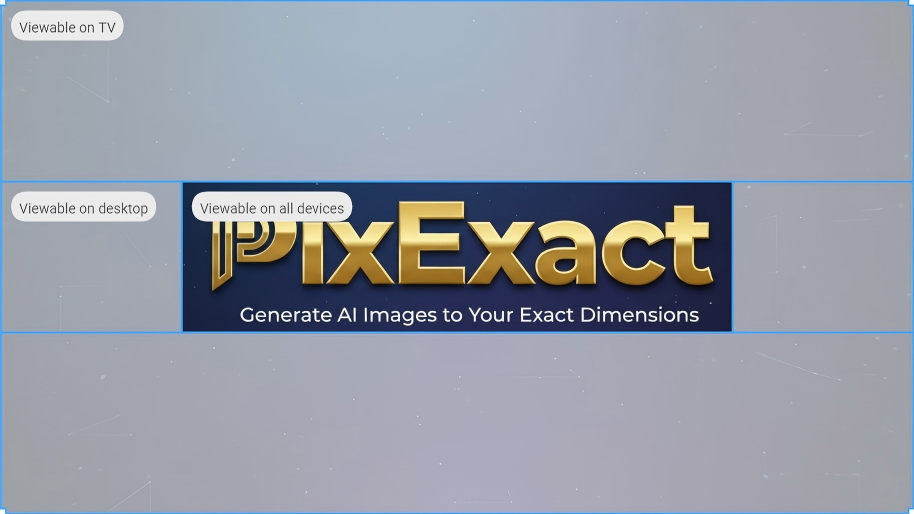
Understanding the 2560x1440 Safe Zone
Even at 2560x1440, YouTube crops your banner differently on different devices. The safe zone — the center 1546x423px area — is the only region guaranteed to display on all screens. Our AI automatically ensures your most important content stays within this zone.
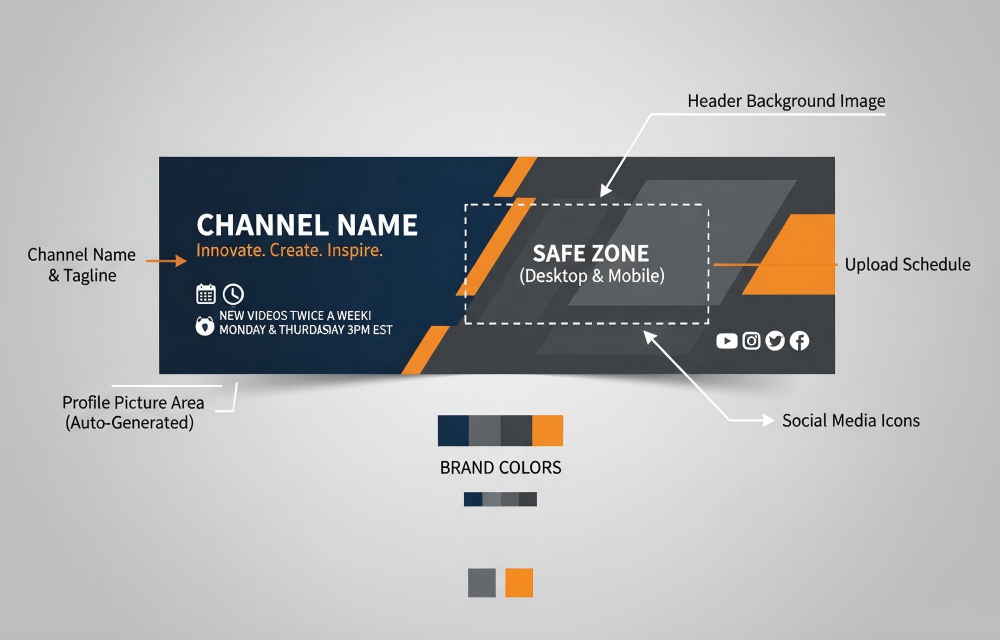
Making the Most of the Full 2560x1440 Canvas
The unique advantage of 2560x1440 is the full canvas visible on TV. Think of your banner in three zones: the safe zone (always visible), the desktop strip (visible on desktop + TV), and the TV-only edges. Designing all three zones intentionally creates a premium layered experience.

Banner Styles for Professional 2560x1440 Channels
2560x1440 is the preferred choice for channels that want to project professionalism and authority. The full canvas supports richer brand storytelling that resonates with audiences expecting high production values.
How to Create a 2560x1440 YouTube Banner with AI
Describe Your Channel
Tell the AI about your channel — niche, style, colors, channel name. Optionally upload your logo or profile picture to include it in the design.
Select 2560x1440 Size
The 2560x1440 preset is already set — YouTube's recommended size. The AI optimizes your banner for all three display zones: TV, desktop, and mobile safe zone.
Preview & Download
Switch between TV, desktop, and mobile previews to confirm everything looks perfect, then download your banner in full resolution and upload it to YouTube Studio.
Frequently Asked Questions
What is a 2560x1440 YouTube banner?
A 2560x1440 YouTube banner is channel art created at YouTube's officially recommended dimensions — 2560 pixels wide by 1440 pixels tall. It's the highest-quality banner size YouTube supports and the only size that displays the complete image on Smart TV screens. Our AI generator creates banners at exactly these dimensions, with all important content automatically placed within the 1546x423px safe zone visible on all devices.
Why does YouTube recommend 2560x1440?
YouTube recommends 2560x1440 because it provides the best display quality across all screen types — including Smart TVs, where the full 2560x1440 image is shown. Smaller sizes like 2048x1152 are accepted but result in cropped edges on large TV screens. For channels focused on brand presentation and professional appearance, 2560x1440 delivers the maximum visual impact.
How does a 2560x1440 banner look on TV?
On Smart TV screens, YouTube displays the complete 2560x1440 banner — the only size where this happens. Desktop browsers show a 2560x423px horizontal strip, and mobile devices show the center 1546x423px safe zone. This means at 2560x1440, viewers on large TV screens see your full banner design, including any background imagery or brand elements you've placed in the edge areas.
What is the YouTube banner safe zone?
The safe zone is the center 1546x423 pixels of your YouTube banner — the only area that's guaranteed to display on every device, including mobile phones. YouTube crops banners differently on different screens: TV shows the full image, desktop shows a wide strip, and mobile only shows the safe zone. Always keep your channel name, logo, and critical information within this center region. Our AI automatically ensures all key elements stay within the safe zone.
Should I use 2560x1440 or 2048x1152?
Choose 2560x1440 if you want YouTube's recommended quality, especially if your audience includes TV viewers or you're building a professional brand. Choose 2048x1152 if you prioritize smaller file sizes, faster uploads, or run a gaming/vlog channel where TV viewing is less common. Both sizes are fully YouTube-compatible — the difference is whether the edge areas (outside the safe zone) display on TV screens.
Can I include my channel logo in a 2560x1440 banner?
Yes — our AI YouTube Banner Maker lets you upload your logo or profile picture before generating. The AI intelligently integrates your logo into the banner design, positioning it naturally within the safe zone so it's clearly visible on all devices. This creates a cohesive branded look without any manual editing.
How can I preview how my banner looks on different devices?
After generating your banner, our built-in device preview feature lets you switch between TV, desktop, and mobile views instantly. You can see exactly how your 2560x1440 banner will appear to viewers on each screen type before downloading. This ensures your safe zone content is perfectly positioned and nothing important gets cropped.
How do I upload a 2560x1440 banner to YouTube?
Go to YouTube Studio (studio.youtube.com) → Customization → Branding tab → click Upload under "Banner image" → select your file (JPG or PNG, max 6MB) → adjust the crop preview if needed → click Publish. Your new banner will be live on your channel immediately. The whole process takes about 30 seconds.
What file format should I use for a 2560x1440 YouTube banner?
YouTube accepts JPG and PNG formats for channel banners, with a maximum file size of 6MB. PNG typically delivers the sharpest quality for a 2560x1440 banner, while JPG produces smaller file sizes if you're close to the 6MB limit. Our AI downloads banners in high-quality PNG format, ready to upload directly to YouTube.
How does the AI create a 2560x1440 YouTube banner?
Our AI analyzes your channel description, style preferences, and any uploaded logo or reference images. It then generates a custom 2560x1440 banner that follows YouTube's composition guidelines — placing important elements in the safe zone, using appropriate visual hierarchy, and creating a design that works across all device crop sizes. The AI handles all the technical requirements automatically, delivering a professional result in seconds.
Can I use the generated 2560x1440 banner commercially?
Yes — all banners generated under paid plans include a full commercial license. You can use them for monetized YouTube channels, business accounts, brand channels, client projects, or any commercial purpose without restrictions.
How many 2560x1440 banners can I generate?
New users receive free credits to try the generator. Each generation uses credits based on the AI model selected. Paid plans offer generous credit packages, and you can generate unlimited variations at 2560x1440 until you find the perfect banner for your channel.
More Tools
Explore more AI-powered tools to supercharge your creative workflow.


Create Your 2560x1440 YouTube Banner with AI Today
Join thousands of creators using PixExact to generate YouTube's recommended banner size in seconds. No design skills needed — just your channel vision.