
Hotel Lobby AI Video Generator
Join the Hotel Lobby AI trend with two photos. We put your pair in the orange booth under the hanging mic, trading bars to the original "Hotel Lobby" song with the same moves and timing. No prompts, no CapCut, no editing.
Hotel Lobby AI Videos Made With PixExact
Same orange booth, a new duo at the mic every time.
What Is the Hotel Lobby AI Trend?
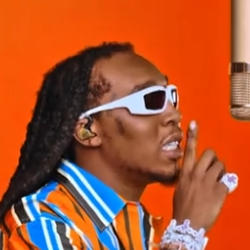
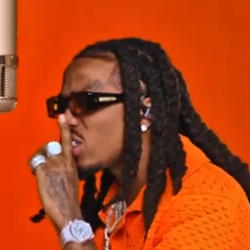
The Hotel Lobby AI trend remakes Quavo and Takeoff's 2022 A COLORS SHOW performance of "Hotel Lobby" by Unc & Phew. Two people stand in front of a flat orange wall and share one microphone hanging from the ceiling: one raps into it, the other hypes, then they lean in and swap. Despite the name, there's no hotel lobby in the video. It's just the song title.
In mid-September 2026, TikTok creator @glorify_studio put two characters from Suits at the mic and passed 1.7 million views. A cat version on X followed days later, then couples, grandparents, athletes and cartoon duos. Quavo reposted the untouched original as "The Original", and Billboard reported the song's weekly US streams more than doubled.
How to Make a Hotel Lobby AI Video
Three steps, all in your browser.
Choose How to Upload
Pick Separate Photos to upload the Left and Right performer one by one, or Group Photo if you already have a picture of the two of you side by side.
Add Photos and Generate
Add both people, then click Generate. Each video costs 170 credits and is usually ready in a few minutes.
Download and Post
Preview the result, download the MP4 and share it on TikTok, Instagram Reels, X or YouTube Shorts.
Who Takes the Left Spot and Who Takes the Right?
Same booth, two very different jobs. Put the right person in each spot.
Left: The Lead at the Mic
Stands under the hanging mic and carries most of the verse, leaning in with every bar. Cast the one who always wants the spotlight.
Right: The Hype Partner
Points, nods, ad-libs and even turns around mid-verse to keep the energy up. Cast the friend who reacts louder than anyone else.
Separate Photos or One Photo of Both?
Both work. Pick whichever photos you already have.
Separate Photos (recommended)
One photo for Left and one for Right. Each face gets full attention, and the two photos don't need to be taken together. Perfect for long-distance friends.
Group Photo
Upload one picture of the two of you. The person on the left raps at the mic and the person on the right hypes. Make sure both faces are clear and nobody is blocked.
Why Make Your Hotel Lobby AI Video With PixExact
Built for this one trend, not a generic face swap.
The Booth Everyone Knows
The orange wall, the hanging mic and the steady shot stay as they are, so viewers recognize the trend in the first second.
Original Song, In Sync
"Hotel Lobby" plays underneath, and the mic sharing, gestures and lip-sync follow the original timing.
It Looks Like You
Faces, hairstyles and outfits come from your photos, not from the original performers.
Two Photos, Two People
Upload one photo per person or one photo of both. No app, no template slots, no prompt to write.
Ready in Minutes
Most videos finish in a few minutes and are saved to your assets.
Credits Back If It Fails
If a render fails, your credits are refunded automatically.
Hotel Lobby AI Ideas: Who Should Take the Mic?
The funniest versions star a pair nobody expects to see rapping.
Best Friends
The classic. Put your loudest friend on the mic and yourself on hype duty, then send it to the group chat.
You and Your Partner
A rap duo couple is an easy anniversary or birthday surprise. Bonus points if neither of you can rap.
Grandma and Grandpa
Grandparents trading bars in the orange booth is one of the most shared Hotel Lobby AI versions for a reason.
Your Cats or Dogs
The trend took off with two cats at the mic. Put your dog on lead and your cat on hype, or any pair of pets, with a sharp photo of each face.
Coworkers
Your boss on lead, the intern on hype. Made for the team chat or a farewell video.
Siblings or Parent and Kid
Quavo and Takeoff were uncle and nephew. Recast the booth with your own family duo.
Photo Tips for a Better Hotel Lobby AI Video
The AI can only match faces it can see clearly. A minute spent picking photos saves a second try.
- Use clear, front-facing photos. Sunglasses, low hats and side angles are the most common reason a face looks off.
- Waist-up shots work best. The face and outfit should both be easy to see.
- In Separate Photos mode, use one person per photo to make it clear who goes where.
- For a group photo, stand side by side facing the camera, with the lead rapper on the left.
- Natural light beats filters. Skip heavy beauty filters and AI-edited photos.
- Only use photos of people who said yes.
Before You Post
Quick checks before your duo goes live.
Label It as AI
Turn on TikTok's AI-generated content label or say it in your caption, and tag #hotellobby so people find it in the trend.
If the Sound Gets Muted
Some platforms mute copyrighted songs. If that happens, add "Hotel Lobby" by Quavo and Takeoff from the app's own sound library and line it up with the clip.
Get Your Partner's OK
Both people in the video should be fine with being in it, especially if your account is public.
Keep It Respectful
Takeoff passed away in November 2022, and many fans hold this performance close. Make it about your own pair and credit the original.
Hotel Lobby AI FAQs
What is Hotel Lobby AI?
Hotel Lobby AI is a viral trend that uses AI to replace Quavo and Takeoff in their orange-booth performance of "Hotel Lobby" with two new people, keeping the shared mic, the moves and the song. This generator makes that video from your own photos.
Why is it called Hotel Lobby if there's no hotel?
The trend is named after the song. "Hotel Lobby" was the first single by Unc & Phew, the duo of Quavo and his nephew Takeoff, released on May 20, 2022. The video itself is just an orange wall and a mic.
Where does the original Hotel Lobby video come from?
COLORS, the Berlin music channel that films artists in front of a single color, posted the performance on YouTube on June 17, 2022. It has more than 120 million views.
Who started the Hotel Lobby AI trend?
Know Your Meme traces the first known AI edit to TikTok creator @glorify_studio, who put Harvey and Mike from Suits at the mic in mid-September 2026. A cat version on X spread it further a few days later.
Is this the same as the Migos AI trend?
Yes. Quavo and Takeoff were two of the three members of Migos, so many posts call it the Migos AI trend, the Quavo AI trend or the Unc & Phew AI trend. It's all the same orange booth.
How do I make a Hotel Lobby AI video?
Upload a photo of each person, or one photo of both, at the top of this page and click Generate. No app, prompt or editing needed, and the video is usually ready in a few minutes.
Is the Hotel Lobby AI generator free?
Each video costs 170 credits. If generation fails, the credits go back to your account automatically.
Can I make it with just one photo?
Yes, if both people are in it. Switch to Group Photo and upload a picture of the two of you side by side. Every Hotel Lobby AI video needs two faces, one for each side of the mic.
Can I put my cats or dogs in the video?
Yes. Upload one photo per pet in Separate Photos mode. Pick a sharp photo where the whole face is visible, ideally looking toward the camera.
How long is the video?
About 15 seconds, landscape MP4 at 720p, with the original "Hotel Lobby" audio.
Why does someone look different from their photo?
AI occasionally misses a face. Clear, front-facing photos with one person each fix most cases. If a result looks off, try again with a different photo.
Is this a CapCut template?
No. CapCut templates usually paste one face into a fixed edit. This is an AI video generator that puts two people of your choice in the booth, right in your browser.
Is this affiliated with Quavo, Migos or COLORS?
No. PixExact is not affiliated with Quavo, Takeoff, Migos, Quality Control, Motown or COLORS. This is a parody template inspired by a fan-made trend.
Can I keep my video private?
Videos are public by default. Paid members can turn off Public Visibility before generating.
More Tools
Explore more AI-powered tools to supercharge your creative workflow.


The Mic Is Waiting
Pick your duo, upload two photos and make your Hotel Lobby AI video in minutes.