You don’t always need new footage to make short-form content. A folder with product photos, screenshots, old campaign visuals, presentation slides, webinar clips, event pictures, or screen recordings can give you enough material for Reels, Shorts, TikToks, ads, and quick posts.
The real work is choosing one idea and building a short video around it. A static photo can become a product teaser and a longer tutorial can become several quick clips. Existing assets are often more useful than they look at first, especially when you crop them properly, add light motion, and export them in the right format.
Creating Short Content for Different Platforms

Short-form content behaves differently on each platform, so the same file rarely works everywhere without changes. You have to build a clear multiplatform visual strategy first.
For Instagram, vertical framing is usually the safest choice. Reels need a strong opening visual, because people decide fast whether to keep watching. If you’re using a product photo, start with the most recognizable image, then move into details. If you’re using screenshots, crop tightly so the viewer doesn’t have to search for the important part.
For YouTube Shorts, the idea matters more than decorative editing. Like a perfect thumbnail, a clip should answer one question, show one process, or make one clear point. If you have a longer video, don’t try to squeeze the whole thing into 40 seconds. Cut out useful moments and build several shorts. That’s usually the simplest answer to how to make short video clips from longer material.
For TikTok, directness helps. A rougher edit can still work if the idea feels specific. Old behind-the-scenes visuals, product tests, quick comparisons can fit well there. Text can sound more casual than it would on a website or in a paid ad.
For LinkedIn, the viewer needs context. A short video made from slides, charts, or event photos should explain what people are seeing. Start with the problem, show the visual, then give one takeaway. Avoid tiny text from original slides. If people cannot read it on a phone, crop the slide or replace the text with a larger version.
Useful Tools for Short-Form Video Creation
No need for a huge setup to make short videos from existing visuals. A few focused tools are usually enough.
Apart from the editing side, Movavi has a decent converter to transform media file formats in a flash. It can help prepare video clips, audio, and images for further editing or direct social media upload. The program supports over 180+ formats and can quickly compress files to save disk space.
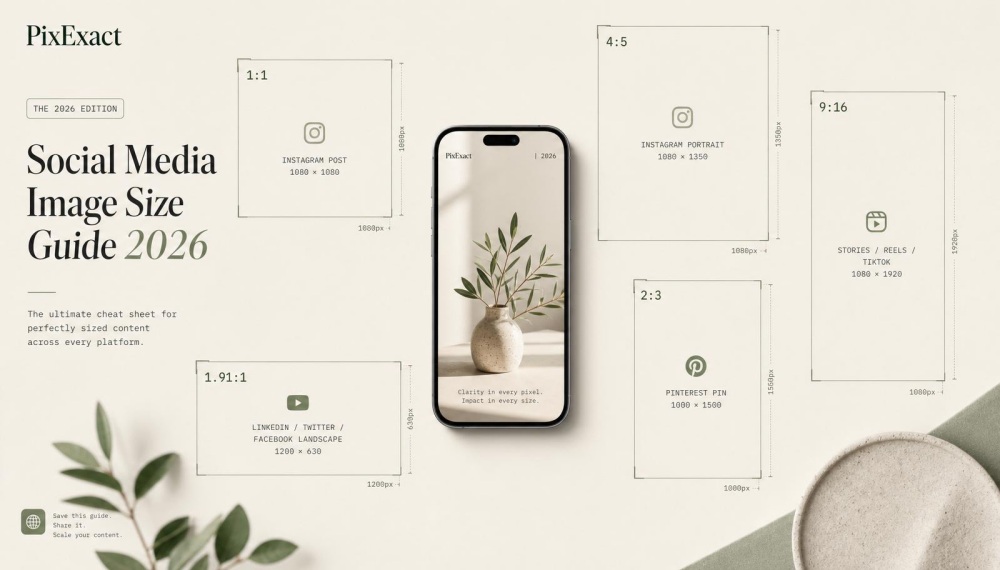
If you need fresh visuals sized for a specific platform, PixExact can help. It is an AI image generator that outputs images at exact pixel dimensions — 1080×1920 for Reels, 1080×1080 for feed posts, or any custom size you need — so the image fits your format without cropping before editing.
CapCut is a practical app for quick vertical edits, captions, templates, and mobile-first exports. It works well when you’re mainly creating content for social platforms, including IG, TikTok, or YT Shorts.
Clipchamp can handle basic browser-based editing. It’s useful for assembling photos, clips, text, and music without installing a heavy program. The app is also available on Windows as a desktop version.
OBS can help when your existing assets are web pages, dashboards, slide decks, or product screens. You can record a short walkthrough, then cut it into smaller clips.
HandBrake is a free program for compression and format changes. It’s less suited beginners and hobbyists than options like Movavi, but it can help when file size is the main issue.
A Simple Workflow for Turning Assets into Short Videos

A short video made from old assets should still feel planned. The easiest way to avoid a random edit is to move through the process in order.
- Choose one message. Decide what the viewer should understand after five or ten seconds. For example: “This feature saves setup time,” “This product has three color options,” or “This webinar tip solves one common problem.”
- Sort your assets. Pick visuals with one clear subject: a clean product image works better than a crowded photo, a screenshot with one visible action is easier to understand than a full dashboard, and a slide with one number outpeforms those with six paragraphs.
- Set the format early. Vertical 9:16 works best for Reels, Shorts, and TikTok. Square or 4:5 can work for Instagram feed posts. Horizontal video still makes sense for YouTube, websites, email, and presentations. Set the frame before adding text, or you may have to redo the layout later.
- Add controlled movement. Static visuals need motion, but keep it simple. Use a slow zoom, a side movement, a crop change, or a sequence of images. If the asset is a screenshot, zoom into the part that matters. If it’s a product photo, move from the full image to a detail.
- Check format and file size. Short content can fail for technical reasons: wrong aspect ratio, huge file, unsupported format, or blurry upload. MP4 is usually the safest option for posting. If your files are mixed, convert into a format your editing software and platform can handle well.
- Export and watch on your phone. Desktop previews can hide problems, especially on 2K+ monitors. On a phone, you’ll quickly notice unreadable text, awkward cropping, low volume, or slow pacing.
Tips for Making Short Clips from Existing Assets
These tips are especially helpful when you need to create several pieces of content from the same folder of visuals.
- Build each clip around one idea. If one video explains three things, split it into three posts. A short tutorial show one particular task and a product teaser focuses on one new feature.
- Start with the strongest visual. Do not open with a logo screen unless the brand is already the reason people care. Show the result, the problem, the product, or the most useful frame first.
- Keep text short and readable. Use phrases people can read on a phone in one glance: “Before editing,” “Cropped for Reels,” “Final export,” or “3-second product view.” Also check spelling in older templates and multilingual assets. A stray word like “creare” in an English post can make the final clip look unfinished.
- Use motion carefully. Too many transitions, spins, and zooms can make the edit look messy. Create a loop only when it fits the idea, such as a rotating product view, repeated screen action, or before-and-after animation.
- Organize files before export. Rename files clearly, especially when creating several platform versions. “product-demo-instagram-9x16” is easier to manage than “final_final_03.” Save unused fragments too, because a rejected photo, cut webinar line, or removed slide may work for a future post.
Final Check
Now you have some basic understanding of how to make a short video from old visuals. Keep the focus on one idea, one format, and one clear sequence first. Choose the strongest assets, crop them for the platform, add light motion, make the text readable, and export the right file.
Existing clips often have more use left in them than they seem. With a practical edit, they can become short content without another shoot.