Product Image Size Guide for Amazon, Shopify, and Etsy (2026)
Selling on Amazon, Shopify, or Etsy means your product images must hit exact pixel dimensions and meet each platform's technical rules — or listings get rejected, look unprofessional, or convert poorly. This guide gives you the current required sizes for all three platforms in one place (verified July 2026), plus how to generate product images at those exact dimensions without cropping or resizing.
PixExact is an AI image generator for creating images at exact pixel dimensions, such as 2000×2000, 1600×1600, and 2048×2048, so you can produce marketplace-ready product images without resizing or cropping after generation.
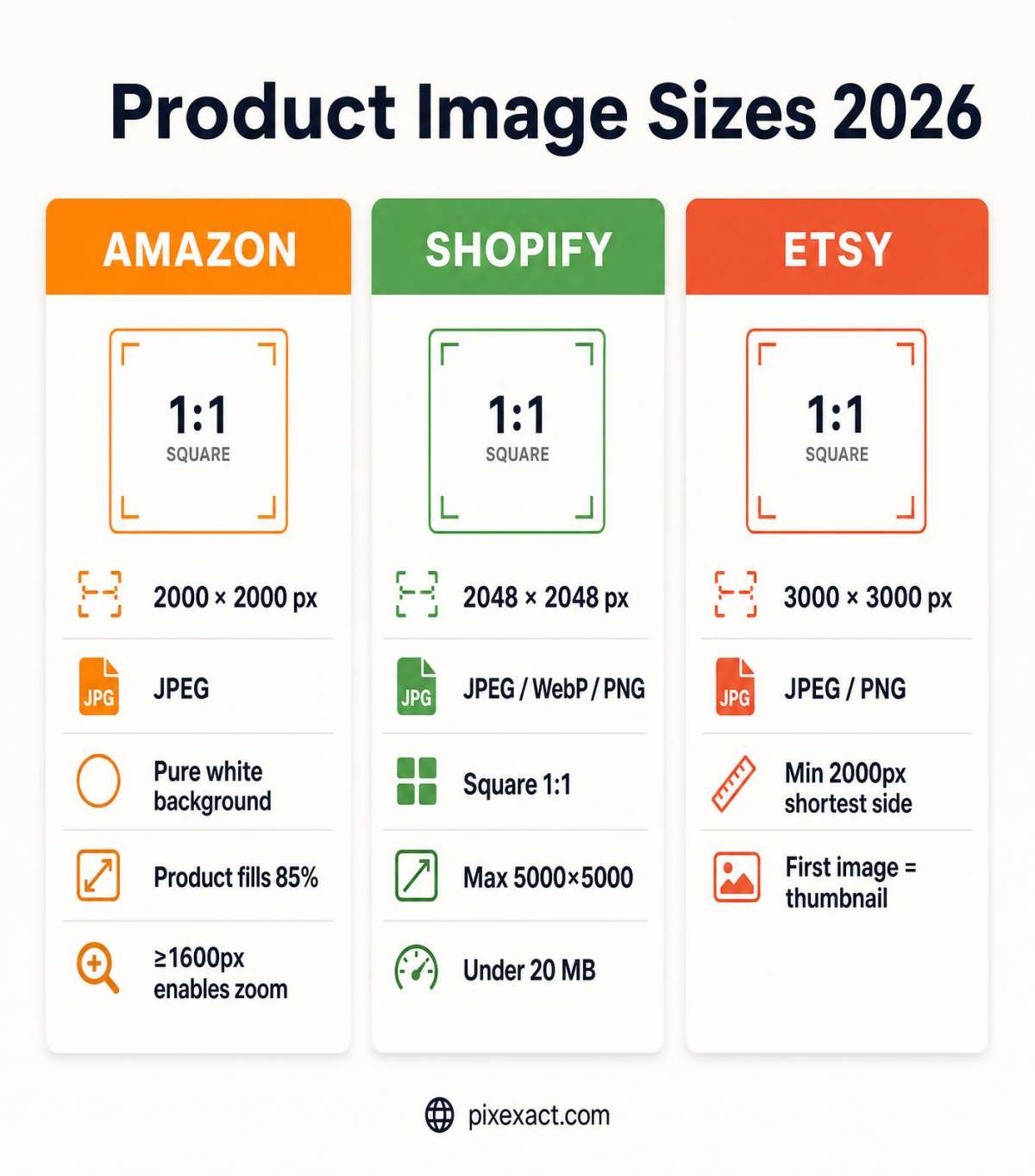
Quick Answer: Recommended Product Image Sizes
If you only need the numbers, here are the most-used, safe dimensions per platform:
| Platform | Recommended Size | Format | Key Rule |
|---|---|---|---|
| Amazon (main image) | 2000×2000 px | JPEG | Pure white background (RGB 255,255,255), product fills ~85% of frame, ≥1600 px enables zoom |
| Shopify (product) | 2048×2048 px | JPEG / WebP / PNG | Square recommended, max 5000×5000 px (25 MP), under 20 MB |
| Etsy (listing) | 3000×3000 px | JPEG / PNG | Minimum 2000 px shortest side, first image is the square thumbnail |
Recommended baseline for all three: generate a single square 3000×3000 master image, then export platform variants from it. A 3000×3000 master safely covers Etsy's higher recommendation while still downscaling cleanly for Amazon and Shopify.
Amazon Product Image Requirements
Amazon has the strictest rules of the three platforms, especially for the main (primary) image.
Amazon size and technical specs
| Requirement | Specification | Generate |
|---|---|---|
| Recommended dimensions | 2000×2000 px (best for zoom and conversion) | Make a 2000×2000 Amazon image |
| Zoom threshold | Longest side ≥ 1600 px enables zoom | Generate a 1600×1600 image |
| Minimum accepted | 1000×1000 px (images below this are rejected) | — |
| Maximum | 10000×10000 px | — |
| Aspect ratio | 1:1 square strongly recommended | — |
| File format | JPEG (.jpg) preferred; PNG, GIF, TIFF accepted | — |
| Maximum file size | 10 MB | — |
| Color modes | RGB or CMYK | — |
Amazon main image rules
- Background must be pure white (RGB 255, 255, 255 / #FFFFFF) — off-white or gray backgrounds get rejected or suppressed.
- Product must fill at least 85% of the image frame.
- Only the product being sold — no props, text, logos, watermarks, or borders.
- Must show the product as it is actually sold, in true color and configuration.
- AI-generated images are allowed as long as they meet the technical specs (true white background, 85% frame fill, no overlays).
Amazon secondary images
Additional images (up to 8 more slots depending on category, for 9 total) are more flexible: lifestyle shots, infographics, dimension callouts, and packaging are all allowed. Keep them at 2000×2000 px for consistent zoom behavior.
Generate a 2000×2000 Amazon main image with PixExact, then use the AI Background Remover to place your product on a pure white background and meet Amazon's requirement exactly.
Shopify Product Image Requirements
Shopify is the most flexible platform, but consistency across your catalog and fast page load matter most for conversion.
Shopify size and technical specs
| Requirement | Specification | Generate |
|---|---|---|
| Recommended dimensions | 2048×2048 px (display and zoom sweet spot) | Make a 2048×2048 Shopify image |
| Aspect ratio | 1:1 square recommended for grid consistency | — |
| Maximum dimensions | 5000×5000 px (25 megapixels) | — |
| Maximum file size | 20 MB | — |
| Zoom floor | ~800×800 px minimum for usable zoom | Resize an image to exact size |
| File formats | JPEG, PNG, WebP, GIF, HEIC | — |
| Best format for photos | WebP or JPEG (smaller files, faster load) | — |
| Best format for transparency | PNG | — |
Shopify best practices
- Use the same aspect ratio for every product so collection grids stay aligned — all Shopify themes display products as squares, so non-square images may be cropped.
- 2048×2048 px is the practical sweet spot; going larger than this adds file weight with little visible benefit and can hurt Core Web Vitals.
- Compress aggressively — aim for under 300–500 KB per image. Large files slow page load and drag down mobile conversion and SEO.
- Use WebP where supported for the best quality-to-size ratio.
Generate a 2048×2048 Shopify product image at exactly the size your theme expects, or resize an existing photo to 2048×2048 with the AI Image Resizer — no manual cropping.
Etsy Product Image Requirements
Etsy prioritizes the first listing image because it becomes the square thumbnail shoppers see in search across mobile, desktop, and shop views.
Etsy size and technical specs
| Requirement | Specification | Generate |
|---|---|---|
| Recommended dimensions | 3000×3000 px (square, best for zoom and all crops) | Make a 3000×3000 Etsy image |
| Minimum shortest side | 2000 px (uploads below this are rejected) | — |
| First image minimum | 635×635 px to appear in search | Generate a white-background listing image |
| Maximum file size | Under 20 MB (aim for under 1 MB for speed) | — |
| File formats | JPEG, PNG, GIF, HEIC (sRGB recommended) | — |
| Number of images | Up to 10 per listing | — |
Etsy thumbnail and safe-zone behavior
Etsy crops your first image differently across placements, so the focal point must survive all of them:
- Desktop search: cropped to roughly 4:3 landscape.
- Mobile app and shop grid: cropped to 1:1 square.
- Listing detail and zoom: uses the full uploaded resolution.
Keep the product centered with generous margins so it stays fully visible in the tightest (square) crop. A 3000×3000 square first image is the safest default.
Etsy best practices
- The first image is your thumbnail — make it clear, well-lit, and centered.
- Use all 10 image slots: hero, detail, scale/context, lifestyle, and packaging. Listings with 7–10 photos tend to convert better than 1–3.
- Keep a consistent style across your shop to build a recognizable brand.
Generate a 3000×3000 Etsy listing image with PixExact, keeping your product centered and fully in-frame.
One Product Photo, Every Marketplace Size
Most sellers do not need a single image — they need the same product shown consistently across every channel: an Amazon main image, Shopify collection and hero images, Etsy listing photos, plus social ads and promo posts that drive traffic back to the listing. Recreating that set by hand, one crop at a time, is where hours disappear and where the product ends up looking slightly different on every platform.
The faster workflow is to start from one product photo or prompt and deliver a full, size-correct asset pack:
- Marketplace images: a 3000×3000 Etsy master, a 2000×2000 Amazon main image on pure white, and 2048×2048 Shopify product images — each at the exact pixel size the platform expects.
- Promotion assets: matching social and ad creatives (Instagram post, Story, Facebook or Google ad) that keep the same product, style, and framing so your campaign looks cohesive.
- Consistent output: the same subject and brand look across every size, with the product kept centered and fully in frame — no drift, no re-cropping, no rejected listings.
Start from an existing product shot with the AI Image-to-Image Generator, or generate a whole multi-size set at once with the Social Media Campaign Pack Generator, then fine-tune any single size in the exact-size generator.
Turn one product photo into every marketplace and campaign size with PixExact — exact dimensions, consistent style, ready to publish.
Aspect Ratio vs Exact Pixel Size — Why It Matters for E-commerce
Many AI image generators only let you pick an aspect ratio, such as 1:1 or 4:5. That is not enough for marketplaces.
- Aspect ratio only defines the shape (for example, square), not the actual pixels. A 1:1 image could be 800×800 or 3000×3000 — and Amazon needs at least 1600 px on the longest side to enable zoom, while Etsy rejects anything under 2000 px on the shortest side.
- Choosing a ratio and then resizing or cropping degrades quality, can cut off the product, and may push you below the platform minimum.
- Marketplaces enforce exact rules: Amazon's 2000×2000 zoom sweet spot, Shopify's 5000×5000 px and 20 MB caps, Etsy's 2000 px shortest-side minimum.
With exact-size generation you enter the target width and height — for example 3000×3000 — and get an image at that precise resolution, ready to upload. No cropping, no upscaling, no rejected listings.
Unlike many AI image generators that only support aspect ratios, PixExact lets you enter an exact width and height, such as 2000×2000 or 3000×3000, and generate product images at that exact pixel size.
How to Create Marketplace-Ready Product Images with AI
- Choose your target platform and size. For a universal master, start with 3000×3000 px, which satisfies Etsy's minimum and downscales cleanly for Amazon and Shopify.
- Generate the product image at that exact size in PixExact — enter 3000 × 3000 rather than only picking a square ratio.
- Set a pure white background for the Amazon main image (RGB 255, 255, 255), or use the background remover to place your product on white.
- Confirm the product fills about 85% of the frame and is centered so it survives thumbnail crops on Etsy and grid crops on Shopify.
- Export the exact-size file in the right format — JPEG for Amazon and photo listings, WebP or JPEG for Shopify speed, PNG when you need transparency. Resize per-platform variants with the AI Image Resizer if needed.
- Reuse the master for other platforms by exporting each required size while keeping the same subject and framing.
Create your first product image at an exact size with PixExact now.
Common Product Image Mistakes That Hurt Conversions
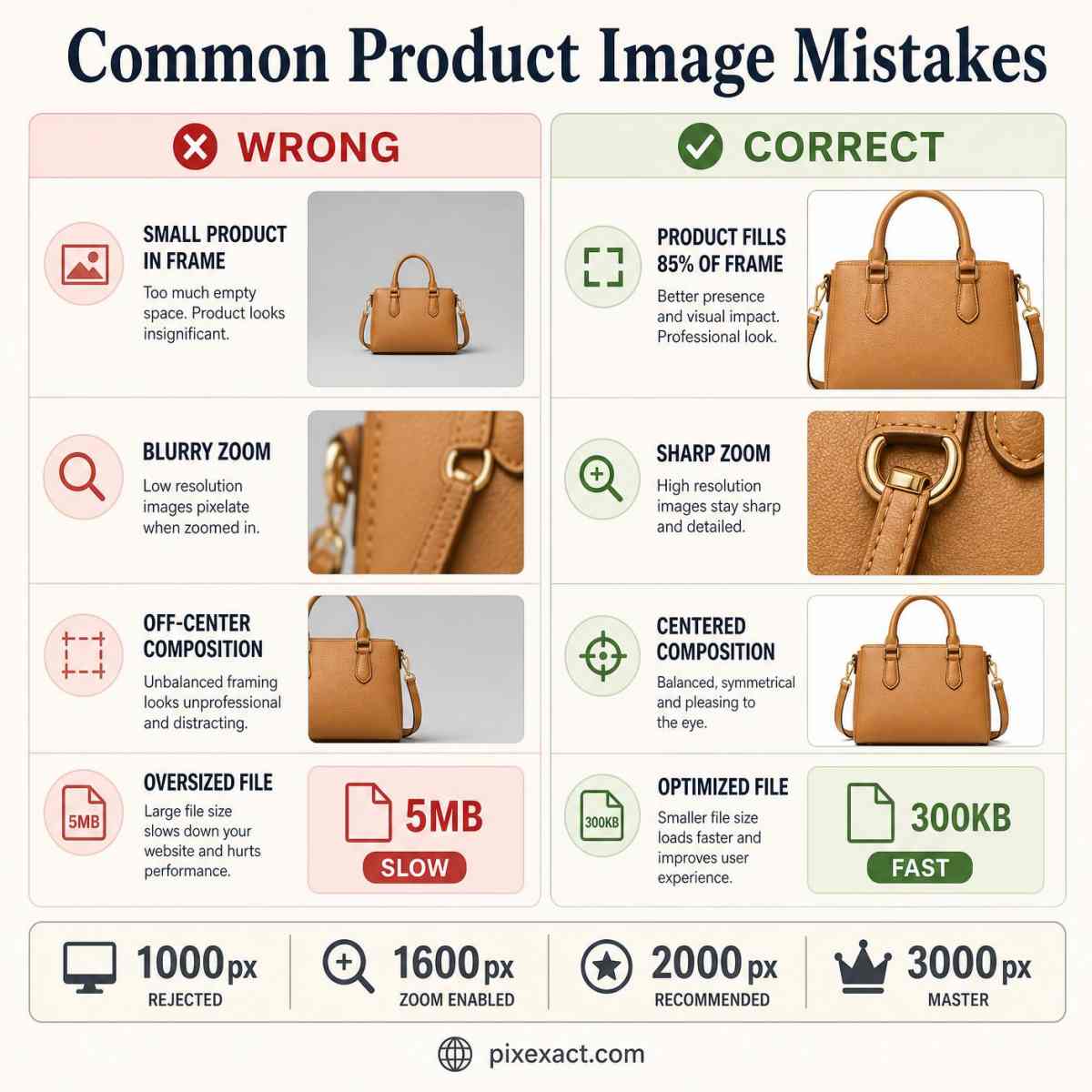
- Uploading below the zoom threshold. Under 1600 px on the longest side disables Amazon zoom, which reduces buyer confidence.
- Non-pure-white backgrounds on Amazon main images. Off-white (#F5F5F5) or gray backgrounds can trigger suppression or look unprofessional.
- Uploading under 2000 px to Etsy, which rejects images below the shortest-side minimum.
- Inconsistent aspect ratios on Shopify, causing uneven, jumpy collection grids.
- Product too small in the frame, so thumbnails look empty and get fewer clicks.
- Cropping the subject when resizing from the wrong base ratio.
- Oversized files that slow page load and drag down mobile conversion and SEO.
Frequently Asked Questions
What is the best size for a product image on Amazon?
Amazon recommends 2000×2000 pixels. The longest side should be at least 1600 px to enable zoom, the minimum accepted size is 1000×1000 px, the background must be pure white (RGB 255, 255, 255), and the product should fill about 85% of the frame.
What size should Shopify product images be?
Shopify recommends 2048×2048 pixels in a 1:1 square ratio for consistent collection grids. Maximum dimensions are 5000×5000 px (25 megapixels) and files must be under 20 MB. WebP or JPEG is best for photos.
What is the best image size for Etsy listings?
Etsy recommends at least 2000 px on the shortest side, with 3000×3000 px square as the practical best size for sharp zoom and clean thumbnail crops. The first image becomes your search thumbnail, so keep the product centered.
Can I create a 3000×3000 product image with AI?
Yes. With PixExact you enter the exact width and height — 3000 × 3000 — and generate the image at that precise resolution, ready to upload to Amazon, Shopify, or Etsy without cropping or resizing.
What is the difference between aspect ratio and exact pixel size?
Aspect ratio defines only the shape (for example 1:1 square), while exact pixel size defines the actual resolution (for example 3000×3000). Marketplaces enforce exact pixel rules, so a square ratio alone is not enough — you need the correct pixel dimensions.
How do I make a white background product image with AI?
Generate the product at your target exact size, then set or replace the background to pure white using PixExact's background remover. This meets Amazon's pure-white main image requirement (RGB 255, 255, 255).
Do I need different image sizes for each platform?
You can create one 3000×3000 master image and reuse it across Amazon, Etsy, and most Shopify themes, since it downscales cleanly to each platform's recommended size. For strict cases, export the exact size each platform recommends from the same source image with an image resizer.
What file format is best for e-commerce product images?
Use JPEG for Amazon and most photo listings, WebP or JPEG on Shopify for faster load times, and PNG when you need a transparent background. Keep files under each platform's size limit (10 MB for Amazon, 20 MB for Shopify and Etsy).