Social Media Image Size Guide 2026
Posting the wrong image size means cropped faces, blurry uploads, or a feed that looks inconsistent across platforms. This guide gives you the exact pixel dimensions for every major social platform in 2026 — Instagram, Facebook, X (Twitter), LinkedIn, TikTok, Pinterest, and YouTube — plus how to generate every size you need from a single idea, without cropping or resizing. Generate social images at exact size with PixExact.
PixExact is an AI image generator for creating images at exact pixel dimensions, such as 1080×1080, 1080×1350, 1080×1920, and 1200×630, so you can produce platform-ready social media images without resizing or cropping after generation.
All dimensions below were verified in July 2026. Platforms adjust specs periodically, so treat these as current best-practice recommendations.
Quick Answer: The Universal Social Media Sizes
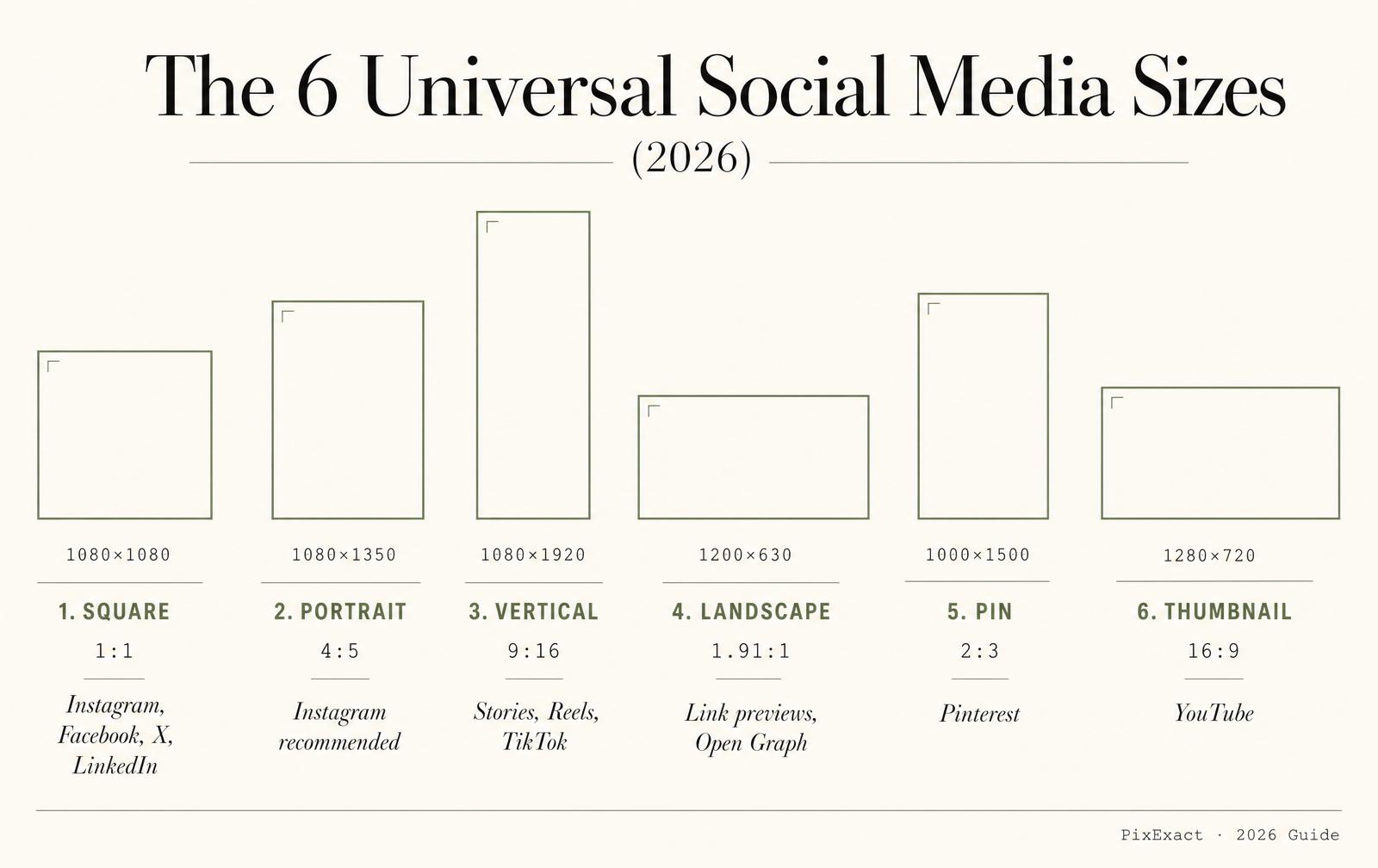
If you only remember a handful of sizes, these cover the vast majority of feeds and formats in 2026:
| Format | Size | Aspect Ratio | Used For |
|---|---|---|---|
| Square post | 1080×1080 px | 1:1 | Instagram, Facebook, X, LinkedIn feed |
| Portrait post | 1080×1350 px | 4:5 | Instagram (recommended), Facebook, LinkedIn |
| Vertical full-screen | 1080×1920 px | 9:16 | Stories, Reels, TikTok, Pinterest video |
| Landscape / link preview | 1200×630 px | 1.91:1 | Link shares, Open Graph, ads |
| Pinterest pin | 1000×1500 px | 2:3 | Pinterest standard pin |
| YouTube thumbnail | 1280×720 px | 16:9 | Video thumbnails |
Practical rule: design mobile-first in vertical (4:5 or 9:16) formats — they take up more screen space and consistently outperform square in most feeds. Need to check a ratio first? Use the free aspect ratio calculator.
Generate any of these sizes at exact pixel dimensions with PixExact.
Instagram Image Sizes (2026)
Instagram now favors a 4:5 portrait grid, so 1080×1350 px is the recommended default for feed posts. Square still works but may crop slightly in the profile grid.
| Asset Type | Recommended Size | Aspect Ratio | Notes | Generate |
|---|---|---|---|---|
| Feed post (portrait, recommended) | 1080×1350 px | 4:5 | Best for feed and profile grid | Make a 1080×1350 post |
| Feed post (square) | 1080×1080 px | 1:1 | Safe default | Make a 1080×1080 post |
| Feed post (landscape) | 1080×566 px | 1.91:1 | Wide shots | — |
| Story / Reel | 1080×1920 px | 9:16 | Keep key content in the center safe zone | Make a 1080×1920 story |
| Profile photo | 320×320 px | 1:1 | Displayed as a circle | — |
Safe zone tip for Stories and Reels: avoid roughly the top 250 px and bottom 340 px, where Instagram's UI (username, caption, buttons) overlays your image. Keep text and faces centered. For a deeper breakdown of Instagram post dimensions, see the Instagram Post Size Guide.
Facebook Image Sizes (2026)
| Asset Type | Recommended Size | Aspect Ratio | Notes | Generate |
|---|---|---|---|---|
| Square post | 1080×1080 px | 1:1 | Standard feed image | Make a 1080×1080 post |
| Vertical post | 1080×1350 px | 4:5 | Strong mobile presence | Make a 1080×1350 post |
| Link share / preview | 1200×630 px | 1.91:1 | Open Graph link image | Make a 1200×630 link image |
| Story / Reel | 1080×1920 px | 9:16 | Full-screen vertical | Make a 1080×1920 story |
| Profile photo | 320×320 px | 1:1 | Displayed as a circle | — |
| Cover photo | 851×315 px | ~2.7:1 | Desktop display | Make an 851×315 cover |
| Event cover | 1920×1005 px | ~1.91:1 | Event pages | — |
X (Twitter) Image Sizes (2026)
| Asset Type | Recommended Size | Aspect Ratio | Notes | Generate |
|---|---|---|---|---|
| In-stream / link preview | 1200×675 px | 16:9 | Standard feed image | Make a 1200×675 image |
| Shared landscape image | 1600×900 px | 16:9 | Higher-res wide image | Make a 1600×900 image |
| Square image | 1200×1200 px | 1:1 | Alternative feed format | Make a 1200×1200 image |
| Header / banner | 1500×500 px | 3:1 | Profile header | Make a 1500×500 header |
| Profile photo | 400×400 px | 1:1 | Displayed as a circle | — |
To design a profile header, use the Twitter header maker built for the exact 1500×500 px size.
LinkedIn Image Sizes (2026)
| | Asset Type | Recommended Size | Aspect Ratio | Notes | Generate | | --- | --- | --- | --- | --- | | Square post | 1080×1080 px | 1:1 | Standard feed image | Make a 1080×1080 post | | Vertical post | 1080×1350 px | 4:5 | Strong mobile feed presence | Make a 1080×1350 post | | Link share image | 1200×627 px | 1.91:1 | Article and link previews | Make a 1200×627 link image | | Personal profile banner | 1584×396 px | 4:1 | Personal profile header | Make a 1584×396 banner | | Company page cover | 1128×191 px | ~6:1 | Company page header | — | | Profile photo | 400×400 px | 1:1 | Displayed as a circle | — | | | --- |
For LinkedIn banners specifically, use the LinkedIn banner maker and see the LinkedIn banner size guide.
TikTok Image Sizes (2026)
| Asset Type | Recommended Size | Aspect Ratio | Notes | Generate |
|---|---|---|---|---|
| Video / full-screen | 1080×1920 px | 9:16 | Standard vertical content | Make a 1080×1920 image |
| Video cover / thumbnail | 1080×1920 px | 9:16 | Ensure subject stays visible when cropped | Make a 1080×1920 cover |
| Profile photo | 400×400 px | 1:1 | Displayed as a circle | — |
Pinterest Image Sizes (2026)
| Asset Type | Recommended Size | Aspect Ratio | Notes | Generate |
|---|---|---|---|---|
| Standard pin | 1000×1500 px | 2:3 | Best-performing pin format | Make a 1000×1500 pin |
| Square pin | 1000×1000 px | 1:1 | Alternative format | Make a 1000×1000 pin |
| Video / idea pin | 1080×1920 px | 9:16 | Full-screen vertical | Make a 1080×1920 pin |
| Profile cover | 800×450 px | 16:9 | Profile header | — |
| Profile photo | 400×400 px | 1:1 | Displayed as a circle | — |
YouTube Image Sizes (2026)
| Asset Type | Recommended Size | Aspect Ratio | Notes | Generate |
|---|---|---|---|---|
| Video thumbnail | 1280×720 px | 16:9 | Minimum 1280 px wide | Make a 1280×720 thumbnail |
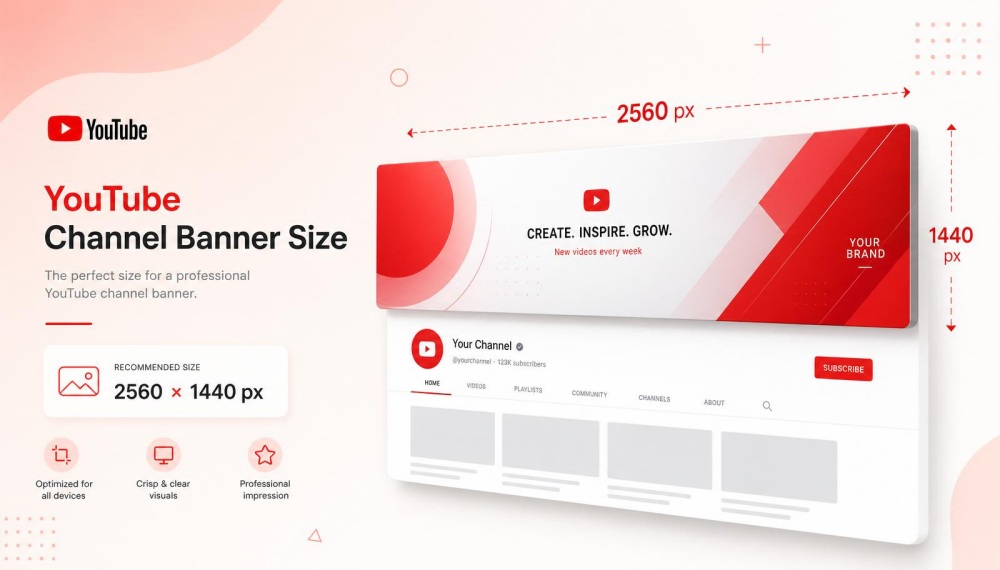
| Channel banner | 2560×1440 px | 16:9 | Safe area 1546×423 px centered | Make a 2560×1440 banner |
| Channel profile picture | 800×800 px | 1:1 | Displayed as a circle | — |
Channel banner note: the banner displays differently across TV, desktop, and mobile. Keep your logo and text inside the central 1546×423 px safe area so nothing important is cut off on smaller screens. See the dedicated YouTube banner maker, the YouTube banner size guide, and the YouTube thumbnail size guide for those exact formats.
One Prompt, Every Social Media Size
Most creators and marketers do not need a single image — they need the same idea adapted to every platform at once: an Instagram post and Story, a Facebook link image, an X header, a LinkedIn post, a Pinterest pin, and a YouTube thumbnail. Rebuilding that set by hand, resizing and re-cropping one format at a time, is where hours disappear and where the same campaign ends up looking slightly different on every channel.
The faster workflow is to start from one prompt or image and deliver a full, size-correct pack:
- Every format in one pass: square, portrait, 9:16 vertical, link preview, and pin sizes generated together at exact pixel dimensions.
- Consistent look: the same subject, style, and brand feel across all sizes — no drift between the Instagram version and the LinkedIn version.
- Composition-safe: the subject stays centered and fully in frame for each aspect ratio, so faces and text are never cut off by a crop.
Generate a whole multi-size set at once with the Social Media Campaign Pack Generator, start from an existing image with the AI Image-to-Image Generator, or fine-tune any single size in the exact-size generator.
Aspect Ratio vs Exact Pixel Size — Why It Matters
Most AI image tools only let you pick an aspect ratio, such as 1:1 or 9:16. That is not the same as choosing an exact pixel size.
When you only choose a ratio, you still have to resize or crop the output to hit the platform's required dimensions. Every resize risks softening the image, and every crop risks cutting off a face, a logo, or key text. Across a multi-platform campaign, those small compromises add up to a feed that looks inconsistent and unpolished.
Choosing exact pixel dimensions removes that step. When you generate a 1080×1350 Instagram post or a 1280×720 YouTube thumbnail directly, the image is already the right size and composed for that canvas — no resizing, no cropping, no quality loss.
Unlike many AI image generators that only support aspect ratios, PixExact lets you enter an exact width and height, such as 1080×1920 or 1200×630, and generate an image at that precise pixel size.
How to Create Platform-Ready Social Media Images
- Step 1: Choose your platform and format. Use the tables above to find the exact size — for example, 1080×1350 px for an Instagram feed post.
- Step 2: Generate at the exact size. Enter the exact width and height in the PixExact exact-size generator, or pick the platform preset, and describe the image you want.
- Step 3: Keep key content in the safe zone. For Stories, Reels, and banners, keep faces, logos, and text centered so nothing is cut off by UI overlays or cross-device cropping.
- Step 4: Generate the full set. To cover an entire campaign, use the Social Media Campaign Pack Generator to produce every platform size in one consistent style.
- Step 5: Resize an existing asset if needed. Already have a design? Use the AI Image Resizer to convert it to another exact size without distortion.
- Step 6: Export and publish. Download and upload directly — no manual cropping or resizing required.
Common Social Media Image Mistakes to Avoid
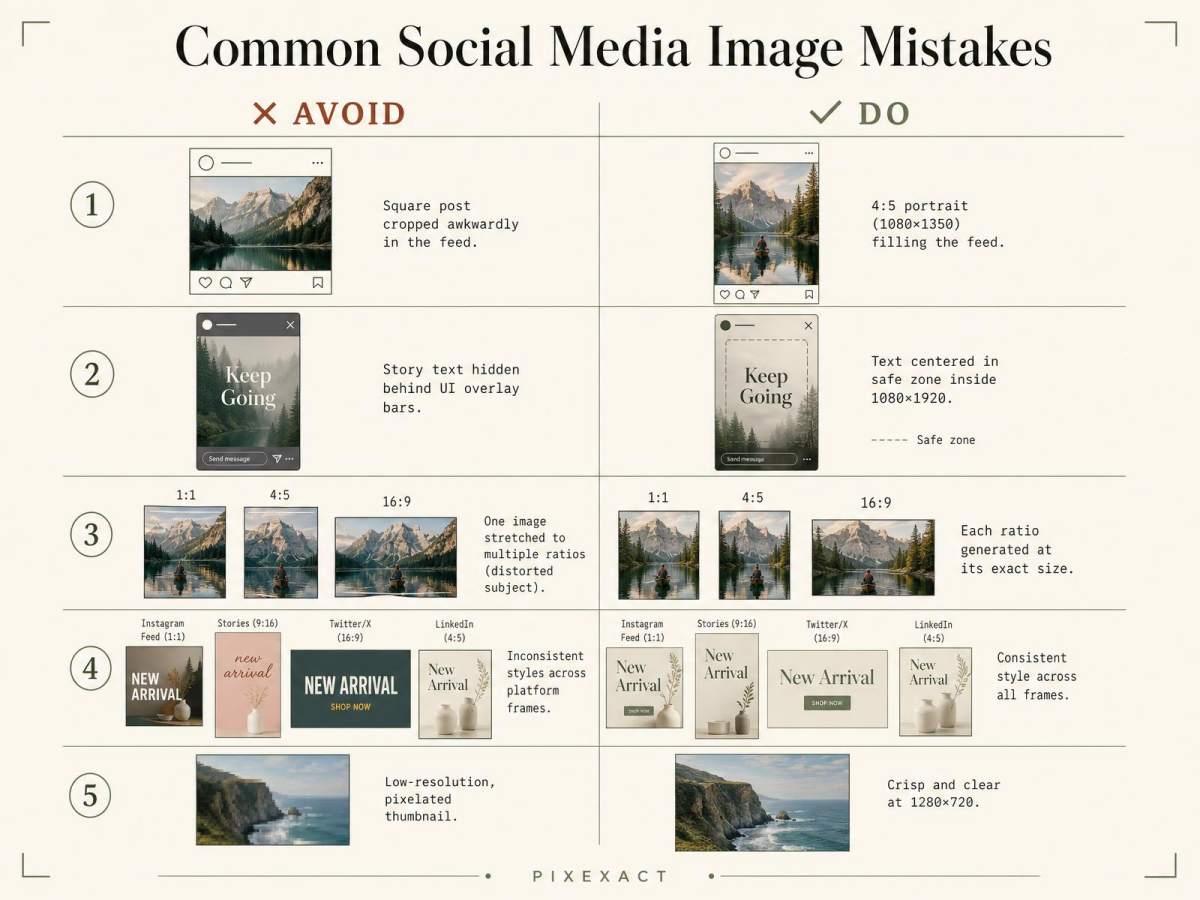
- Uploading square images everywhere. Vertical 4:5 and 9:16 formats use more screen space and perform better in most 2026 feeds.
- Ignoring safe zones. Stories, Reels, and banners have UI overlays and cross-device crops that hide edge content. Keep key elements centered.
- Resizing a single asset for every platform. Stretching one image to fit different ratios causes distortion or cropped subjects. Generate each size at its exact dimensions instead.
- Inconsistent branding across channels. When each platform version looks different, your campaign loses recognition. Use one consistent style across all sizes.
- Low resolution. Always export at the recommended pixel width (typically 1080 px or more) so images stay sharp on high-density screens.
Frequently Asked Questions
What are the best social media image sizes in 2026?
The most versatile sizes are 1080×1080 px (square), 1080×1350 px (4:5 portrait), 1080×1920 px (9:16 vertical for Stories and Reels), 1200×630 px (link previews), 1000×1500 px (Pinterest pins), and 1280×720 px (YouTube thumbnails). These cover the majority of formats across Instagram, Facebook, X, LinkedIn, TikTok, Pinterest, and YouTube.
What is the best Instagram post size in 2026?
1080×1350 px (4:5 portrait) is the recommended Instagram feed post size in 2026, because it takes up the most space in the feed and fits the profile grid. 1080×1080 px (square) still works but may crop slightly in the grid.
What size should a social media Story or Reel be?
1080×1920 px (9:16) is the standard size for Instagram Stories and Reels, Facebook Stories, and TikTok. Keep important content centered to avoid the top and bottom UI overlay zones.
Yes. PixExact lets you enter an exact width and height, such as 1080×1350 or 1200×630, and generate an image at that precise pixel size, so it is ready to publish without resizing or cropping. You can generate a social media image at an exact size here.
How do I create images for every platform from one design?
Use the Social Media Campaign Pack Generator to generate every platform size from a single prompt in one consistent style — for example an Instagram post, a Story, a link image, and a Pinterest pin together — so your whole campaign looks cohesive.
What is the difference between aspect ratio and exact pixel size?
Aspect ratio is the shape of an image (such as 1:1 or 9:16), while exact pixel size is its precise width and height (such as 1080×1080 px). Choosing only a ratio still requires resizing or cropping to hit a platform's exact dimensions; choosing exact pixel size produces a ready-to-publish image directly.
What size is a link preview or Open Graph image?
1200×630 px (1.91:1) is the standard link preview size and works across Facebook, X, and LinkedIn. It ensures your shared links display a clean, uncropped image.
What is the best Pinterest pin size?
1000×1500 px (2:3) is the best-performing Pinterest pin size in 2026. Avoid pins taller than this ratio, as Pinterest truncates very tall pins in the feed.
How do I resize an existing social media image to another size?
Use the AI Image Resizer to convert an existing image to a new exact pixel size without stretching or distorting the subject.
Use the AI Image Resizer to convert an existing image to a new exact pixel size without stretching or distorting the subject.
Export at a minimum of 1080 px on the shortest common dimension for feed images, and use the recommended sizes in the tables above. Higher resolution keeps images sharp on high-density and retina displays.