The recommended YouTube channel banner (channel art) size is 2560×1440 pixels (16:9), with a mobile-safe zone of 1546×423 pixels in the center. Because YouTube crops your banner differently on TV, desktop, and mobile, keeping your channel name and logo inside that safe zone is what really matters. This guide covers every dimension, the cross-device safe zones, and how to generate a publish-ready banner at exactly 2560×1440 with PixExact — no cropping, no resizing.
What Is the Correct YouTube Banner Size?
 The recommended YouTube channel banner size is 2560×1440 pixels at a 16:9 aspect ratio. This is the resolution YouTube uses to render your channel art across every device, from large Smart TVs down to mobile phones.
| Attribute | Recommended Value |
|---|---|
| Recommended resolution | 2560×1440 pixels |
| Minimum resolution | 2048×1152 pixels |
| Aspect ratio | 16:9 |
| Mobile-safe zone (all devices) | 1546×423 pixels |
| Maximum file size | 6MB (keep under 4MB recommended) |
| File formats | JPG, PNG, GIF (non-animated), BMP |
| Recommended format | PNG or JPG |
The key difference from a thumbnail: a thumbnail (1280×720) displays at one size, but a banner is cropped to a different visible region on every device. If your important content sits outside the safe zone, it gets cut off on mobile.
PixExact helps you create a YouTube banner at exactly 2560×1440 pixels, composed so your key content stays inside the safe zone — without resizing or cropping after generation.
YouTube Banner Sizes at a Glance
Both accepted banner sizes are fully YouTube-compatible. Choose based on your channel type and how your audience watches.
| Asset Type | Recommended Size | Aspect Ratio | Best For | Generate |
|---|---|---|---|---|
| Channel banner (recommended) | 2560×1440 px | 16:9 | Business, education, brand, Smart-TV audiences | Make a 2560×1440 banner with PixExact |
| Channel banner (minimum) | 2048×1152 px | 16:9 | Gaming, vlog, music, entertainment | Make a 2048×1152 banner with PixExact |
| Channel profile picture | 800×800 px | 1:1 | All channels | Generate an 800×800 profile image with PixExact |
| Video thumbnail | 1280×720 px | 16:9 | Video covers | See the thumbnail size guide |
Unlike many AI image generators that only let you choose an aspect ratio, PixExact lets you enter an exact width and height, such as 2560×1440, and generate an image at that precise pixel size.
The Safe Zone: What Actually Displays on Each Device
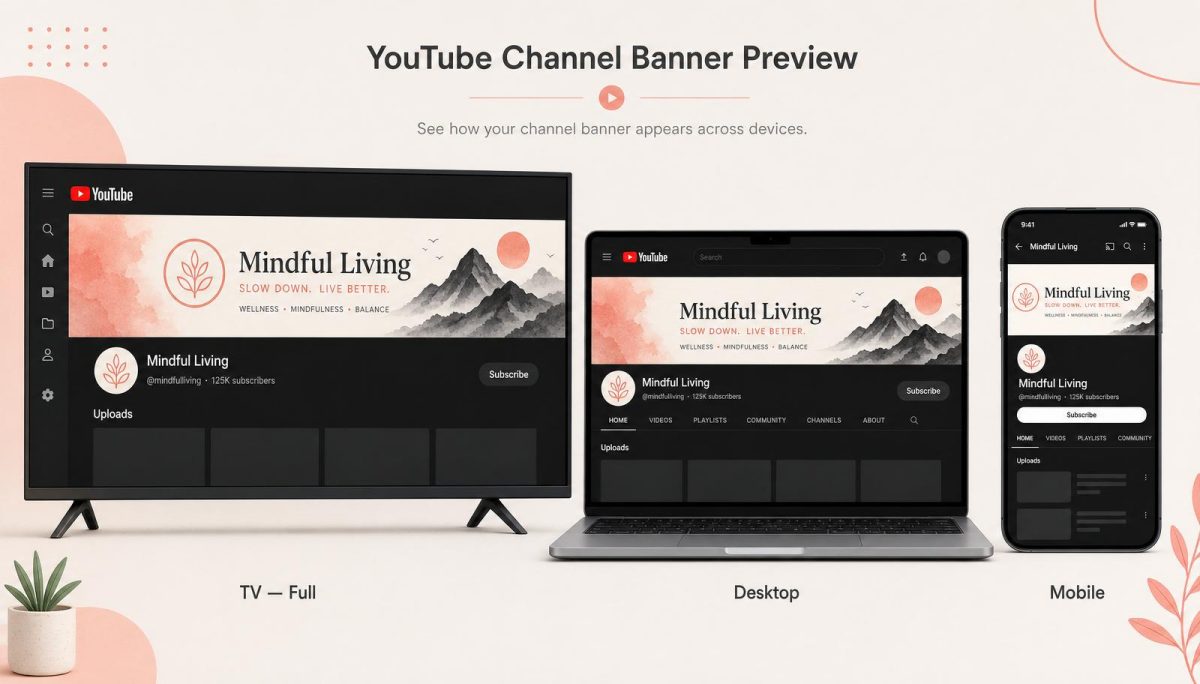
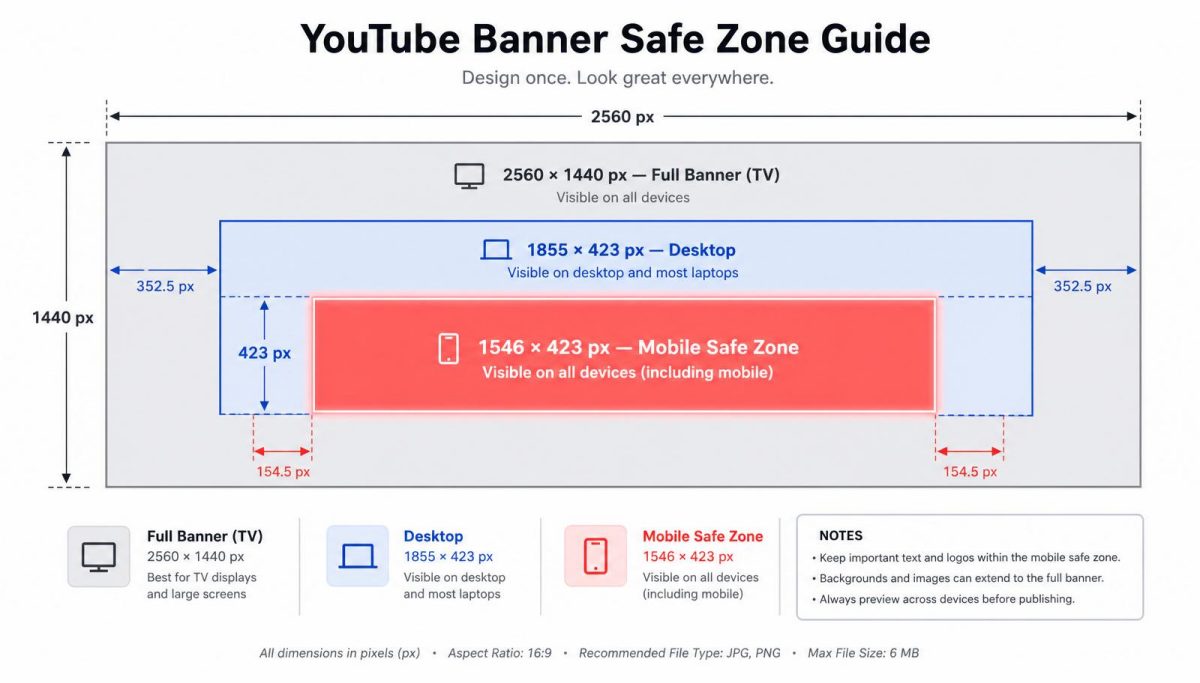 This is the single most important part of banner design, and where most banners fail. YouTube shows a different portion of your 2560×1440 banner depending on the device:
| TV | 2560×1440 px | The full banner is visible |
|---|---|---|
| Desktop (maximized) | approx. 1855×423 px | A wide horizontal strip |
| Tablet | approx. 1546×423 px | A narrower strip |
| Mobile | 1546×423 px | Only the center safe zone |
The mobile-safe zone is 1546×423 pixels in the exact center of your banner. This is the only region guaranteed to display on every device.
Rules to design around:
- Keep your channel name, logo, tagline, and upload schedule inside the center 1546×423 safe zone.
- Treat the outer edges (left, right, top, bottom) as decorative or background only, since they may be cropped on smaller screens.
- Maintain a background that still looks intentional when trimmed to the desktop and mobile strips.
PixExact's YouTube Banner Maker composes for the target 2560×1440 canvas directly and optimizes placement for the 1546×423 safe zone, then lets you preview the banner exactly as it appears on TV, desktop, and mobile before you download. So instead of guessing whether your text survives the crop, you can see every device view first.
How to Make a YouTube Banner at Exactly 2560×1440 with AI
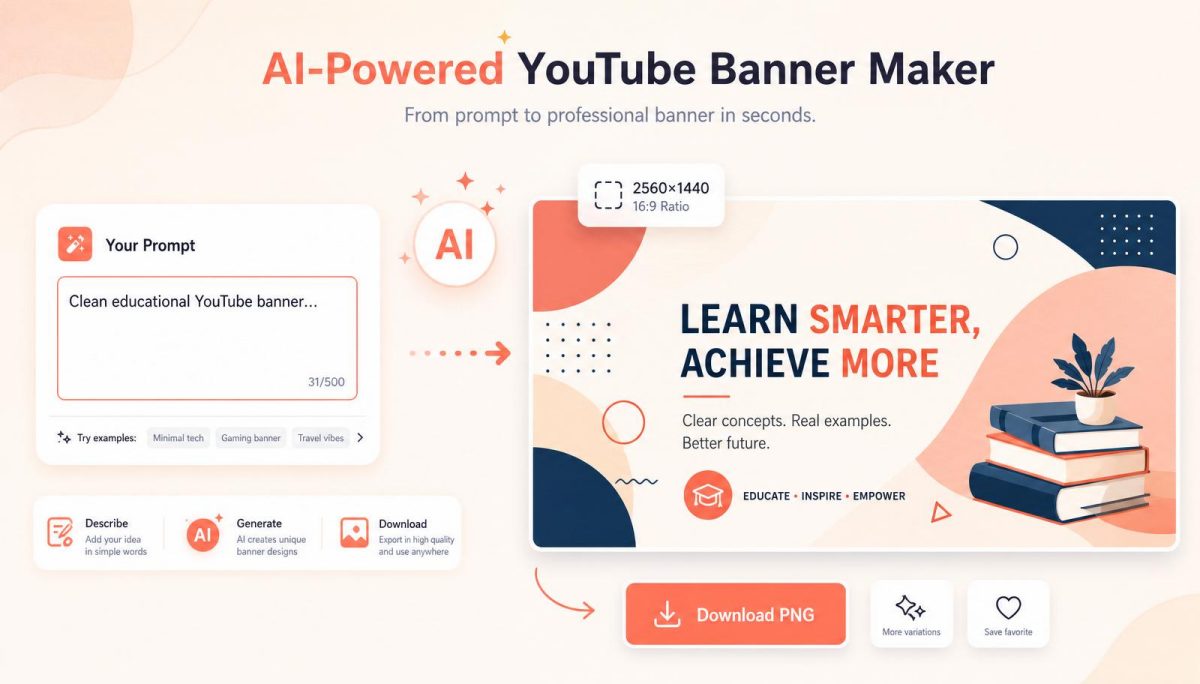 You do not need to memorize dimensions or manually resize. Here is the workflow:
- Open the PixExact YouTube Banner Maker and choose 2560×1440 (or 2048×1152), or enter a custom size.
- Describe your channel in a prompt, for example: "Clean educational YouTube banner, channel name centered, soft blue gradient, minimal icons, professional." You can also add your logo and profile picture.
- Generate the banner at exactly 2560×1440 pixels — no cropping, no resizing.
- Preview it on TV, desktop, and mobile to confirm your key content stays inside the 1546×423 safe zone.
- Download a publish-ready PNG or JPG under YouTube's file-size limit and upload it in YouTube Studio.
Need this exact size right now? Make a 2560×1440 YouTube banner with PixExact.
Design Tips for a High-Converting Channel Banner
- Put the essentials (channel name, logo, value proposition) inside the center safe zone.
- Keep text short and high-contrast so it stays readable when cropped to the mobile strip.
- Communicate your niche at a glance (gaming, education, business, vlog).
- Include your upload schedule
- Put the essentials (channel name, logo, value proposition) inside the center safe zone.
- Keep text short and high-contrast so it stays readable when cropped to the mobile strip.
- Communicate your niche at a glance (gaming, education, business, vlog).
- Include your upload schedule or a short tagline if it fits the safe zone cleanly.
- Keep branding consistent with your thumbnails and profile picture.
- Refresh your banner every 3–6 months to reflect new series, campaigns, or rebrands.
With PixExact you can generate multiple banner variations at the exact same 2560×1440 size while keeping a consistent style — useful for testing which channel art looks best across devices.
Frequently Asked Questions
What size should a YouTube banner be?
The recommended YouTube banner size is 2560×1440 pixels at a 16:9 aspect ratio, with a minimum of 2048×1152. Keep your important content within the center safe zone of 1546×423 pixels so it displays on every device.
What is the YouTube banner safe zone?
The safe zone is the center 1546×423 pixels of your 2560×1440 banner — the only area guaranteed to display on all devices, including mobile phones. YouTube crops banners differently on TV, desktop, and mobile, so channel names, logos, and key text should stay inside this region.
Can I create a YouTube banner at exact pixel dimensions with AI?
Yes. PixExact lets you generate a banner at exactly 2560×1440 (or 2048×1152) pixels rather than only choosing an aspect ratio, and it optimizes composition for the safe zone so you get a publish-ready image without cropping or resizing.
What is the difference between 2560×1440 and 2048×1152 banners?
Both are fully YouTube-compatible. 2560×1440 is YouTube's recommended size and looks best on large screens including Smart TVs, making it ideal for professional and brand channels. 2048×1152 is the minimum accepted size with a smaller file, popular with gaming, vlog, and entertainment channels.
Both are fully YouTube-compatible. 2560×1440 is YouTube's recommended size and looks best on large screens including Smart TVs, making it ideal for professional and brand channels. 2048×1152 is the minimum accepted size with a smaller file, popular with gaming, vlog, and entertainment channels.
YouTube shows a different portion of your banner on each device. If your text or logo sits outside the center 1546×423 safe zone, it gets cropped on mobile and desktop. Keeping key elements inside the safe zone — and previewing across devices before publishing — prevents this.
What is the maximum file size for a YouTube banner?
A YouTube banner can be up to 6MB and can be uploaded as JPG, PNG, or non-animated GIF. PNG and JPG are recommended for the best quality.
How is a YouTube banner different from a thumbnail?
A banner (channel art) is 2560×1440 and appears at the top o
A banner (channel art) is 2560×1440 and appears at the top of your channel page, cropped per device. A thumbnail is 1280×720 and appears as your video cover at a single, consistent size. They are different assets with different dimensions and safe-zone rules.
Make Your YouTube Banner Now
PixExact is an AI image generator for creating images at exact pixel dimensions, such as 2560×1440, 2048×1152, and 800×800, without cropping or resizing. The YouTube Banner Maker composes for the safe zone and previews your banner on TV, desktop, and mobile, so your channel art is right before you publish.
Make a 2560×1440 YouTube banner with PixExact →