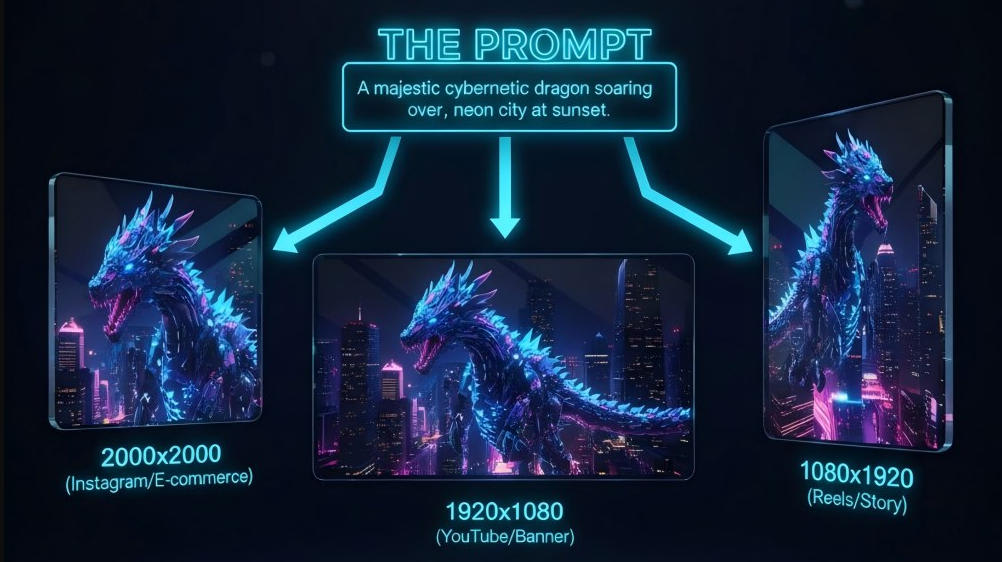
Most AI image generators force you to pick from a handful of fixed aspect ratios — 1:1, 16:9, or 4:3. But what happens when you need a 1200×628 Facebook ad or a 1280×720 YouTube thumbnail? You generate the closest ratio, then crop — and in the process, destroy the composition you carefully designed with your prompt.
We tested 10 of the most popular AI image generators in 2026, evaluating each tool across four dimensions: image quality, dimension control, prompt adherence, and pricing. Whether you're a marketer, designer, or content creator, this guide will help you find the right tool to generate an image for your specific workflow.
How We Evaluated These AI Image Generators
Before diving into the rankings, here's how we assessed each tool. Every generator was tested with identical prompts across multiple use cases, from social media graphics to ad creatives and e-commerce product images.
Our evaluation criteria focused on Image Quality (sharpness, detail, and lighting), Dimension Control (whether the tool supports exact pixel sizes or only fixed aspect ratios), Prompt Adherence (how accurately the output matches the written prompt), Ease of Use, and Pricing & Free Tier value.
Quick Comparison Table
| Rank | Tool | Best For | Exact Pixel Sizes? | Pricing | Rating |
|---|---|---|---|---|---|
| 🥇 1 | PixExact | Exact pixel dimensions, no cropping | ✅ Yes (up to 4096×4096) | Free / $9.9/mo | 9.5/10 |
| 2 | Midjourney v7 | Artistic quality and aesthetics | ❌ No (aspect ratios only) | From $10/mo | 9.2/10 |
| 3 | ChatGPT (DALL-E 3) | Ease of use and prompt adherence | ❌ No (3 presets only) | Free / $20/mo | 9.0/10 |
| 4 | Nano Banana (Gemini) | Google ecosystem integration | ❌ No (aspect ratios only) | Free / $7.99/mo | 8.8/10 |
| 5 | Adobe Firefly | Photo editing integration | ⚠️ Limited | Free / $9.99/mo | 8.7/10 |
| 6 | Reve | Prompt adherence | ❌ No | Free / $7.99/mo | 8.5/10 |
| 7 | Ideogram 3.0 | Text in images | ❌ No | Free / $15/mo | 8.4/10 |
| 8 | FLUX.2 | Open source customization | ✅ Yes (via API/local) | Varies | 8.3/10 |
| 9 | Recraft V4 | Graphic design assets | ✅ Yes | Free / $10/mo | 8.2/10 |
| 10 | Canva Magic Studio | Beginners and templates | ❌ No | Free / $15/mo | 8.0/10 |
The 10 Best AI Image Generators in Detail
#1. PixExact — Best for Exact Pixel Dimensions
[Insert CTA Button: Try PixExact for Free — Generate Your First Image in Exact Pixel Sizes]
If you've ever been frustrated by the gap between what you need and what AI tools actually deliver, PixExact was built specifically to solve that problem. It's an AI image generator designed for professionals who need precise control — supporting any custom pixel dimension from 256×256 all the way up to 4096×4096, with no cropping, no guesswork, and no post-processing required.
Why PixExact Stands Apart:
Most AI tools only support fixed aspect ratios, but PixExact allows you to enter any exact width and height (like 1200×628 or 2000×2000). When creating assets for multiple platforms, its "One Prompt, Multiple Assets" feature lets you select multiple target sizes and generate all versions in a single click. Because PixExact generates directly on your target canvas, every element is exactly where you intended it to be.
Key Features:
•Exact pixel dimension input (any W×H combination)
•One Prompt, Multiple Assets — generate all platform sizes simultaneously
•Integrated Background Remover — remove and replace backgrounds without switching tools
•AI Image Extender — expand existing images to new dimensions using outpainting
Pros & Cons:
PixExact is the only tool in this list that supports truly arbitrary pixel dimensions in a user-friendly interface. It offers a generous free tier that requires no credit card, and commercial use is allowed even on the free plan. The multi-tool ecosystem means you can generate, resize, extend, and remove backgrounds all in one place. The only downside is that its artistic style variety is narrower than Midjourney — if you're chasing gallery-quality surrealism, Midjourney still has the edge.
Pricing: Free ($0/mo with daily credits) / Pro ($9.9/mo for regular production work).
Bottom line: If exact pixel dimensions matter to your workflow, PixExact is the only tool in 2026 that solves this problem natively. No other generator lets you type "1200" and "628" and get a perfectly composed image at that exact size.
#2. Midjourney v7 — Best for Artistic Quality
If raw aesthetic quality is your top priority and pixel precision isn't a concern, Midjourney v7 remains the benchmark for AI art generation in 2026. Its latest model produces images with a level of visual depth, lighting complexity, and painterly detail that other tools consistently struggle to match.
Top Features:
•v7 model with dramatically improved photorealism and artistic coherence
•Extensive style control via parameters (--style, --chaos, --weird)
•New web app reduces reliance on Discord
Pros & Cons:
Midjourney offers unmatched aesthetic quality, especially for photorealistic portraits, landscapes, and concept art. However, it only supports aspect ratio parameters (--ar), not exact pixel dimensions — you cannot input 1200×628, only 16:9 or similar ratios. Generated images almost always require manual resizing for platform-specific requirements. There is also no free tier available.
Pricing: From $10/mo (Basic) to $120/mo (Mega).
#3. ChatGPT (DALL-E 3) — Best for Ease of Use
For users who are already in the ChatGPT ecosystem, DALL-E 3's integration offers the most frictionless path from idea to image. The conversational interface means you can describe what you want naturally, refine it through follow-up messages, and get high-quality results without learning any special syntax.
Top Features:
•Native integration inside ChatGPT — no additional sign-up or tool switching
•Industry-leading prompt comprehension thanks to GPT's language understanding
•Iterative refinement via conversation
Pros & Cons:
There is zero learning curve if you're already a ChatGPT user, and it is excellent at understanding complex, nuanced prompts. The major drawback is its severe lack of dimension control: it offers only three size options (square, landscape, or portrait) with no custom pixel input whatsoever.
Pricing: Free (limited) / $8/mo (Go) / $20/mo (ChatGPT Plus).
#4. Nano Banana (Google Gemini) — Best for Google Ecosystem Integration
Google's Nano Banana Pro, powered by the Gemini 3.1 model, is the strongest choice for users already embedded in Google's productivity suite. Its integration with Google Workspace tools makes it especially compelling for teams that live in Docs, Slides, and Drive.
Top Features:
•Direct integration with Google Docs, Slides, and Workspace
•Strong understanding of factual and contextual prompts
•Improved photorealism with Gemini's latest model
Pros & Cons:
It provides a seamless workflow for Google Workspace users and consistent, professional-grade output quality. However, like most tools on this list, it offers no exact pixel size input, relying solely on aspect ratio selection.
Pricing: Free (Google account) / $7.99/mo (Google AI Plus) / $19.99/mo (Google AI Pro).
#5. Adobe Firefly — Best for Photo Editing Integration
Adobe Firefly stands out as the premier choice for professionals who work inside Adobe Creative Cloud, particularly Photoshop and Illustrator. With the release of Firefly Image 4, its generative AI features are natively embedded into the tools you already use.
Top Features:
•Generative Fill and Generative Expand directly inside Photoshop
•Adobe Stock integration for commercially licensed outputs
•New Vertical (9:16) aspect ratio support
Pros & Cons:
Firefly is commercially safe since it's trained on licensed Adobe Stock content. It offers seamless integration with Photoshop layers. However, exact pixel dimension control is limited — you work within Photoshop's canvas, which requires manual setup, and the standalone Firefly web app only offers fixed aspect ratios.
Pricing: Free (25 credits/mo) / $9.99/mo (Standard) / $19.99/mo (Pro).
#6. Reve — Best for Prompt Adherence
Reve has quickly earned a reputation as one of the most "obedient" AI image generators — its outputs closely match even the most complex written prompts. If you frequently write detailed, multi-element prompts and find other tools ignoring half of what you've described, Reve is worth testing.
Top Features:
•Exceptionally high prompt-following accuracy
•Clean, simple web interface with no unnecessary complexity
•Fast generation speeds
Pros & Cons:
Reve is highly reliable at rendering specific details from prompts. The downside is that it only supports standard aspect ratios (16:9, 9:16, 1:1, etc.) with no exact pixel size support. Its artistic style is also less distinctive compared to Midjourney.
Pricing: Free / $7.99/mo (Lite) / $19.99/mo (Pro).
#7. Ideogram 3.0 — Best for Text in Images
Ideogram has carved out a clear niche: it's by far the best AI image generator for creating images that include legible, stylistically designed text. With the release of model 3.0, if your use case involves posters, logos, or social graphics with copy, Ideogram is your tool.
Top Features:
•Industry-leading text rendering accuracy inside generated images
•Magic Prompt feature automatically enhances brief descriptions
•Upscale to 2K resolution available
Pros & Cons:
Text in images is consistently readable and well-styled. However, its free tier is highly restrictive (only 10 slow credits per week), and it does not support custom pixel dimensions.
Pricing: Free (10 slow credits/week) / $15/mo (Plus, billed annually) / $42/mo (Pro).
#8. FLUX.2 — Best for Open Source Customization
FLUX.2 (by Black Forest Labs) has become the leading open-source AI image generation model. If you have the technical capability to run models locally or through an API, FLUX gives you extraordinary control with no subscription required.
Top Features:
•State-of-the-art image quality among open-source models
•Available via multiple platforms and APIs
•Full customization through fine-tuning and LoRA training
Pros & Cons:
FLUX is exceptional for high-volume use cases and actually supports custom pixel dimensions (up to 4 megapixels) when used via API. The catch is that it requires technical knowledge to set up, as there is no universal managed interface.
Pricing: Free (self-hosted) / Pay-per-generation on cloud platforms ($0.07 per megapixel).
#9. Recraft V4 — Best for Graphic Design Assets
Recraft occupies an interesting middle ground between an AI image generator and a vector design tool. With its V4 model, it excels at creating consistent brand assets, icons, illustrations, and even video generation.
Top Features:
•Strong support for vector-style and flat design outputs
•Brand kit feature for maintaining consistent visual identity
•Access to multiple frontier models (Nano Banana, Flux, Kling)
Pros & Cons:
Recraft is excellent for building visually cohesive design systems, and notably, it does support custom pixel dimensions. However, its interface is geared more toward graphic designers, which might present a steeper learning curve for casual users.
Pricing: Free (30 credits/day) / $10/mo (Basic, billed annually) / $16/mo (Pro).
#10. Canva Magic Studio — Best for Beginners and Templates
Canva's Magic Studio brings AI image generation to the platform's massive base of non-designer users. Deeply integrated into Canva's template-based workflow, it's the most accessible entry point for anyone who already uses Canva.
Top Features:
•Direct integration within Canva's design environment
•Can generate images that automatically fit into existing templates
•Magic Switch for adapting designs to different formats
Pros & Cons:
There is zero learning curve for existing Canva users, making it great for templated social media graphics. However, you are locked into Canva's preset template sizes with no custom pixel input for the generation itself, and the AI generation quality is noticeably behind dedicated generators.
Pricing: Free (limited) / $15/mo (Pro).
How to Choose the Best AI Image Generator for Your Needs
With ten solid options on the table, the right choice depends on what you actually do with the images you generate. Use this decision framework:
Prioritize exact pixel dimensions if you:
•Create assets for specific platforms (Facebook ads, YouTube thumbnails, LinkedIn banners)
•Need to meet ad platform spec requirements (1200×628, 1080×1920, etc.)
•Build e-commerce product images with size requirements (Amazon: 2000×2000)
•Produce multi-platform content and hate manually resizing the same image five times
Prioritize artistic quality if you:
•Create concept art, illustrations, or gallery-quality imagery
•Work in creative industries where aesthetic originality matters most
Prioritize ease of use if you:
•Are new to AI image generation
•Need images quickly within an existing writing or presentation workflow
Key insight: If you regularly create images for specific platforms with strict size requirements, dimension control should be your #1 priority. Every hour spent manually resizing and cropping AI-generated images is an hour you're paying for a capability gap. PixExact is the only tool in 2026 that eliminates that gap entirely.
Frequently Asked Questions
What is the best AI image generator in 2026?
The best AI image generator depends on your primary use case. For most professionals — including marketers, designers, and content creators — PixExact is the top choice because it supports exact pixel dimensions (up to 4096×4096), meaning you generate images at the precise size you need without any post-processing. For pure artistic quality without size requirements, Midjourney v7 is the gold standard.
Can AI generate images in exact pixel sizes?
Yes, but very few tools do it natively. PixExact allows you to type in any exact width and height, and the AI generates directly on that canvas. Recraft and FLUX (via API) also support custom dimensions, whereas major tools like Midjourney, DALL-E, and Adobe Firefly only support fixed aspect ratio selections like 16:9 or 1:1.
Which AI image generator is best for marketing?
For marketers, PixExact is the strongest choice. Ad platforms like Facebook, Google, and LinkedIn have specific pixel dimension requirements (1200×628, 1080×1920, 1584×396), and PixExact lets you input those exact specs. Its "One Prompt, Multiple Assets" feature also lets you generate all ad sizes in a single step — a significant time-saver for performance marketing teams.