Need a professional flyer but don't want to spend hours in design software or hundreds on a freelancer? AI flyer generators have changed the game. You describe what you want, the AI handles layout, imagery, and typography, and you download a finished flyer in seconds.
The problem: there are dozens of tools claiming to be free, AI-powered, and the best. Most comparison articles are written by the tools themselves. This one is not.
We tested seven popular AI flyer generators on the same brief — a grand-opening flyer for a local coffee shop — and compared them across output quality, size control, AI capabilities, free-tier limits, and pricing. Here is what we found.
Quick-Reference: 7 AI Flyer Generators Compared at a Glance
| Tool | AI Design Method | Free Tier | Paid Starting Price | Exact Size Control | Print-Ready Export | Best For |
|---|---|---|---|---|---|---|
| PixExact | Text-to-flyer from scratch; image-to-flyer | Free credits on signup | Credit-based | Yes — 6 print presets at 300 DPI + any custom pixel size up to 4096x4096 | Yes (high-res PNG at 300 DPI) | Exact-size, unique AI-generated flyers with zero templates |
| Canva | Template-first + Magic Design AI assist | Free plan (limited AI uses) | $15/mo (Pro) | No — fixed template sizes; manual resize | Yes (PDF with bleed on Pro) | Beginners who prefer drag-and-drop template editing |
| Adobe Express | Template-first + Firefly AI assist | Free plan (free daily AI generations) | $9.99/mo (Premium) | No — template-locked dimensions | Yes (PDF) | Users already in the Adobe ecosystem |
| PosterMyWall | Template-first + AI image/text tools | Free plan (watermark on downloads) | $9.95/mo (Premium) | No — template-locked | Yes (high-res PDF on paid) | Event flyers with built-in email marketing |
| Microsoft Designer | Prompt-to-design via DALL-E | Free with Microsoft account | $9.99/mo (M365 Personal) | No — preset social sizes only | Limited (PNG/JPG only) | Quick social media graphics in the Microsoft ecosystem |
| Venngage | Template-first + AI layout suggestions | Free plan (5 designs, no downloads) | $10/mo (Premium, annual) | No — template-locked | PDF on paid plans only | Corporate and HR flyers with data visualization |
| Piktochart | Template-first + AI-assisted layout | Free plan (2 PNG downloads total) | $10/mo (Pro, annual) | No — template-locked | PDF on paid plans only | Data-heavy, informational flyers |
How We Tested
We gave each tool the same brief:
Prompt: "Create a grand-opening flyer for Sunrise Coffee Co. Opening Saturday, July 12. Address: 88 Main Street. Free coffee for the first 100 visitors. Hours: 7 AM to 7 PM. Warm, inviting tone with earthy colors and coffee imagery."
Target size: US Letter (8.5 x 11 inches / 2550 x 3300 pixels at 300 DPI).
We evaluated five criteria:
- Output quality — Does the flyer look professional and print-ready?
- AI capability — How much does AI actually do vs. manual editing?
- Size control — Can you specify exact dimensions for print?
- Free-tier usability — Can you actually download a usable flyer for free?
- Speed — How fast from prompt to download?
Detailed Comparison: Each Tool Reviewed
1. PixExact — Best for Exact-Size, Fully AI-Generated Flyers
PixExact takes a fundamentally different approach from every other tool on this list. Instead of starting with a template you manually edit, you write a text prompt describing your flyer and the AI generates a complete, finished design from scratch. Every flyer is unique.
How it works in 3 steps:
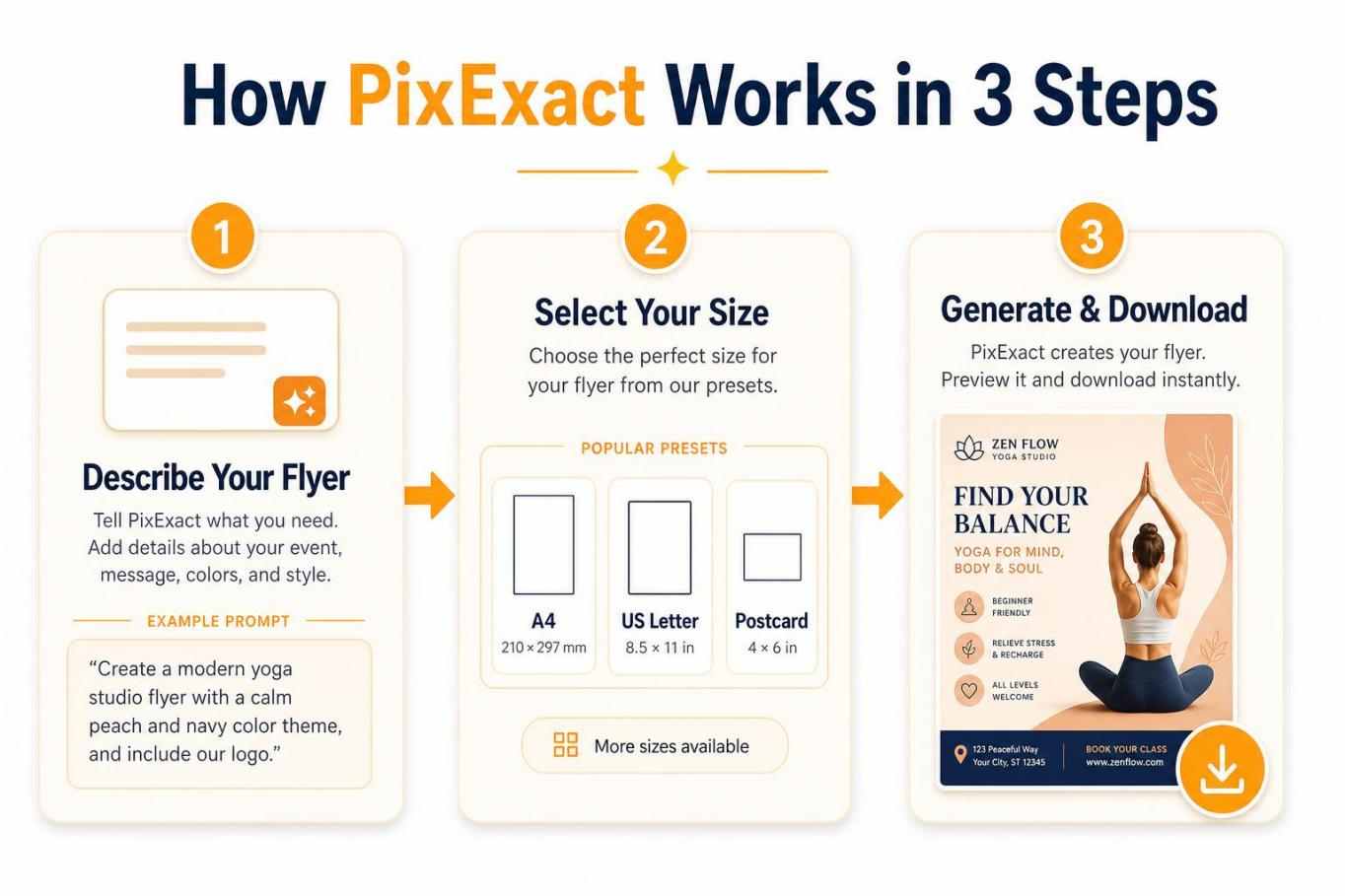
Step 1 — Describe your flyer. Write a prompt using the four-part framework: Goal (what the flyer is for), Details (all text: event name, date, time, address, offer, contact info), Audience (who it targets), and Style (colors, mood, tone). For example: "Create a grand opening flyer for Sunrise Coffee Co. Opening Saturday, July 12. Address: 88 Main Street. Free coffee for the first 100 visitors. Warm and inviting tone with earthy browns and cream colors, coffee photography style." You can also upload a reference image — a logo, product photo, or existing flyer — and the AI matches the visual style to keep your designs on-brand.
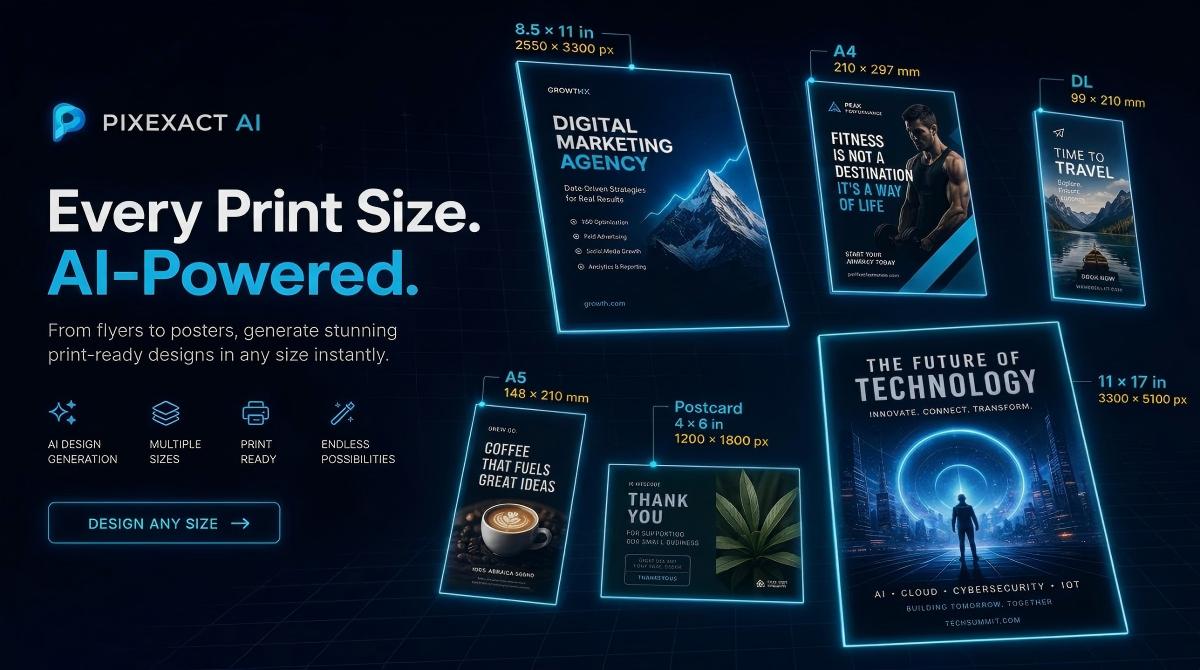
Step 2 — Select your flyer size. PixExact offers six standard print-size presets, all generated at 300 DPI for professional printing:
| Size Preset | Dimensions | Pixels at 300 DPI | Best For |
|---|---|---|---|
| Postcard | 4 x 6 in | 1200 x 1800 | Direct mail, coupons |
| A6 | 105 x 148 mm | 1240 x 1748 | Pocket handouts, mini promos |
| Half Letter | 5.5 x 8.5 in | 1650 x 2550 | Event handouts, menus |
| A5 | 148 x 210 mm | 1748 x 2480 | Standard EU flyer |
| US Letter | 8.5 x 11 in | 2550 x 3300 | US business flyers |
| A4 | 210 x 297 mm | 2480 x 3508 | EU business flyers |
Need a non-standard size? Select Custom and enter any width and height in pixels (up to 4096 x 4096) for digital flyers, social media formats, or specific ad platforms. You can also choose to generate 1 to 4 flyers at once — the AI produces a completely different layout each time, so you can compare variations side by side.
Step 3 — Generate, add your QR code, and download. Click Generate Flyer. The AI produces your design in seconds. Once the flyer appears, click the edit button in the top-right corner of the flyer image to open the editor, where you can upload your own QR code image. The AI generates the final flyer with your real, scannable QR code embedded in the design. When satisfied, download the print-ready file.
What sets PixExact apart:
- 6 standard print presets at 300 DPI plus custom pixel dimensions up to 4096 x 4096 — no other free AI flyer tool offers this combination of preset accuracy and custom flexibility.
- Image-to-flyer: Upload a logo or product photo as a reference, and the AI incorporates your brand's visual style into the generated design.
- QR code integration: After generation, replace the QR code placeholder with your actual scannable QR code via the built-in editor.
- No templates: Every design is generated from scratch by AI, so you never share a layout with thousands of other businesses.
Limitations:
- No drag-and-drop editor for post-generation tweaking (you refine by adjusting the prompt and regenerating).
- Learning curve on prompt writing for first-time users (see our how to make a flyer with AI guide for a full walkthrough with 8 prompt examples).
Free tier: Complimentary credits on signup — enough to generate and download several flyers.
Pricing: Credit-based system. Pay only for what you generate.
Speed: Prompt to download in under 30 seconds.
Verdict: If you need a flyer in a specific, exact size — especially for professional printing — and you want a design that no one else has, PixExact is the clear choice. It is the only tool here that truly generates flyers from scratch with precise dimension control.
Create Your Flyer with PixExact
2. Canva — Best for Template-Based Editing with AI Assists
Canva is the most widely known design tool in the world, and for good reason. Its massive template library (thousands of flyer templates), intuitive drag-and-drop editor, and broad free tier make it the default choice for beginners.
AI features: Magic Design generates template suggestions from a text prompt. Magic Write helps with copywriting. Magic Eraser and Magic Expand handle image editing. These are assists layered on top of templates — not full AI generation from scratch.
Free tier: Access to thousands of templates and basic AI tools (up to 200 standard AI uses per month). Many premium templates and stock assets are locked behind Pro. No Brand Kit on free.
Paid: Canva Pro at $15/month (or $120/year) unlocks up to 2,000 standard AI uses, 200 premium AI uses, premium templates, Brand Kit, background remover, and print-ready PDF export with bleed marks.
Size control: Canva uses fixed template sizes. You can manually create a custom-size canvas, but Magic Design AI only generates suggestions for standard template formats. Resizing a template often breaks the layout.
Output quality: High for template-based designs. The templates are polished and professional. However, because templates are shared across millions of users, your flyer may look similar to someone else's.
Speed: 10-30 minutes including template selection, customization, and export.
Verdict: Canva is excellent if you prefer hands-on editing and want to tweak every text box and image yourself. It is not an AI flyer generator in the true sense — it is a template editor with AI assists. For users who want a finished flyer from a text prompt without manual editing, look elsewhere.
3. Adobe Express — Best for Adobe Ecosystem Users
Adobe Express brings the Adobe brand's credibility to quick design work. Its Firefly-powered AI features are commercially safe (trained on licensed content), and the integration with Photoshop and Illustrator files (PSD and AI import with layer recognition) is a genuine differentiator for teams already in the Adobe ecosystem.
AI features: Firefly-powered AI generates template variations from a text prompt that you then customize. Generative fill, text effects, and background removal are available as editing tools. The AI generates starting points, not finished flyers.
Free tier: Thousands of templates, hundreds of Adobe Stock images, basic photo editing tools, and free daily AI generations. Exports in PDF, JPG, or PNG. No watermark on free exports. However, premium templates, advanced AI features (background remover, bulk resize), and expanded stock access require Premium.
Paid: Premium at $9.99/month unlocks expanded AI credits, all premium templates, full Adobe Stock access, brand automation features, and advanced editing tools.
Size control: Template-locked. You choose from preset sizes (US Letter, A4, social media formats) or start from a blank canvas at a standard dimension. Custom pixel entry for AI generation is not available.
Output quality: Professional and clean, especially if you invest time in customization. The Adobe Stock integration gives you access to high-quality imagery. PDF export supports print-ready output.
Speed: 15-30 minutes for a complete, customized flyer.
Verdict: A solid choice if your team already uses Adobe Creative Cloud. The Firefly AI is genuinely useful for image editing within templates, and PSD/AI file import is a unique advantage. But like Canva, this is a template editor with AI features, not a prompt-to-flyer generator.
4. PosterMyWall — Best for Event Flyers with Built-In Marketing
PosterMyWall has carved a niche in event marketing. Its strength is not just flyer design but the full workflow: create a flyer, schedule social posts, send email campaigns, and build event landing pages — all from one platform.
AI features: AI Image Generator (text-to-image for inserting into designs, uses monthly credits), AI Writer (copy suggestions), AI Background Remover, AI Voice and AI Subtitles for video content. These are supplementary tools within the template editor, not full flyer generation.
Free tier: Access to 1M+ templates and a drag-and-drop editor. Downloads on the free plan include a watermark. Watermark-free high-res image downloads cost $5.99 each on the free plan. No AI tools on the free tier — AI features require a Premium subscription.
Paid: Premium at $9.95/month (or approximately $8.33/month billed annually) includes watermark-free unlimited downloads, 100 AI credits/month, 1 Brand Kit, 3 social accounts with Content Planner, and 3,000 trackable email sends/month. Premium Plus at $29.95/month adds unlimited Brand Kits, 250 AI credits, unlimited social accounts, and 10,000 email sends/month.
Size control: Template-locked with resize options for different platforms. No custom pixel entry for generation.
Output quality: Good for event-focused designs. The template library is extensive for concerts, church events, community gatherings, and restaurant promotions. Exports in JPG, PNG, and high-res PDF.
Speed: 10-20 minutes for a customized template-based flyer.
Verdict: Choose PosterMyWall if you need an all-in-one solution for event marketing — not just the flyer, but also the email blast and social scheduling. The watermark on free downloads and the lack of AI tools on the free tier are the main drawbacks.
5. Microsoft Designer — Best for Quick Social Graphics in Microsoft 365
Microsoft Designer uses DALL-E integration to generate designs from text prompts. It is tightly integrated with the Microsoft 365 ecosystem, making it convenient for users who already live in Word, PowerPoint, and Teams.
AI features: True prompt-to-design generation via DALL-E. You describe what you want, and Designer generates multiple layout options. More AI-forward than Canva or Adobe Express in terms of the initial generation step.
Free tier: Available with any Microsoft account. AI image generation credits are included on the free tier (the exact number may vary; typically enough for casual use).
Paid: Microsoft 365 subscription at approximately $9.99/month (Microsoft 365 Personal) unlocks additional credits and tighter integration with other Microsoft apps.
Size control: Preset social media sizes only (Instagram post, Facebook post, etc.). No standard print flyer sizes like US Letter or A4. No custom pixel entry.
Output quality: Acceptable for social media graphics. Less polished than dedicated design tools for print applications. Typography and layout quality can be inconsistent, especially for text-heavy flyer designs.
Speed: Under 1 minute for initial generation, but further manual editing is usually needed.
Verdict: A decent option for quick social media graphics if you are already in the Microsoft ecosystem. Not suitable for print flyers due to limited size options, no bleed support, and lower output quality compared to dedicated tools.
6. Venngage — Best for Corporate and Data-Driven Flyers
Venngage positions itself as a design tool for business communications — HR flyers, internal announcements, infographic-style handouts, and corporate event materials. Its AI features focus on layout suggestions and copy generation rather than image creation.
AI features: AI Flyer Generator creates template-based layouts from a text description. AI writing assistance helps refine copy. Layout suggestions optimize content placement. These are template refinement tools.
Free tier: Up to 5 designs total. Free users cannot download their designs — the only export option is Publish to Web (public sharing via link). No PNG, PDF, or any file download on the free plan. This makes the free tier essentially a preview-only experience.
Paid: Premium at approximately $10/month per user (billed annually; $19/month if billed monthly) unlocks unlimited designs, PNG and PNG HD downloads, private sharing, 50 image uploads, premium templates, and Brand Kit. Business at $24/month per user adds PDF and PowerPoint export, team collaboration, 1,000 image uploads, and priority support.
Size control: Template-locked. Standard flyer sizes available within templates but no custom pixel entry.
Output quality: Clean and professional for corporate applications. Particularly strong for data visualization and infographic-style flyers. Less suitable for creative, visual-impact designs like event promotions.
Speed: 15-25 minutes for a complete design.
Verdict: A specialized tool for corporate environments that need polished, brand-consistent internal communications and B2B marketing materials. The free tier is extremely limited — no file downloads at all. Not the best choice for small businesses, event promoters, or anyone who needs a downloadable flyer without paying.
7. Piktochart — Best for Informational and Data-Heavy Flyers
Piktochart excels at turning information into visual formats. If your flyer needs to communicate data, statistics, schedules, or complex information clearly, Piktochart's layout engine handles it better than most competitors.
AI features: AI-assisted layout generation from text prompts. The AI organizes your content into a structured, readable format. Chart and data visualization tools are built in. 60 AI credits included on the free plan.
Free tier: Unlimited visual projects but only 2 PNG downloads total (a lifetime cap, not monthly). Exports include a Piktochart watermark on the free plan.
Paid: Pro at $10/month per user (billed annually; $15/month if billed monthly) unlocks unlimited PNG downloads, watermark-free exports, 500 AI credits/month, premium templates, and Brand Kit. Business at $17/month per user (billed annually; $20/month if billed monthly) adds PDF and PowerPoint export, 3,000 AI credits, and 250 GB storage.
Size control: Template-locked. Standard sizes available within templates; no custom pixel entry.
Output quality: Excellent for structured, information-dense designs. Charts, graphs, and data displays are a standout. Less suited for highly visual, image-driven flyer styles.
Speed: 15-30 minutes for a data-heavy flyer.
Verdict: The right tool if your flyer's primary job is to communicate data clearly — think academic event schedules, research summaries, or product comparison sheets. The free tier is essentially a trial (2 lifetime downloads with watermark). For standard marketing flyers, other tools offer more design flexibility and more generous free plans.
Feature-by-Feature Comparison
| Feature | PixExact | Canva | Adobe Express | PosterMyWall | Microsoft Designer | Venngage | Piktochart |
|---|---|---|---|---|---|---|---|
| True AI generation (prompt to finished flyer) | Yes | No (template + AI assist) | No (template + AI assist) | No (template + AI tools) | Partial (generates layouts) | No (template + AI assist) | No (template + AI assist) |
| Print size presets at 300 DPI | Yes (6 presets) | No (template sizes) | No (template sizes) | No (template sizes) | No | No | No |
| Custom pixel dimensions | Yes (up to 4096x4096) | Manual canvas only | No | No | No | No | No |
| Image-to-flyer (upload reference) | Yes | No | No | No | No | No | No |
| QR code integration | Yes (upload real QR via editor) | Yes (Pro feature) | No | Yes | No | No | No |
| Watermark-free on free tier | Yes | Yes (on free templates) | Yes | No (watermark on free) | Yes | N/A (no downloads on free) | No (watermark on free) |
| Downloadable file on free tier | Yes (high-res PNG) | Yes (PNG, JPG) | Yes (PDF, JPG, PNG) | Yes (with watermark) | Yes (PNG, JPG) | No (Publish to Web only) | Yes (2 PNGs lifetime, watermarked) |
| Print-ready PDF export | High-res PNG at 300 DPI | PDF (Pro) | PDF (free and paid) | PDF (paid) | No | PDF (Business plan) | PDF (Business plan) |
| Template library | None (AI-generated) | 10,000+ | 5,000+ | 1,000,000+ | Limited | 1,000+ | 500+ |
| Brand Kit | Via reference image upload | Pro only | Premium only | Premium only | No | Premium only | Pro only |
| Built-in email marketing | No | No | No | Yes (3,000-10,000 sends/mo) | No | No | No |
| Learning curve | Moderate (prompt writing) | Low | Low | Low | Low | Low-Moderate | Moderate |
How to Choose the Right Flyer Tool
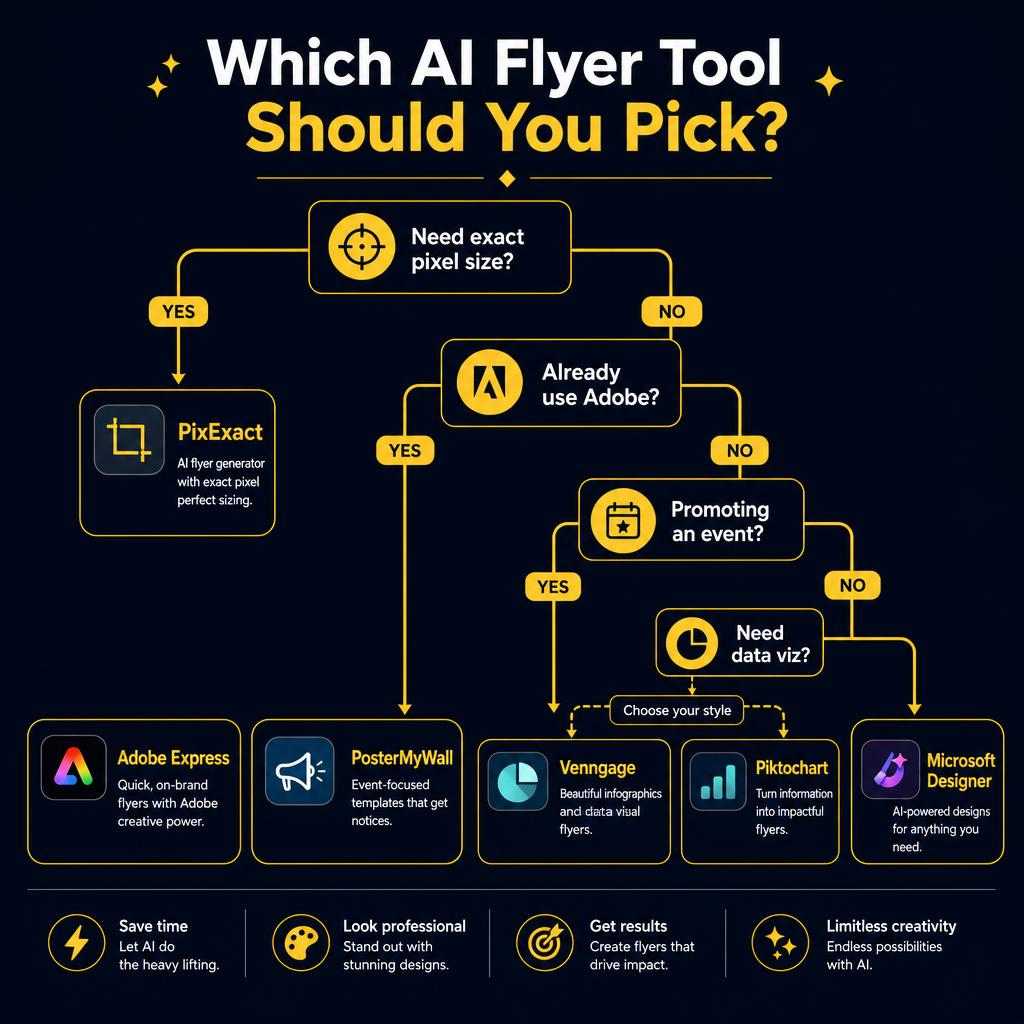
Use this decision framework:
You need a flyer in an exact, specific print size (US Letter, A5, Postcard, or custom dimensions): Choose PixExact. It is the only tool with 6 dedicated print-size presets at 300 DPI plus custom pixel entry up to 4096 x 4096.
You prefer editing a template by hand and have 20-30 minutes: Choose Canva (largest template library) or Adobe Express (best if you use Adobe Creative Cloud).
You are promoting an event and need email + social scheduling built in: Choose PosterMyWall. Its all-in-one marketing workflow is unmatched for event promoters.
You need a quick social media graphic and use Microsoft 365: Choose Microsoft Designer. Fast, free, and integrated with your existing tools.
You are creating a corporate or data-heavy flyer: Choose Venngage (corporate communications) or Piktochart (data visualization).
You want a completely unique design that no one else has: Choose PixExact. Every flyer is generated from scratch — no shared templates.
Frequently Asked Questions
What is the best free AI flyer generator in 2026?
It depends on your needs. For fully AI-generated, unique flyers with exact print-size control, PixExact is the top choice — it offers 6 standard print presets at 300 DPI plus custom dimensions. For template-based design with a massive library, Canva offers the strongest free tier. For event marketing with built-in email tools, PosterMyWall is the best option (though AI features require a paid plan).
Can I really create a flyer for free with AI?
Yes. PixExact gives complimentary credits on signup — enough to generate and download several flyers with no watermark. Canva and Adobe Express have generous free plans for template-based editing. The main limitations on free tiers vary: PosterMyWall adds watermarks, Venngage does not allow any file downloads, and Piktochart limits you to 2 watermarked PNG downloads total.
What is the difference between an AI flyer generator and a template editor?
An AI flyer generator (like PixExact) creates a complete, unique design from a text description — you provide the goal, details, audience, and style, and the AI handles layout, imagery, typography, and composition from scratch. A template editor (like Canva, Adobe Express, or PosterMyWall) gives you a pre-designed starting point that you manually customize by swapping images, editing text, and adjusting elements.
Which AI flyer generator gives the best print quality?
For print quality, exact dimensions and resolution matter. PixExact generates flyers at 300 DPI across all six standard print-size presets (Postcard through A4), producing files that are ready to send directly to a print shop. Canva Pro exports print-ready PDFs with bleed marks. Adobe Express also supports PDF export on both free and paid tiers. PosterMyWall requires a paid plan for watermark-free, high-resolution downloads. For a full guide on print dimensions, see our Flyer Size Guide.
Do I need design skills to use these tools?
No. PixExact requires zero design skills — you write a text prompt describing your flyer (goal, details, audience, style) and the AI generates a finished design in seconds. Template editors like Canva and Adobe Express require basic skills (dragging elements, resizing text boxes, choosing colors) but are designed for beginners. The learning curve for all seven tools is low to moderate.
Can I use AI-generated flyers commercially?
Yes, with caveats. PixExact-generated flyers are unique AI creations suitable for commercial use. Canva allows commercial use with asset-level licensing considerations. Adobe Express uses Firefly (trained on licensed content) for commercially safe outputs. PosterMyWall allows commercial use on paid plans. Always check each tool's current terms of service for your specific use case.
How do I choose the right flyer size?
Start with your distribution method: US Letter (8.5 x 11 in) for general North American use, A4 for international, A5 or Half Page for handouts, and Postcard (4 x 6 in) for direct mail. PixExact makes this easy with dedicated print-size presets — just select from the dropdown and the AI generates at the correct 300 DPI resolution. For a complete breakdown of all standard flyer dimensions with pixel calculations, see our Flyer Size Guide.
Start Creating Your Flyer
You have seen how the top tools compare. If you want a flyer that is truly yours — unique, sized exactly to your specifications, and ready in seconds — try PixExact.
No templates. No shared layouts. No manual editing. Just describe your flyer, pick your size, and download.