Need the right flyer size for your next project? This guide covers every standard flyer dimension — in inches, millimeters, and pixels — so you can design with confidence whether you are printing at a local shop or sharing online.
Use the quick-reference table below to jump straight to pixel dimensions, or read on for detailed guidance on bleed, safe areas, and how to pick the perfect size for your use case. Once you have settled on a size, our step-by-step guide on how to make a flyer with AI shows you exactly how to go from a blank prompt to a print-ready download.
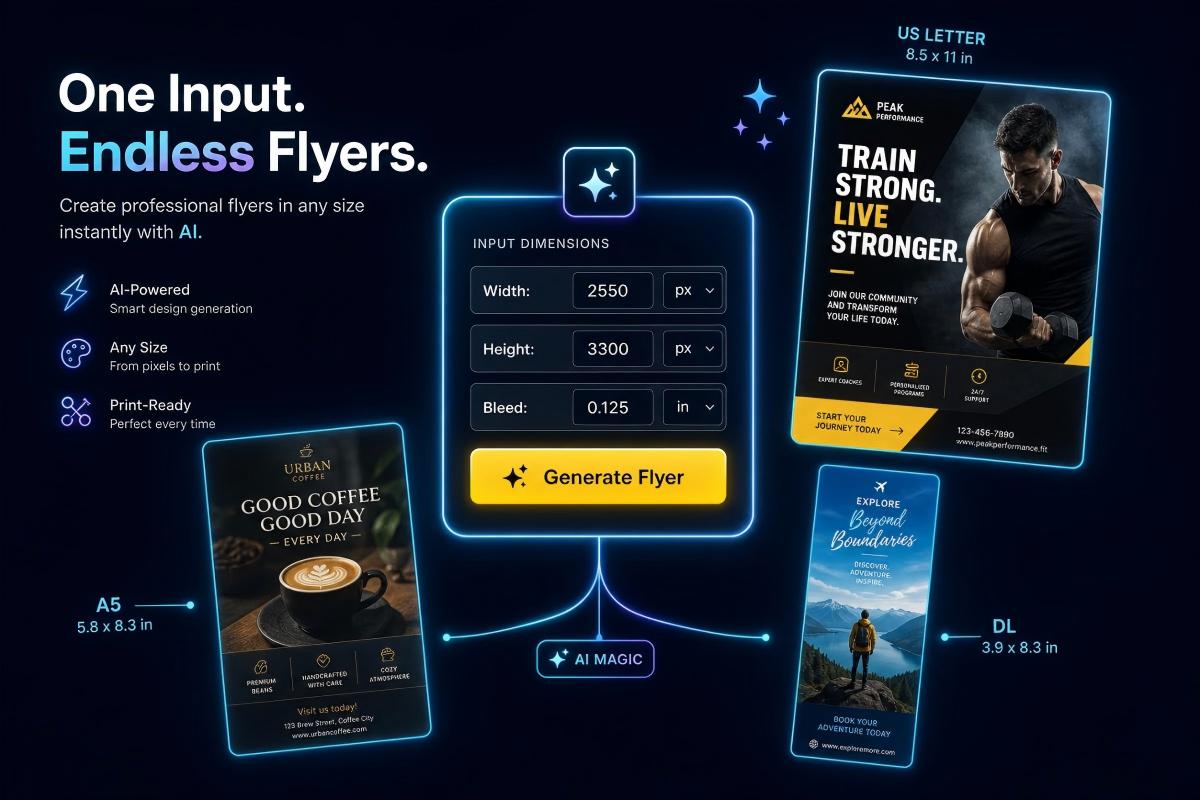
PixExact helps you create flyer images at exact pixel dimensions, such as US Letter, A4, A5, and DL, without resizing or cropping after generation.
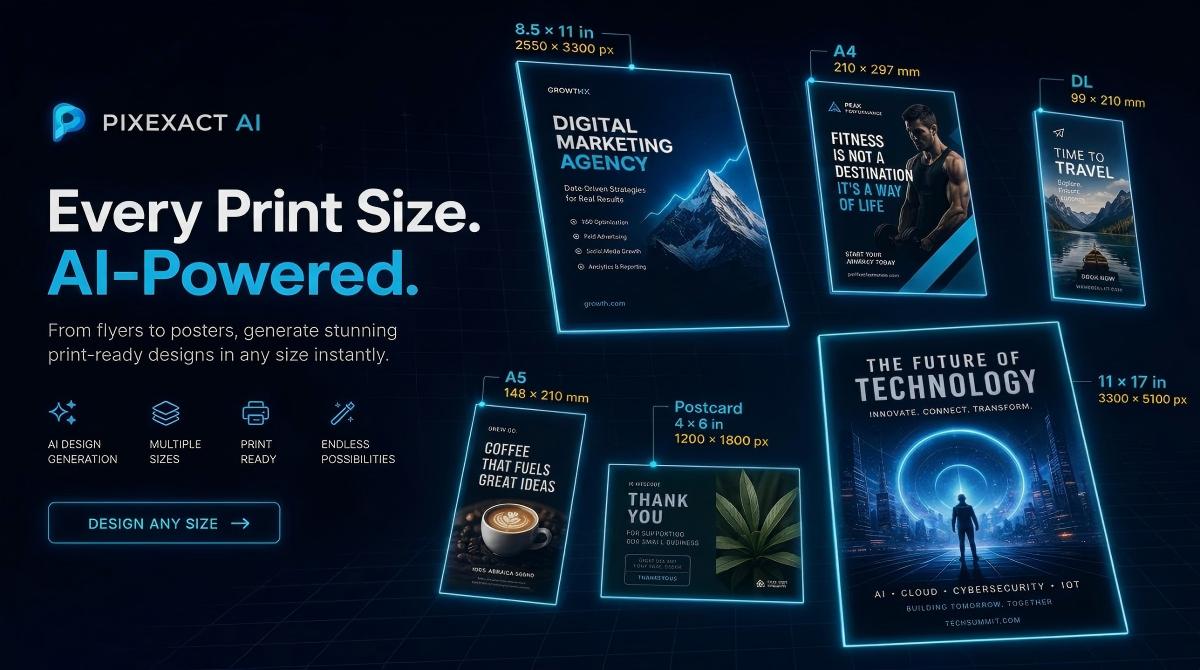
Quick-Reference: All Standard Flyer Sizes at a Glance
| Flyer Size | Inches | Millimeters | Pixels at 300 DPI | Pixels with Bleed (300 DPI) | Best For | Action / Generate |
|---|---|---|---|---|---|---|
| US Letter | 8.5 x 11 | 216 x 279 | 2550 x 3300 | 2625 x 3375 | General marketing, event flyers, menus | Generate US Letter Flyer with PixExact |
| A4 (ISO) | 8.3 x 11.7 | 210 x 297 | 2480 x 3508 | 2551 x 3579 | International standard, catalogs, detailed flyers | Generate A4 Flyer Now |
| A5 | 5.8 x 8.3 | 148 x 210 | 1748 x 2480 | 1819 x 2551 | Invitations, promo inserts, handouts | Generate A4 Flyer with AI |
| Half Page | 8.5 x 5.5 | 216 x 140 | 2550 x 1650 | 2625 x 1725 | Event promos, party flyers, coupons | Generate Half Page Flyer |
| Quarter Page | 4.25 x 5.5 | 108 x 140 | 1275 x 1650 | 1350 x 1725 | Coupons, compact promos, takeaways | Generate Quarter Page Flyer |
| Postcard | 4 x 6 | 102 x 152 | 1200 x 1800 | 1275 x 1875 | Direct mail, quick announcements | Generate Postcard Flyer |
| DL | 3.9 x 8.3 | 99 x 210 | 1165 x 2480 | 1240 x 2551 | Rack inserts, restaurant menus, coupons | Generate DL Flyer with PixExact |
| Rack Card | 3.5 x 8.5 | 89 x 216 | 1050 x 2550 | 1125 x 2625 | Hotel displays, travel guides, takeout menus | Generate Rack Card with PixExact |
| Large Format | 11 x 17 | 279 x 432 | 3300 x 5100 | 3375 x 5175 | Posters, maps, venue announcements | Generate Large Flyer |
| A6 (Small) | 4.1 x 5.8 | 105 x 148 | 1240 x 1748 | 1311 x 1819 | Pocket flyers, loyalty cards, mini promos | Generate A6 Flyer with PixExact |
All bleed dimensions assume a standard 0.125 inch (3.175 mm) bleed on each side — the most common specification at commercial printers.
Tip: With PixExact AI Flyer Generator, you can create a flyer in any of these sizes instantly. Just enter your dimensions, describe your design, and download a print-ready file.
Standard Print Flyer Sizes Explained
1. US Letter (8.5 x 11 inches)
The US Letter size is the most common flyer format in North America. It matches the standard paper size used in home and office printers, which means you can print test copies before committing to a professional run.
Dimensions at a glance:
- Inches: 8.5 x 11
- Millimeters: 216 x 279
- Pixels at 300 DPI: 2550 x 3300
- With bleed: 2625 x 3375
When to use US Letter: general-purpose marketing flyers, restaurant menus, event announcements, grand opening flyers, real estate open house sheets. This size fits standard pocket folders and is widely supported by every print shop.
2. A4 (8.3 x 11.7 inches)
A4 is the international equivalent of US Letter and the default paper size across Europe, Asia, Africa, and South America. If your audience is outside North America, A4 is the safer choice.
Dimensions at a glance:
- Inches: 8.3 x 11.7
- Millimeters: 210 x 297
- Pixels at 300 DPI: 2480 x 3508
- With bleed: 2551 x 3579
When to use A4: catalogs, product sheets, conference handouts, corporate flyers, and any flyer intended for international distribution or folding into a standard C4 envelope.
3. A5 (5.8 x 8.3 inches)
Exactly half of an A4 sheet, A5 is the most popular compact flyer size worldwide. It is large enough to include meaningful content but small enough to hand out efficiently at trade shows, in-store displays, or door-to-door campaigns.
Dimensions at a glance:
- Inches: 5.8 x 8.3
- Millimeters: 148 x 210
- Pixels at 300 DPI: 1748 x 2480
- With bleed: 1819 x 2551
When to use A5: event invitations, promotional inserts, product launch flyers, leaflets, and small-business handouts. A5 also fits neatly into a C5 envelope for mailing.
4. Half Page (8.5 x 5.5 inches)
The Half Page flyer is a US Letter sheet cut in half horizontally. Its landscape orientation feels modern and stands out in a stack of portrait-oriented mail.
Dimensions at a glance:
- Inches: 8.5 x 5.5
- Millimeters: 216 x 140
- Pixels at 300 DPI: 2550 x 1650
- With bleed: 2625 x 1725
When to use Half Page: party flyers, event promos, coupon flyers, seasonal sales, and any campaign where you want a wide, attention-grabbing layout at half the cost of a full-page print.
5. Quarter Page (4.25 x 5.5 inches)
A US Letter divided into four, the Quarter Page is the most budget-friendly option for high-volume distribution. Think: stacking hundreds on a counter or inserting into shopping bags.
Dimensions at a glance:
- Inches: 4.25 x 5.5
- Millimeters: 108 x 140
- Pixels at 300 DPI: 1275 x 1650
- With bleed: 1350 x 1725
When to use Quarter Page: coupons, loyalty-program promos, take-one displays, appointment reminders, and inserts in retail bags.
6. Postcard (4 x 6 inches)
The postcard size is optimized for direct mail. In the United States, a 4 x 6 inch postcard qualifies for USPS letter-rate postage, making it one of the cheapest formats to mail at scale.
Dimensions at a glance:
- Inches: 4 x 6
- Millimeters: 102 x 152
- Pixels at 300 DPI: 1200 x 1800
- With bleed: 1275 x 1875
When to use Postcard: direct-mail campaigns, save-the-date announcements, appointment reminders, thank-you cards, and follow-up marketing.
7. DL (3.9 x 8.3 inches)
DL stands for "Dimension Lengthwise" and matches one-third of an A4 sheet. This tall, slim format is designed to fit a standard DL envelope (110 x 220 mm) and is widely used in Europe and Australia.
Dimensions at a glance:
- Inches: 3.9 x 8.3
- Millimeters: 99 x 210
- Pixels at 300 DPI: 1165 x 2480
- With bleed: 1240 x 2551
When to use DL: restaurant menus, rack-display leaflets, tri-fold insert panels, coupon strips, and mail-ready promotional pieces.
8. Rack Card (3.5 x 8.5 inches)
The rack card is the North American counterpart to DL. Its slim profile fits into wire display racks commonly found in hotels, visitor centers, waiting rooms, and retail stores.
Dimensions at a glance:
- Inches: 3.5 x 8.5
- Millimeters: 89 x 216
- Pixels at 300 DPI: 1050 x 2550
- With bleed: 1125 x 2625
When to use Rack Card: tourism and travel guides, spa and salon menus, takeout restaurant menus, tradeshow handouts, and any location with a wire display rack.
9. Large Format (11 x 17 inches)
Also called Tabloid or Ledger size in North America, 11 x 17 is the bridge between a flyer and a poster. It provides maximum visual impact while still being foldable down to Letter size.
Dimensions at a glance:
- Inches: 11 x 17
- Millimeters: 279 x 432
- Pixels at 300 DPI: 3300 x 5100
- With bleed: 3375 x 5175
When to use Large Format: concert announcements, community event posters, in-store promotions, conference signage, and any application where the flyer doubles as a small poster. Looking for even bigger sizes? Check out our Poster Size Guide for A3, A2, and larger dimensions.
10. A6 (4.1 x 5.8 inches)
The smallest standard ISO flyer size, A6 is exactly one-quarter of an A4 sheet. It is pocket-sized and ultra-portable.
Dimensions at a glance:
- Inches: 4.1 x 5.8
- Millimeters: 105 x 148
- Pixels at 300 DPI: 1240 x 1748
- With bleed: 1311 x 1819
When to use A6: pocket flyers, loyalty program cards, mini event invitations, and takeaway promos at concerts and festivals.
Understanding Bleed, Trim, and Safe Area
If you are printing flyers professionally, three measurements matter:
Trim Size is the final, finished dimension of your flyer — the size your audience holds in their hands. All the dimensions listed in the table above are trim sizes.
Bleed is the extra area that extends beyond the trim line. Printers require bleed to ensure that colors and images reach the very edge of the paper after cutting. The industry standard is 0.125 inches (3.175 mm) on each side.
Safe Area (or Safe Zone) is the inner margin where all critical text and logos must stay. Keeping important elements at least 0.125 inches (3.175 mm) inside the trim line prevents them from being accidentally cut off.
How to calculate bleed dimensions: add 0.25 inches (6.35 mm) to both width and height of your trim size. For example, a US Letter flyer becomes 8.75 x 11.25 inches with bleed, or 2625 x 3375 pixels at 300 DPI.
Tip: When you use PixExact's AI Flyer Generator, you can specify your exact dimensions — including bleed — and the AI generates artwork that extends to the edges, so your files are print-ready from the start.
Digital Flyer Sizes for Social Media and Web
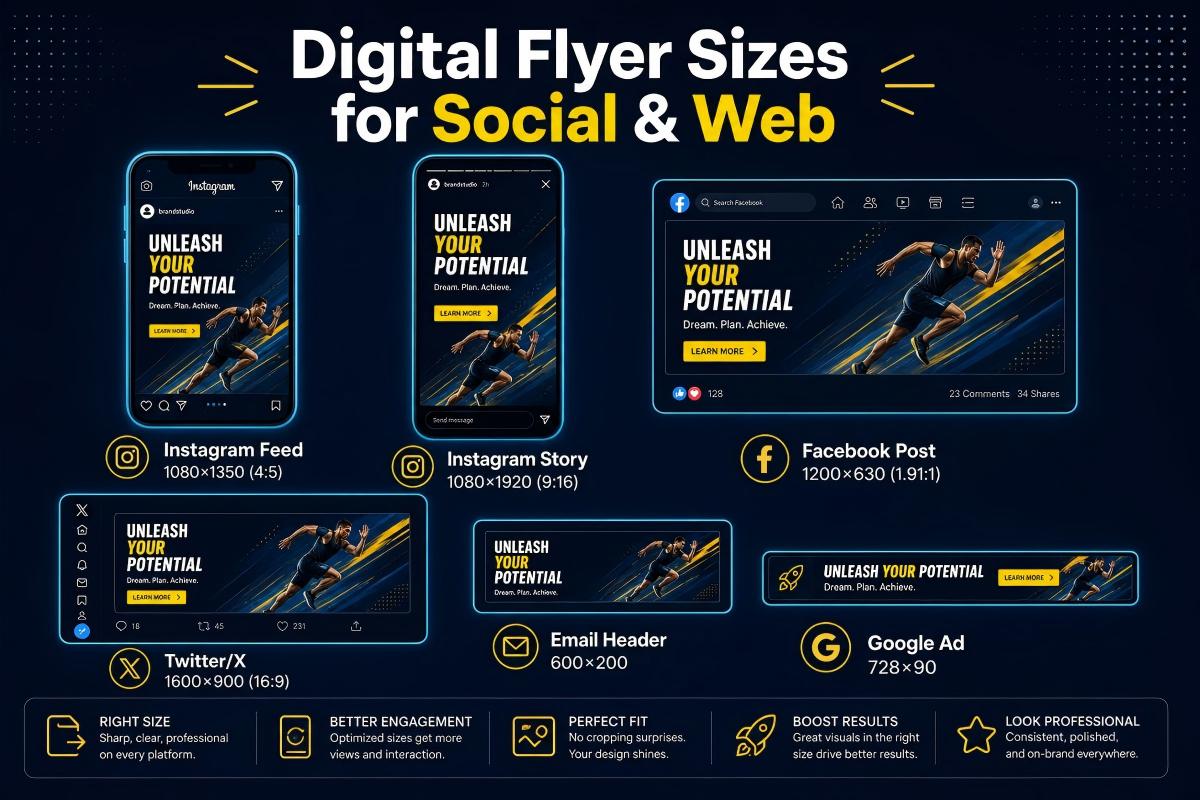
Not every flyer ends up on paper. If you are sharing flyers on social media, email newsletters, or your website, use these optimized digital dimensions:
| Platform / Use | Recommended Size (px) | Aspect Ratio | Notes |
|---|---|---|---|
| Instagram Feed (Vertical) | 1080 x 1350 | 4:5 | Best engagement; takes up maximum screen space |
| Instagram Feed (Square) | 1080 x 1080 | 1:1 | Clean grid appearance |
| Instagram / Facebook Stories | 1080 x 1920 | 9:16 | Full-screen vertical |
| Facebook Feed Post | 1200 x 630 | 1.91:1 | Optimal for link previews |
| Facebook Feed (Vertical) | 1080 x 1350 | 4:5 | Maximum mobile feed visibility |
| Email Newsletter Header | 600 x 200 to 600 x 400 | 3:1 to 3:2 | Depends on email template |
| Website Hero Banner | 1920 x 600 to 1920 x 800 | ~3:1 | Full-width desktop display |
| Google Display Ad | 300 x 250 or 336 x 280 | ~4:3 | Medium rectangle; most common ad unit |
| Google Display Ad (Leaderboard) | 728 x 90 | ~8:1 | Top-of-page banner |
Pro tip: If you want one flyer design that works on both Instagram and Facebook, start with 1080 x 1350 pixels. This vertical 4:5 format occupies the most screen real estate on mobile feeds across both platforms.
How to Choose the Right Flyer Size
Picking the right size comes down to four factors:
1. Distribution Method
- Handing out on the street or at events: A5 or Half Page — easy to hold, easy to carry in bulk
- Mailing: Postcard (4 x 6) for budget-friendly USPS rates; DL for international envelopes
- Display racks: Rack Card or DL — designed to stand upright in wire displays
- Posting on walls and windows: Large Format (11 x 17) for maximum visibility
- Inserting into folders or bags: Quarter Page or A6
2. Content Volume
- Minimal text (one headline + one image + one CTA): Postcard, A6, or Quarter Page
- Moderate content (a few paragraphs, images, and contact details): A5 or Half Page
- Detailed information (menus, product lists, schedules, maps): US Letter, A4, or Large Format
3. Budget
Smaller flyers cost less per unit to print and less to mail. If you are distributing thousands, consider A5 or Postcard sizes to stretch your budget further. Large Format is best reserved for high-impact, lower-volume applications.
4. Region
- North America: US Letter, Half Page, Postcard, Rack Card, and Large Format are the norms
- Europe, Asia, South America, Africa, Australia: A4, A5, A6, and DL are standard
- Global campaigns: design in A4 (it is slightly taller than US Letter) and trim for local markets
DPI Explained: What Resolution Do You Need?
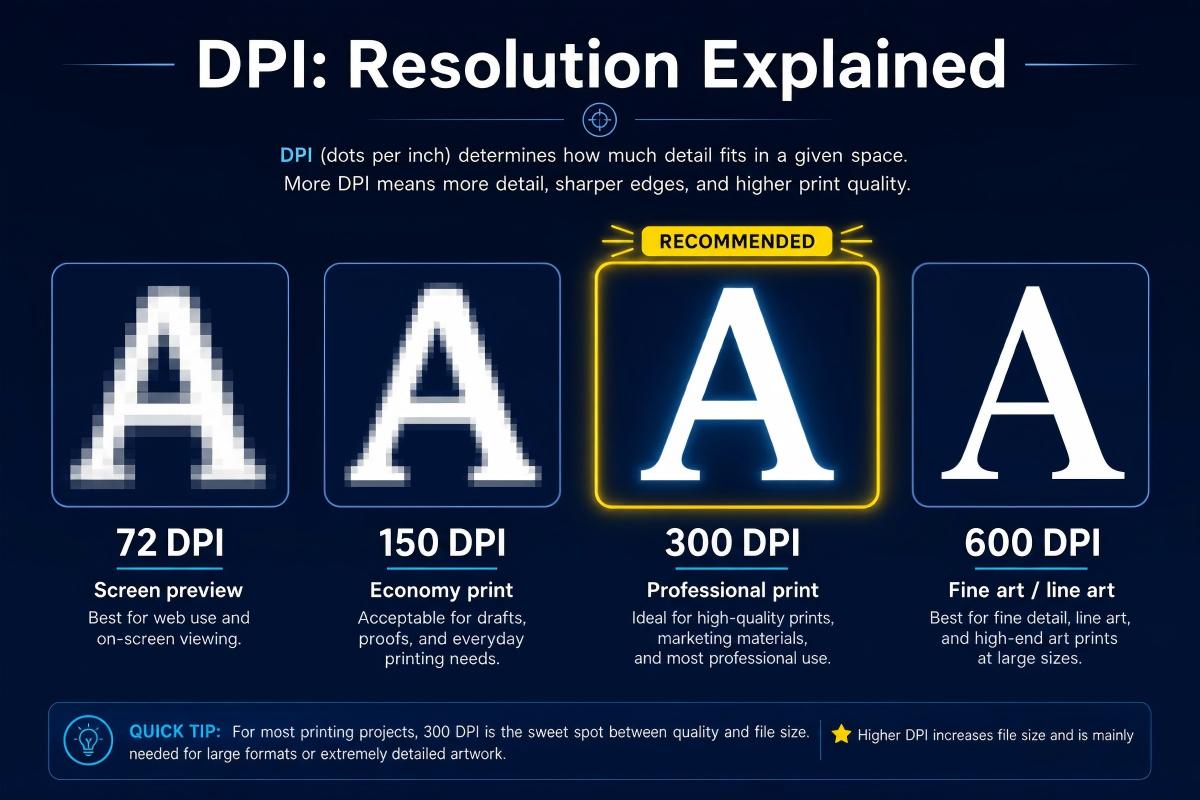
DPI (dots per inch) determines how sharp your flyer looks when printed. Here is a quick guide:
| DPI | Quality Level | When to Use |
|---|---|---|
| 72 | Screen preview only | Early mockups; never for final print |
| 150 | Economy print | Budget prints viewed at arm's length or farther |
| 300 | Professional print | Recommended for all commercial flyer printing |
| 600 | Fine art / line art | Specialty printing with intricate line detail |
Always design your flyer at 300 DPI unless you have a specific reason to go higher. At 300 DPI, a US Letter flyer is 2550 x 3300 pixels — large enough for crisp text and sharp images on professional printing equipment.
For digital-only flyers (social media, email, web), 72 DPI is sufficient because screens display at much lower density than print. However, design at the correct pixel dimensions listed in the digital sizes table above.
Frequently Asked Questions
What is the standard flyer size?
The most common flyer size is US Letter (8.5 x 11 inches / 216 x 279 mm) in North America and A4 (8.3 x 11.7 inches / 210 x 297 mm) internationally. Both are widely supported by printers and fit standard folders and envelopes.
What size is a flyer in pixels?
At 300 DPI (the recommended resolution for professional printing), a US Letter flyer is 2550 x 3300 pixels. An A4 flyer is 2480 x 3508 pixels. For other sizes, multiply each dimension in inches by 300 to get the pixel count.
What is flyer bleed and how much do I need?
Bleed is the extra border around your flyer design that gets trimmed off after printing. It ensures colors and images extend cleanly to the edge. The standard bleed is 0.125 inches (3.175 mm) on each side. Add 0.25 inches to both width and height of your final size to get the bleed canvas dimensions.
What is the best flyer size for mailing?
For US mailing, the 4 x 6 inch postcard qualifies for USPS letter-rate postage and is the most cost-effective option. For international mailing, the DL size (3.9 x 8.3 inches) fits standard DL envelopes used worldwide.
What is the difference between a flyer and a poster?
Flyers are typically US Letter / A4 size or smaller, designed for hand distribution or mailing. Posters start at 11 x 17 inches and go up to large-format sizes like 24 x 36 or 27 x 40 inches, intended for wall display. For a complete breakdown, see our Poster Size Guide.
What is the best flyer size for social media?
For Instagram and Facebook feed posts, use 1080 x 1350 pixels (4:5 vertical). For Stories and Reels, use 1080 x 1920 pixels (9:16). For a universal square format, use 1080 x 1080 pixels.
Can I create a custom-size flyer?
Yes. While standard sizes are recommended for cost-effective printing, custom dimensions are fully supported by most professional printers. With PixExact's AI Flyer Generator, you can enter any width and height in pixels and generate a flyer in that exact size.
Create Your Flyer in Any Size with AI
Now that you know the right dimensions, you are ready to design. With PixExact's AI Flyer Generator, you can:
- Enter any standard or custom dimensions
- Describe your design in plain text — the AI handles layout, typography, and imagery
- Download print-ready files at 300 DPI
- Generate multiple size variations from a single prompt
No design skills required. Just pick your size, type your message, and let AI do the rest. New to the process? Our how to make a flyer with AI guide walks through every step with real prompt examples you can copy and use right away.