Search for how to make the Outstanding Tiny Desk AI video and you will find three very different answers: grab a CapCut template, write your own prompt in an AI video model, or use a one-click generator. They sound interchangeable. They are not. Only some of them actually put your face into the real Tiny Desk clip.
This guide compares all three: what each one really does, how long it takes, what it costs and where it tends to go wrong.
Quick Verdict
| CapCut template | Write your own prompt | One-click generator | |
|---|---|---|---|
| What it does | Places your photos or clips into someone else's edit | Edits the real clip, or generates a new scene, from your references | Recasts the real clip from a ready-made template |
| Your face in the real clip? | No | Yes, if you edit the real clip | Yes |
| People | Anyone you filmed yourself | 1 to 5, with more work for each person | 1 to 5 |
| Time | 10 to 20 minutes of editing | 30 minutes to a few hours | A few minutes |
| Cost | Free for most templates | Pay per generation, plus retries | One price per video |
| Best for | Edits of real footage you shot | Custom versions and experiments | Most people who want the meme |
If you want the version everyone recognizes, with your friends laughing in the close-up and playing the sax solo, a generator built on the real clip is the fastest route. If you enjoy tinkering, the prompt route gives you more control. A CapCut template is a different thing altogether.
Method 1: CapCut Template
What it actually does
A CapCut template is someone else's finished edit with empty slots. You tap "Use template," drop in your photos or clips, and the template handles the cuts, captions, transitions and music. Search "tiny desk" in CapCut or tap the template link on a TikTok post to find them.
What it cannot do
A template arranges your media. It does not generate a new person into existing footage. That means:
- No face swap. Your photo appears as your photo, not as you performing in the Tiny Desk room.
- No laughing close-up unless you film yourself laughing.
- Unreliable availability. Trend templates appear and disappear quickly, and some features or sounds need a paid plan or are limited by region.
You may also come across Dreamina, CapCut's AI generation site, which has its own Tiny Desk AI trend page. Its workflow uses models like Seedance 2.5 to generate a new, original desk-concert scene from a prompt. That can look nice, but it is a new video, not the meme clip.
When it makes sense
Use a CapCut template if you already filmed your friends performing in a real office or living room and just want trendy cuts and captions on top. For the AI meme itself, it is the wrong tool.
Method 2: Write Your Own Prompt
How the original creator did it
The video that started the trend was made by Jake Whipple, a Nashville songwriter. According to his interview with Sport & State, he took a 30-second clip of Charlie Wilson's Tiny Desk performance, made it vertical and ran it through Higgsfield, an AI video tool that transfers motion onto new characters, with a photo of each person. Generation ran at about a minute of processing per second of video, and the whole project took around 30 minutes.
The two DIY approaches
Edit the real clip. You give a video model the source clip plus a reference photo for each person and ask it to swap the performers while keeping everything else. This keeps the room, the camera moves, the timing and the live audio, which is what makes the meme recognizable.
Generate a new scene. You describe a desk concert in a prompt and let the model invent it. This is easier to start, but the shots, timing and song will not match the clip people know, and you usually need to add music yourself.
A starter prompt for editing the real clip
If your model supports editing a reference video with reference images, a plain prompt like this is a good starting point:
@Video1 is the source video. Keep its room, lighting, camera movement,
cuts, gestures and timing exactly the same.
Replace the lead singer with the person in @Image1, using their own face,
hair and clothes.
Keep the saxophone. Do not add any logos or text.
Add one "Replace ... with @ImageN" line for each extra person, and describe each person by their position in the shot (back left, back right, at the keyboard, on the sax).
Common DIY problems
Published test notes from people who have rendered this clip many times, including one creator's 32 Seedance test renders, point to the same set of problems:
- Original faces leak through. Edit modes sometimes keep part of the original performer's face, especially when the uploaded person looks similar.
- Small faces get the wrong identity. In the wide band shots, each face takes up only a small slice of the frame, so the model often mixes people up. Close-ups are much more reliable.
- Mentioning the mouth backfires. Asking the model to "keep the lip sync" can make mouths move nonstop. Leave the mouth out of the prompt.
- The same person in two roles can fail. Some models then swap nobody at all. Use one person per role.
- Logos and caps stick around. If the source performers wear branded gear, ask for each person's own clothes.
- Silent output. Many models return video without sound, so you add the song back in an editor and line it up.
- Length surprises. Some models need whole-second clips and pad short references with invented frames.
None of these are impossible to fix, but each fix usually means another render, and every render costs credits.
Where PixExact Motion Control fits
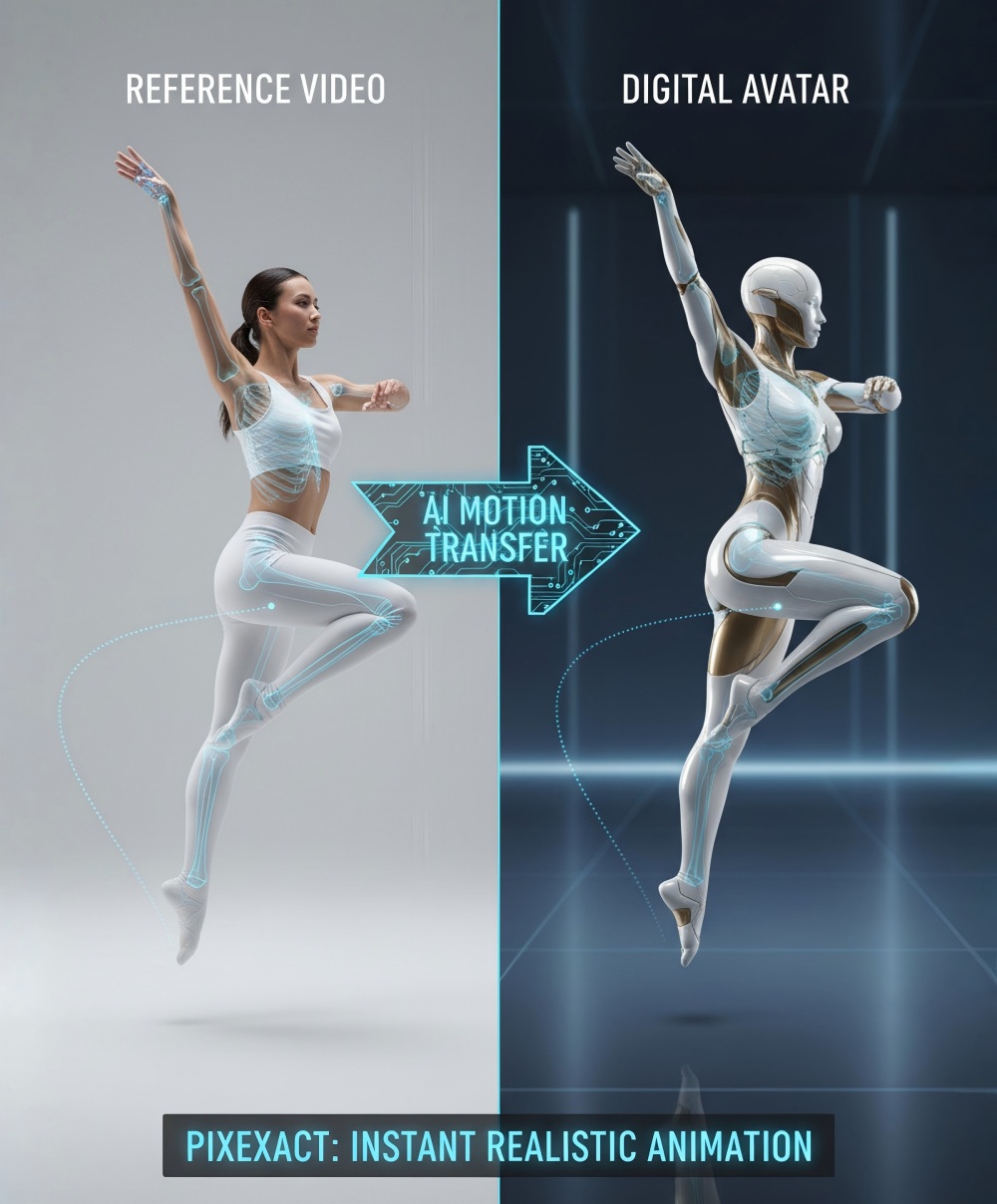
If you want to build something original rather than recast the meme clip, PixExact Motion Control AI runs Kling V3 motion control in the browser. You upload one character image and a 3 to 30 second reference video (MP4), and it transfers the movement onto your character at 720p (5 credits per second) or 1080p (8 credits per second).
It is built for one performer at a time, so it suits a solo concert-style clip you choreograph yourself, not a five-person band swap. Our motion control tutorial and Kling 3.0 overview cover how to get clean results.
Method 3: One-Click Generator
What it does
A Tiny Desk AI generator has already done the DIY work: the clip is prepared, every shot is mapped and the prompt is written. You only upload photos.
On PixExact, the Outstanding Tiny Desk AI video generator works like this:
- The real 19-second clip, with the same cuts, camera moves and live audio, including the sax solo
- Up to five people, cast role by role, or one group photo assigned from left to right
- Only the Main Star is required. Any role you skip is played by a default band member
- Your look comes along. Faces, hair and outfits follow your photos
- Vertical 720p MP4, ready for TikTok, Reels and Shorts
- 180 credits per video, refunded automatically if a render fails
Here is a finished example:
The full walkthrough is in how to make an Outstanding Tiny Desk AI video.
What to check before you pay for any generator
There are now dozens of Tiny Desk AI generators, and they are not all the same product. Before you buy, check:
- Real clip or new scene? Some tools recast the actual performance. Others generate a new desk-concert scene that only looks similar.
- How many people? Some only swap the lead singer and fill the band with AI strangers.
- How long is the video? Shorter clips often cut the sax solo, which removes the payoff.
- What resolution? Cheaper tiers are sometimes 480p.
- What happens to the audio? Look for the original live recording, not a silent file or an AI-generated imitation.
- One video or a credit pack? Make sure the price covers a full-length video at the resolution you want.
- Refunds on failed renders? You should not pay for a video that never arrives.
- Public or private? Find out whether your video is shared publicly by default.
Is There a Free Way to Make a Tiny Desk AI Video?
Honestly, not a complete one. CapCut templates are free but do not swap faces. Every route that actually puts you into the clip runs on paid AI video generation, whether you pay per render in a model playground or per video in a generator. Some sites offer short, watermarked previews, and new PixExact accounts get free credits to try the tools, so check your balance against the 180 credits a Tiny Desk video needs.
Which Method Should You Pick?
- Pick a CapCut template if you filmed real footage of your friends and just want trendy edits.
- Pick the prompt route if you enjoy experimenting, want a custom version of the clip and do not mind a few retries.
- Pick a one-click generator if you want the real meme with your friends in it, in a few minutes, with no editing.
Frequently Asked Questions
Is there a CapCut template for the Tiny Desk AI trend?
There are CapCut templates that use the trend's style and music, and they change often. A template places your photos or clips into an existing edit. It does not put your face into the real Tiny Desk performance.
What prompt do I use for the Tiny Desk AI video?
If your model can edit a reference video, tell it to keep the room, lighting, camera movement, cuts and timing exactly the same, then add one line per person, such as "Replace the lead singer with the person in @Image1." Do not mention the mouth or lip sync, and ask for each person's own clothes.
Which AI tool did the original Tiny Desk AI video use?
The creator, Jake Whipple, told Sport & State he used Higgsfield, an AI video generator that transfers motion onto new characters. The whole project took about 30 minutes.
Why does my DIY version still show the original faces?
Video edit modes sometimes keep part of the original performer, especially in the small faces of wide shots. Use clear front-facing photos, describe each person by position and re-render the shots that fail. A ready-made template avoids most of this work.
Why is my Tiny Desk AI video silent?
Many AI video models return silent output. Add "Outstanding" back in a video editor or in your social app's sound library, and line it up with the singing.
Can I make a Tiny Desk AI video for free?
Not a complete one. CapCut templates are free but do not swap faces, and every tool that recasts the real clip uses paid AI generation. New PixExact accounts get free credits to try the tools.