Pinterest Ad Specs Overview
Pinterest supports specific file types and dimensions across image and video ads. Different aspect ratios are optimized for mobile feeds.
Character limits apply to titles and descriptions. File size restrictions vary between desktop and in-app uploads.
Supported File Types and Formats
Pinterest accepts PNG and JPEG files for image ads. These are the primary file types for static image pins and ads.
For video content, Pinterest supports MP4, MOV, and M4V formats. Videos must use H.264 or H.265 encoding for proper playback across devices.
All uploaded images convert to standard 8-bit RGB JPEGs before becoming pins and ads. Upload images in PNG with sRGB formats to maintain quality and avoid reduction during conversion.
Custom color profiles are not supported on Pinterest. Using unsupported profiles may result in slightly different colors appearing on your published pins and ads.
Aspect Ratios and Dimensions
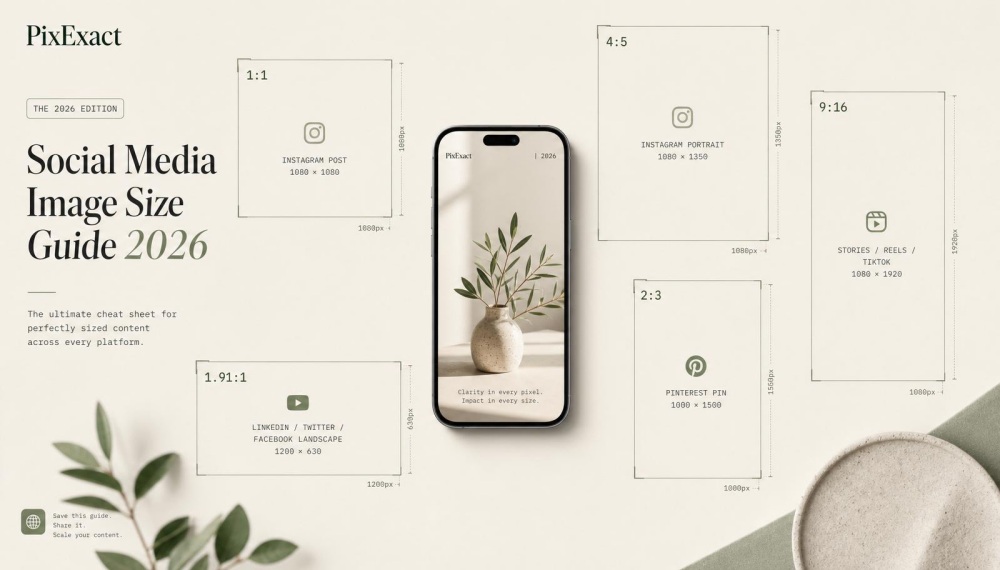
Pinterest recommends a 2:3 aspect ratio for standard image ads, with dimensions of 1000 x 1500 pixels. Pins with aspect ratios greater than 2:3 might get cut off in the home feed.
For video ads, you can use multiple aspect ratios. Square videos at 1:1 or vertical formats like 2:3, 4:5, and 9:16 work best on Pinterest.
Your videos must be shorter than 1:2 (width) and taller than 1.91:1. Carousel ads allow either 1:1 or 2:3 aspect ratio for non-catalog sales campaigns.
Each carousel can include 2 to 5 images. Max width video ads cannot exceed the height of a 1:1 aspect ratio.
These ads expand across the entire feed on mobile devices. Max width video ads are only available as a paid format.
Maximum File Size Specifications
Desktop uploads for standard image ads have a max file size of 20 MB per image. In-app uploads allow slightly larger files at 32 MB maximum.
Video ads can be up to 2GB in total file size. This applies to all video formats including standard width and max width video ads.
Carousel ads maintain the same 20 MB per image limit. If you use 5 images in one carousel ad, each individual image must stay under 20 MB.
Video length has specifications as well. The minimum video length is 4 seconds, with a maximum of 15 minutes.
Ad Character Limits
Titles can include up to 100 characters total. Only the first 40 characters may show in people's feeds, depending on the device.
For Chinese, Japanese, Korean, Arabic, and other double byte languages, only the first 30 characters will display in feeds. This reduced character count applies to all title text in these languages.
Descriptions allow up to 800 characters. Descriptions do not appear when viewing the pin in the home feed or search feed.
They also don't appear for ads when viewed up close. Pinterest uses descriptions in its algorithm to determine relevance for delivery.
You should enter a complete description to help get your pin or ad in front of the right audience.
Standard Image Ads
Standard image ads are the foundation of Pinterest advertising. They use a single static image to reach users in their home feed.
These ads require specific dimensions and file formats to display properly. The recommended size is 1000 x 1500 pixels and a 2:3 aspect ratio to avoid cropping.
Image Ad Dimensions and Guidelines
Pinterest recommends a 2:3 aspect ratio for standard pins, which translates to 1000 x 1500 pixels. This vertical format prevents your image from getting cut off in people's feeds.
Pins with an aspect ratio greater than 2:3 might get trimmed when users scroll through their home feed. You can upload images up to 20 MB on desktop or 32 MB in-app.
The platform automatically converts all uploaded images to standard 8-bit RGB JPEGs before they become pins and ads. Pinterest adds a faint color layer to image pins with white or black backgrounds.
For pins with white or near-white backgrounds, a faint black layer appears in light mode at 4% opacity. For pins with black or near-black backgrounds, a faint white layer shows in dark mode at 10% opacity.
This feature helps distinguish your ads from the app background and highlights any included links.
Optimal File Types and Quality Settings
You should upload your standard image ads as PNG or JPEG files. Pinterest Business recommends PNG with sRGB formats to maintain the best image quality during conversion.
Custom color profiles are not supported on Pinterest and may result in slightly different colors on your published pins and ads. Stick to sRGB to ensure your brand colors appear as intended.
The platform converts all uploaded images to 8-bit RGB JPEGs regardless of your original format. Using PNG files helps preserve image quality through this conversion process.
Your maximum file size is 20 MB when uploading from desktop or 32 MB when creating ads through the mobile app.
Text Overlay and Safe Zone Recommendations
Your title can include up to 100 characters, but only the first 40 characters display in most feeds. For languages like Chinese, Japanese, Korean, and Arabic, only the first 30 characters appear.
Titles show in the home feed and search feed when you enter them. You can add descriptions up to 800 characters long.
Descriptions don't appear when viewing the pin in the home feed or search feed, and they don't show for ads when viewed up close. Pinterest uses your description to determine relevance for delivery, so including one helps your ad reach the right audience.
Keep important text and your logo within the safe zone to prevent cropping. Since Pinterest displays image ads at different sizes across devices, placing critical information in the center two-thirds of your image ensures visibility.
Avoid putting text near the edges where it might get cut off on mobile devices.
Video Ads Specifications
Pinterest video ads support multiple aspect ratios and file formats. Standard width video appears in the regular feed, and max width video spans across the platform's two-column grid.
Video length can range from 4 seconds to 15 minutes.
Standard Width Video Ads
Standard width video ads appear in your Pinterest home feed alongside other pins. These video pins and ads work on both desktop and mobile devices.
Your aspect ratio must be shorter than 1:2 but taller than 1.91:1. Pinterest recommends using square (1:1) or vertical video formats like 2:3, 4:5, or 9:16.
You can upload files up to 2GB in size. Accepted file formats include .mp4, .mov, or .m4v.
Videos play without audio by default when users scroll through their feed. When someone taps your pin, it expands into a larger player with audio enabled.
Max Width Video Ads
Max width video ads take up four times more space than standard video pins. These ads span across Pinterest's two-column grid layout.
Your video cannot exceed the height of a 1:1 aspect ratio for this format. The maximum file size is 2GB, and you can use .mp4, .mov, or .m4v file types.
Max width video ads only work on mobile devices. They don't appear on desktop.
This larger format helps increase brand awareness and purchase intent. You should feature your logo and product in the opening seconds to grab attention quickly.
Video Pin Requirements
You can add supporting text to your video pins. Titles allow up to 100 characters, and descriptions can include up to 500 characters.
Your text may get cut off depending on the device someone uses to view your pin. A strong title with keywords makes your video pin easier to find in search results.
Videos play in the feed automatically without sound. Your video needs to communicate your message visually without relying on audio.
Your pin should tell a clear story about your product. Focus on a single idea in each video.
Video Length and Encoding Details
Your video length must be at least 4 seconds long. The maximum video length allowed is 15 minutes.
Optimal video length is 6–15 seconds. Most users scroll quickly through their feed, so grab attention fast with a dynamic hook in the first few seconds.
You need to use one of these file formats:
- .mp4
- .mov
- .m4v
Keep your file size under 2GB to ensure your video uploads successfully.
Carousel Ad Specs
Carousel ads on Pinterest let you showcase multiple images in a single ad that users can swipe through on both mobile and desktop. Each carousel card can link to different landing pages, making them perfect for displaying product collections or step-by-step guides.
Carousel Format Dimensions
Your carousel images must follow specific dimension requirements to display properly across all devices. Pinterest recommends using a 2:3 aspect ratio for each card, with 1000 x 1500 pixels being the ideal size.
Each image needs to be in JPG or PNG format. The maximum file size is 32MB per card.
All cards within your carousel must use the same aspect ratio. You can't mix square and vertical images in one ad.
This consistency helps create a smooth viewing experience as users swipe through your content.
Number of Cards and File Limits
You can include 2 to 5 cards in each carousel ad. The minimum of two cards lets you compare products or show before-and-after results.
The maximum of five gives you enough space to tell a more complete story. Each card gets its own title and description.
Your title can be up to 100 characters, while descriptions allow up to 500 characters. This text appears with each individual card as users swipe through.
When someone saves your carousel ad to their board, the entire carousel gets pinned. All your cards stay together, maintaining your intended message.
Swipe Through Experience
The carousel format blends naturally into Pinterest feeds. Small dots appear under the main image, showing users they can swipe to see more cards.
Each card in your carousel can direct users to a different URL. This flexibility lets you link the first card to one product and the second card to another.
You could also use cards to guide users through different sections of your website. Carousel ads work on both mobile and desktop.
Users swipe horizontally on mobile devices or click arrows on desktop to move between cards.
Shopping Ads and Collection Ads
Shopping ads and Collection ads connect Pinterest users directly to your products through targeted visual formats. Shopping ads display one image or video at a time with purchase options, while Collection ads combine a main hero image with three smaller product images below.
Pinterest Shopping Ad Formats
Shopping ads feature one image or video at a time and allow people to purchase products they find on Pinterest. These ads follow the same specs as standard image and video ads.
You can create Pinterest shopping ads using .PNG or .JPEG files for images. The max file size is 20 MB for desktop and 32 MB when viewed in-app.
Pinterest recommends using a 2:3 aspect ratio or 1000 x 1500 pixels for best results. For video shopping ads, use .MP4, .MOV, or .M4V file types with H.264 or H.265 encoding.
Your videos can be up to 2GB in file size. Video length should be a minimum of 4 seconds and maximum of 15 minutes, though 6 to 15 seconds works best for ads.
Character limits for shopping ads:
- Title: Up to 100 characters (first 40 show in feeds)
- Description: Up to 800 characters (used by Pinterest's algorithm for targeting)
Collection Ad Structure and Creative Types
Collection ads appear as one main image above three smaller images in feeds on mobile devices. You need a Pinterest business account to create these ads through Ads Manager or bulk editor.
The main hero image is called the static image hero. This large image sits at the top and grabs attention first.
Below it, three secondary creatives show additional products or details. This format lets you showcase multiple items in a single ad.
Pinterest can auto-generate Collection ads if you have a product catalog connected. Otherwise, you build them manually with Pin builder.
Each Collection ad has three separate pieces of ad creative with different specs. You select products from your catalog to populate the smaller images automatically.
This format works well for "shop the look" campaigns where you display coordinated items together.
Image and Video Requirements for Collections
Collection ads support both static images and video content for the hero position. For non-catalog sales, you need .PNG or .JPEG files with a max file size of 20 MB per image.
The aspect ratio should be 1:1 or 2:3. When using catalogs for sales objectives, you can include 2 to 10 images and video per carousel.
The platform pulls these directly from your catalog creative, so specs match what you uploaded to your product feed. The three secondary product images below the hero follow your catalog specifications.
These smaller images help shoppers see related products or different angles of featured items.
Collection ad specifications:
| Element | Requirement |
|---|---|
| File types | .PNG, .JPEG, or video |
| Max file size | 20 MB per image |
| Aspect ratio | 1:1 or 2:3 |
| Title | Up to 100 characters |
| Description | Up to 800 characters |
Collection ads only appear on mobile devices in the home feed. They give you more space to tell your product story compared to single-image pins.
Idea, Showcase, and Quiz Ads
These advanced Pinterest ad formats let you create multi-layered experiences that go beyond single images. Idea ads support brand storytelling through multiple pages, showcase ads highlight secondary creatives below a main image, and quiz ads engage users with interactive questions.
Idea Ads Format and Specs
Idea ads are Pinterest's version of idea pins transformed into paid content. This format allows you to tell a story across multiple pages, with each page containing its own image or video.
You can include up to 20 pages in a single idea ad. Each page supports video clips up to 60 seconds or static images.
The recommended aspect ratio is 9:16 for vertical content that fills mobile screens.
File Requirements:
- Images: PNG or JPEG files
- Videos: MP4 or MOV format
- Maximum file size: 32 MB for mobile
Idea ads appear in the home feed and search results on Pinterest. Each page can include text overlays and stickers to make your message clearer.
Showcase Ads Structure
Showcase ads feature one large hero image at the top with three smaller secondary creatives displayed below. This multi-layered ad format works best for showing product collections or different angles of the same product.
The main image follows standard Pinterest ad specs with a 2:3 aspect ratio recommended (1000 x 1500 pixels). The three smaller images below automatically pull from your product catalog or selected pins.
Users can tap on any of the four images to learn more. The secondary creatives give viewers more options without leaving the ad experience.
This format only works with catalog campaigns in ads manager. Showcase ads appear exclusively on mobile devices.
Quiz Ads Interactive Elements
Quiz ads let you add interactive questions that engage users before showing them personalized results. This format works by asking users to answer 2-6 multiple choice questions based on their preferences.
Each quiz question displays images that users tap to select their answer. After completing the quiz, users see a customized results page with product recommendations or content matched to their responses.
Quiz Ad Components:
- Opening image or video (2:3 aspect ratio)
- 2-6 quiz questions with image options
- Custom results page with recommended pins
- Follow standard image ad specs for visuals
Quiz ads create a more engaging experience than static pins. The interactive elements keep users on your ad longer, which can improve ad performance on Pinterest.
Pinterest Ad Formats and Best Practices
Pinterest offers several ad formats designed for different marketing goals, from building brand awareness to driving conversions. Each format has specific technical requirements and works best for particular campaign objectives.
Ad Types and Use Cases
Standard image ads are the most common ad format on Pinterest. These vertical pins use a 2:3 aspect ratio at 1000 x 1500 pixels and support PNG or JPEG files up to 20 MB.
You can use static image ads for product promotions, brand awareness campaigns, or driving traffic to your site. Video ads help you tell stories and demonstrate products in motion.
Pinterest video ads perform best between 6-15 seconds and support vertical formats like 9:16 or 2:3. The platform accepts MP4, MOV, and M4V files up to 2 GB.
Carousel ads let you showcase 2-5 products or features in one pin. Each card gets its own image, title, and outbound links.
Collection ads combine a hero image or video with product images pulled from your catalog. This format turns inspiration into shopping by letting pinners tap products they see in lifestyle photos.
Idea ads use Pinterest's multi-page format to create immersive tutorials and guides. These ads blend images and video across multiple pages and require a 9:16 aspect ratio at 1080 x 1920 pixels.
Shopping ads connect directly to your product catalog and display real-time pricing. Quiz ads engage users with questions that lead to personalized product recommendations.
Showcase ads feature interactive cards within a single pin.
Pinterest Business Account Requirements
You need a Pinterest business account to run ads on Pinterest. Convert your personal account or create a new business profile through Pinterest Ads Manager.
Your account must have a verified website to use outbound links in your ad creative. A product catalog is required for collection ads and shopping ads.
You sync this catalog to your Pinterest business account through data feeds or integration partners. The catalog needs high-resolution product images and accurate pricing data.
All ads must follow Pinterest's advertising guidelines and specifications. Your ad creative should avoid excessive text overlays and maintain image quality.
Pinterest users expect visual content that fits naturally in their home feed.
Creative Optimization Tips
Design your pins for mobile devices since most Pinterest users browse on phones. Vertical formats capture more screen space and drive better engagement than square or horizontal images.
Add text overlays directly on your image or video to communicate value quickly. Keep your message clear in the first 2-3 seconds since many people scroll fast through their feed.
Design for sound-off viewing by using captions and bold visuals. Place your logo on your ad creative but avoid the bottom-right corner where Pinterest's visual search icon appears.
Use consistent colors, fonts, and photography style across your campaign to build brand recognition. Test different aspect ratio options to see what drives the best return on ad spend for your products.
Video content often delivers higher completion rates than static images when formatted correctly.
Campaign Objectives and Performance Tracking
Choose your campaign objective in Ads Manager based on your marketing goals. Select brand awareness to reach new audiences, visit site to drive traffic, or conversions to track purchases and signups.
Track metrics like impressions, clicks, and conversions through Ads Manager. Monitor your return on ad spend to understand which ad formats and creative variations perform best.
Video ad specs that match Pinterest's recommendations typically deliver stronger results. Consider influencer partnerships to expand your reach beyond paid ads.
Frequently Asked Questions
Pinterest video ads require specific aspect ratios and file formats, while carousel ads need consistent dimensions across multiple images. Different platforms have unique requirements, and optimization involves balancing technical specs with creative best practices.
What are the dimension requirements for Pinterest video ads?
Pinterest video ads support multiple aspect ratios to fit different placements in the home feed. You can use videos shorter than 1:2 (width) or taller than 1.91:1.
The platform recommends using square (1:1) or vertical formats like 2:3, 4:5, or 9:16 aspect ratio. Pinterest ad formats for video allow files up to 2GB in size.
Your video length should be between 4 seconds minimum and 15 minutes maximum. Pinterest recommends keeping video ads between 6 to 15 seconds for better engagement.
File types must be .MP4, .MOV, or .M4V with H.264 or H.265 encoding. Max width video ads cannot exceed the height of a 1:1 aspect ratio.
Can you provide examples of effective Pinterest ad campaigns?
Effective Pinterest ads focus on clear product demonstrations and strong visual hooks. One successful example shows a bag advertisement that demonstrates how many items fit inside, helping viewers understand the product's value.
Standard image ads perform best when they use high contrast and avoid overcrowding. Research shows that only 4% of viral pins used brand color palettes, meaning you can experiment beyond your typical brand colors.
Video content works well for tutorials and step-by-step processes on Pinterest. The most effective video pins use vertical formats with captions for silent autoplay.
Carousel ads succeed when each card tells part of a cohesive story. Your first card should grab attention while subsequent cards provide additional value.
How are Pinterest ad formats and placements utilized for maximum engagement?
Your ad format choice should match your campaign goals. Standard pin ads work best for product highlights and blog teasers, while collection ads excel at shoppable content.
Video pins gain more engagement with vertical aspect ratios. Data shows 76% of viral video pins used a 2:3 ratio or shorter format.
Quiz ads drive engagement through interactive multiple-choice questions. Pinterest quiz ad format allows up to three result pins with personalized recommendations.
Showcase ads use up to four swipeable cards for comprehensive brand storytelling. Each card can include up to three features with custom call-to-action buttons.
What are the technical specifications for Pinterest carousel ads?
Carousel ads require between 2 to 5 images per ad. Each image must use either a 1:1 or 2:3 aspect ratio consistently.
Your file type should be .PNG or .JPEG with a maximum file size of 20 MB per image. The title can include up to 100 characters while descriptions allow up to 800 characters.
Each carousel card should work independently while contributing to your overall message. You need to maintain consistent branding across all frames.
Pinterest users can swipe through carousel ads one image at a time. Small dots appear below the main image to indicate additional cards.
In what ways can Pinterest ad specs be optimized for better performance?
Mobile optimization is critical since most Pinterest users browse on mobile devices. Your ads need to look great on smaller screens first.
Add keywords to your pin titles and descriptions even though they're less visible now. Research shows that viral pins used targeted keywords consistently across all text fields.
Include alt text on your pins for better reach. Pins with alt text earn 25% more impressions and 123% more outbound clicks than those without.
Keep text overlays to 10 words or fewer for showcase ads and quiz ads. Avoid placing important elements at the edges where they might get cut off.
Link your pins to relevant landing pages that load quickly on mobile. The experience from ad to conversion should be seamless.
Test both raw images and designed images with text overlays. Performance varies by category, so you need to find what works for your specific audience.
How do Pinterest ad specifications differ from other platforms like TikTok and Reddit?
Pinterest emphasizes vertical and square formats. Other platforms prioritize different aspect ratios.
Pinterest business help recommends 1000 x 1500 pixels for standard pins. Video length requirements vary significantly across platforms.
Pinterest allows up to 15 minutes for video ads. Shorter content generally performs better.
Pinterest offers unique ad formats like idea ads and quiz ads. These interactive formats leverage Pinterest's planning and discovery nature.
File size limits differ between platforms. Pinterest allows up to 32 MB for static image ads in-app, while desktop limits are 20 MB.
Pinterest users actively search for inspiration and products to purchase later. This intent-driven behavior differs from the entertainment focus of TikTok or the discussion focus of Reddit.
The platform's visual search environment requires different creative approaches. Your Pinterest ad creative needs to function as both inspiration and information.