You have all the information — the event schedule, the service list, the pricing, the contact details — but no images, no design software, and no time to learn a template editor. You just need to turn your text into a professional flyer or leaflet.
That is exactly what a text-to-flyer AI generator does. You type a description of what you want, include all the text content that should appear on the flyer, and the AI creates a complete, print-ready design from your words alone. No photos required. No templates to browse. No design skills needed.
This guide walks you through the text-to-flyer workflow using PixExact AI Flyer Generator, with 8 ready-to-use prompts for text-heavy flyer and leaflet designs.
Quick Reference: 8 Text-Heavy Flyer Ideas at a Glance
| # | Flyer Type | Text Content | Recommended Size |
|---|---|---|---|
| 1 | Event Schedule Flyer | Multi-day agenda with times and locations | US Letter (8.5 x 11 in) |
| 2 | Service Menu Flyer | List of services with descriptions and prices | Half Letter (5.5 x 8.5 in) |
| 3 | Product Specs Flyer | Features, specifications, and comparison data | A4 (210 x 297 mm) |
| 4 | Newsletter-Style Flyer | Updates, announcements, and short articles | US Letter (8.5 x 11 in) |
| 5 | Policy or Rules Announcement | Regulations, guidelines, or procedural updates | A4 (210 x 297 mm) |
| 6 | Class Schedule Flyer | Weekly class timetable with instructors | Half Letter (5.5 x 8.5 in) |
| 7 | Menu and Price List | Food items, categories, and pricing | A5 (148 x 210 mm) |
| 8 | Community Bulletin Flyer | Multiple short announcements on one page | US Letter (8.5 x 11 in) |
How Text-to-Flyer Works in 3 Steps
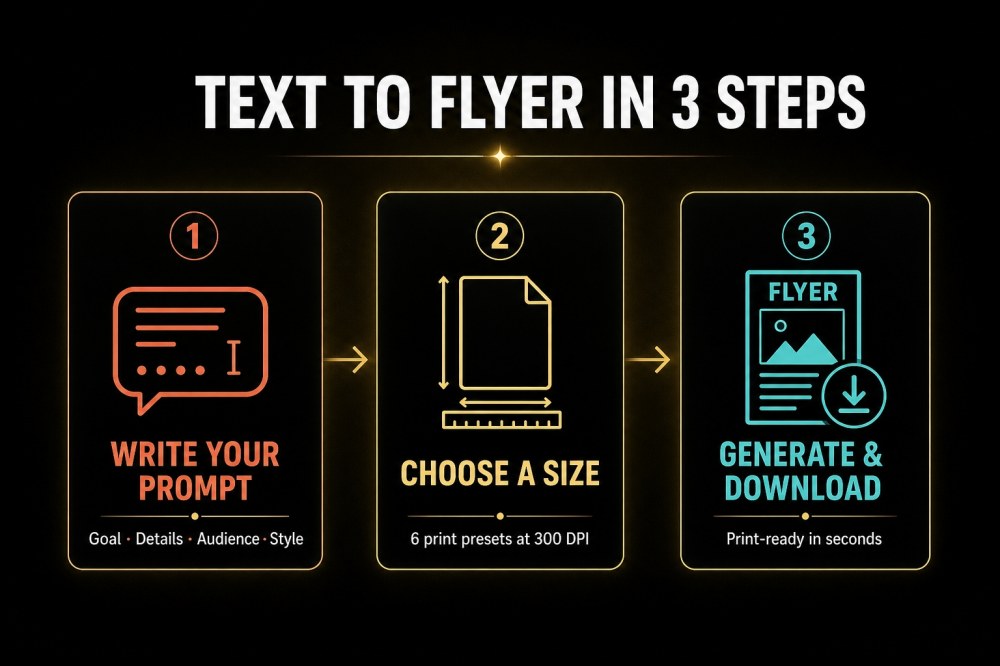
Step 1: Write Your Prompt with All Text Content
Open the PixExact AI Flyer Generator. In the prompt box, describe your flyer using the four-part framework:
- Goal: What is this flyer for? (event schedule, service list, menu, announcement)
- Details: Include every piece of text you want on the flyer — names, dates, times, prices, addresses, phone numbers, descriptions. The AI cannot guess this information, so be thorough.
- Audience: Who will read this? (customers, students, employees, community members)
- Style: Describe the visual tone, colors, and layout preferences. For text-heavy designs, mention "clean layout," "well-organized sections," or "easy to scan."
The key to text-heavy flyers: the more text content you include in your prompt, the more information the AI has to work with. Unlike image-focused posters, text flyers succeed when every detail is explicitly stated.
You do not need to upload any images. The AI generates all visual elements — background, icons, decorative elements, typography — from your text description alone. However, if you want to match your brand style, you can optionally upload a logo or previous flyer as a reference image.
Step 2: Choose Your Flyer Size
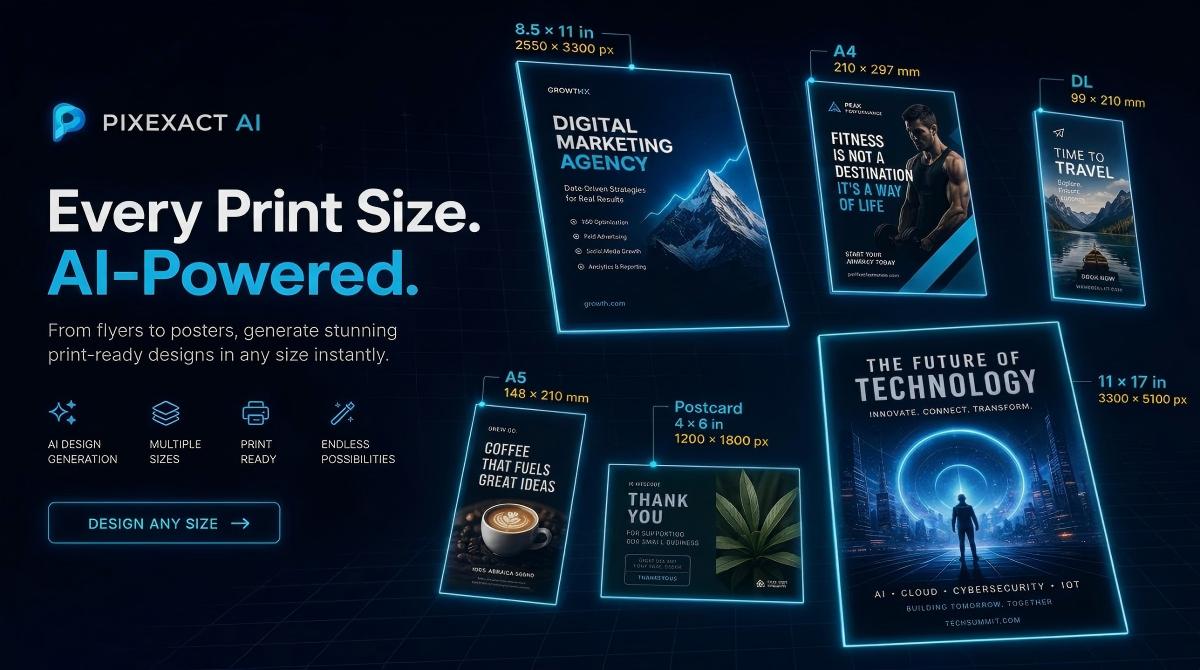
Select from six standard print sizes, all at 300 DPI:
| Size Preset | Dimensions | Pixels at 300 DPI | Best For |
|---|---|---|---|
| Postcard | 4 x 6 in | 1200 x 1800 | Quick reference cards, coupons |
| A6 | 105 x 148 mm | 1240 x 1748 | Pocket handouts, mini menus |
| Half Letter | 5.5 x 8.5 in | 1650 x 2550 | Service menus, class schedules, handouts |
| A5 | 148 x 210 mm | 1748 x 2480 | Restaurant menus, price lists |
| US Letter | 8.5 x 11 in | 2550 x 3300 | Full schedules, newsletters, bulletins |
| A4 | 210 x 297 mm | 2480 x 3508 | Detailed announcements, spec sheets |
For text-heavy flyers, larger sizes work better. US Letter and A4 give the AI enough space to organize multiple sections of text clearly. Half Letter and A5 work well when the text content is moderate (a service list or class schedule).
Need a digital format? Select Custom and enter dimensions like 1080 x 1350 px for Instagram feed or 1080 x 1920 px for Stories.
Set Number of Flyers to 4 to compare how the AI organizes your text content in different layouts.
Step 3: Generate, Add Your QR Code, and Download
Click Generate Flyer. The AI produces your design in seconds.
Review the layout. For text-heavy flyers, check that:
- All text content is present and readable
- Sections are clearly organized with visual hierarchy
- Contact information is prominent
- The overall layout is easy to scan
After generation, click the edit button in the top-right corner of the flyer image to upload your real QR code. The AI generates the final flyer with your scannable QR code embedded in the design.
If the text layout needs adjustment, refine your prompt:
- Add section headers to help the AI organize content ("Section 1: Morning Classes. Section 2: Evening Classes.")
- Specify layout preferences ("organized in two columns" or "with clear section dividers")
- Reduce text if the flyer looks overcrowded, or increase the size preset
Download the print-ready file at 300 DPI.
8 Text-Heavy Flyer Prompts: Copy and Customize
1. Event Schedule Flyer
Why text matters: Multi-day events need clear time slots, locations, and speaker or performer names. The flyer replaces a printed program.
Recommended size: US Letter (8.5 x 11 in) — enough space for a full multi-day agenda.
Prompt:
"Create an event schedule flyer for [Event Name]. Date: [Dates]. Venue: [Venue Name and Address].
Schedule: [Day 1, Date]:
- [Time]: [Session Title] — [Speaker/Location]
- [Time]: [Session Title] — [Speaker/Location]
- [Time]: [Session Title] — [Speaker/Location]
[Day 2, Date]:
- [Time]: [Session Title] — [Speaker/Location]
- [Time]: [Session Title] — [Speaker/Location]
Registration: [Website or Contact]. Clean and professional layout with clear time slots, [color preferences], easy-to-scan sections for each day. Include a QR code linking to full agenda."
Example with details filled in:
"Create an event schedule flyer for the Austin Small Business Summit 2026. Date: October 10-11. Venue: Capital Convention Center, 500 East 4th Street, Austin TX.
Schedule: Friday, October 10:
- 8:30 AM: Registration and Coffee
- 9:00 AM: Keynote — Building a Local Brand in 2026, Sarah Chen
- 10:30 AM: Workshop — Social Media for Small Business, Room A
- 12:00 PM: Networking Lunch
- 1:30 PM: Panel — Funding Your Growth, Main Stage
- 3:00 PM: Workshop — AI Tools for Small Teams, Room B
Saturday, October 11:
- 9:00 AM: Keynote — Customer Retention Strategies, Marcus Rivera
- 10:30 AM: Workshop — Email Marketing That Works, Room A
- 12:00 PM: Closing Lunch and Awards
Register at austinbizsummit.com. Early bird price: $99 through September 15. Clean and professional layout with navy blue and white color scheme, clear time slots organized by day, modern sans-serif typography. Include a QR code linking to registration."
2. Service Menu Flyer
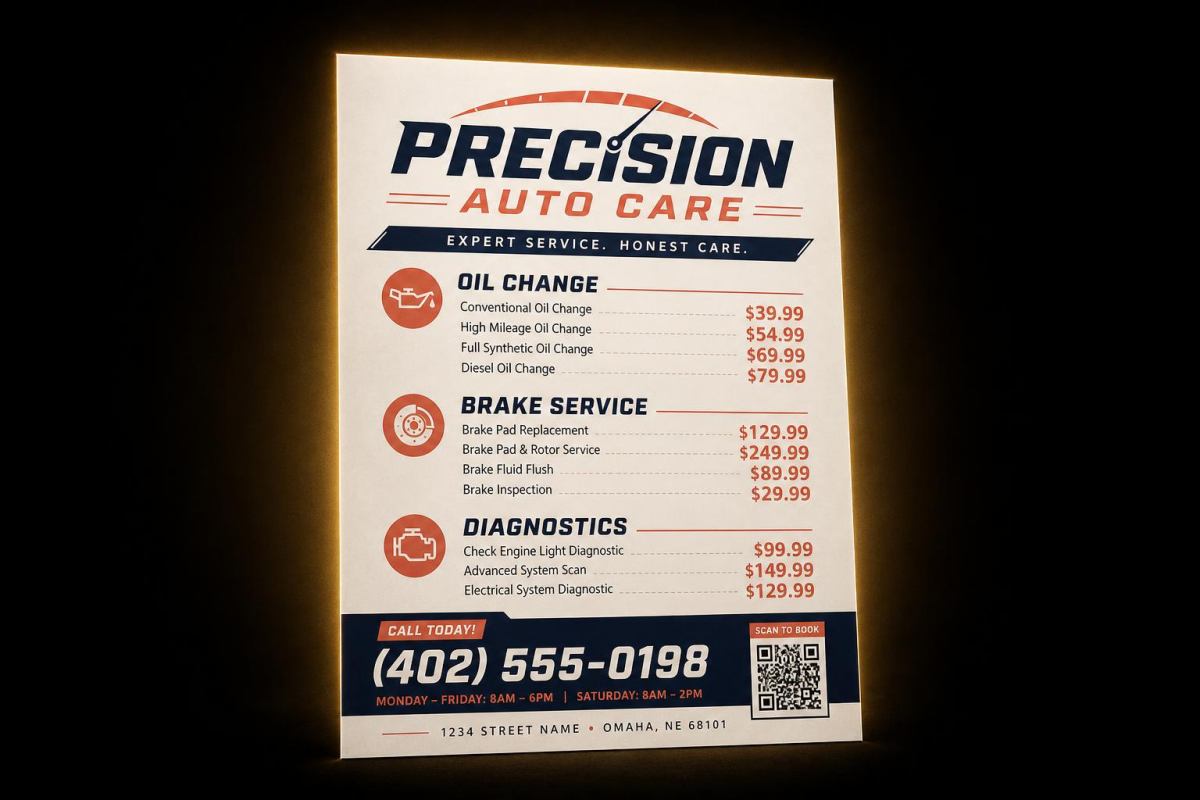
Why text matters: Service businesses need to list what they offer and what it costs. Customers keep these flyers for reference.
Recommended size: Half Letter (5.5 x 8.5 in) — compact enough to hand out or post on a corkboard.
Prompt:
"Design a service menu flyer for [Business Name], a [type of business] in [City]. Services and pricing:
Call [Phone] or book at [Website]. [Tone and color]. Include a QR code linking to online booking."
Example with details filled in:
"Design a service menu flyer for Precision Auto Care, an auto repair shop in Denver. Services and pricing:
Maintenance:
- Oil Change (Synthetic): $65
- Tire Rotation: $35
- Brake Inspection: Free with any service
- Full Vehicle Inspection: $89
Repairs:
- Brake Pad Replacement: from $199
- Battery Replacement: from $149
- AC Recharge: $129
- Check Engine Diagnostic: $75
Call 303-555-0147 or book at precisionautocare.com. Professional and trustworthy with dark blue and silver colors, clean organized layout with clear price columns. Include a QR code linking to online booking."
3. Product Specs Flyer
Why text matters: Technical products need specifications, features, and comparisons clearly laid out for decision-makers.
Recommended size: A4 (210 x 297 mm) — standard for B2B spec sheets.
Prompt:
"Create a product specification flyer for [Product Name] by [Brand]. Product description: [1-2 sentences].
Key Features:
Technical Specifications:
Pricing: [Price or pricing tiers]. Order at [Website] or contact [Email/Phone]. Modern and technical layout with [colors], clean data presentation. Include a QR code linking to product page."
4. Newsletter-Style Flyer
Why text matters: Organizations use single-page newsletters to share multiple updates, announcements, and upcoming events in one printed piece.
Recommended size: US Letter (8.5 x 11 in) — standard newsletter format.
Prompt:
"Create a newsletter-style flyer for [Organization Name]. Issue: [Month/Season Year].
Headline: [Main Announcement] [2-3 sentence summary of main news]
Upcoming Events:
- [Event 1]: [Date, Time, Location]
- [Event 2]: [Date, Time, Location]
[Section 2 Headline]: [2-3 sentence update]
Contact: [Phone/Email/Website]. [Tone and color, e.g., Friendly and organized with green and white colors, clear section headers]. Include a QR code linking to [destination]."
5. Policy or Rules Announcement
Why text matters: Workplaces, HOAs, schools, and facilities need to communicate rules, policies, or procedural changes clearly and officially.
Recommended size: A4 (210 x 297 mm) or US Letter — needs enough space for detailed text.
Prompt:
"Design an official policy announcement flyer for [Organization Name]. Title: [Policy Title].
Effective Date: [Date].
Key Changes:
What This Means for You: [1-2 sentence summary]. Questions? Contact [Name/Department] at [Phone/Email]. Professional and authoritative with [colors], clear numbered sections, formal layout. Include a QR code linking to full policy document."
6. Class Schedule Flyer
Why text matters: Fitness studios, schools, community centers, and training providers need timetables that are easy to scan at a glance.
Recommended size: Half Letter (5.5 x 8.5 in) — postable on bulletin boards and gym walls.
Prompt:
"Create a weekly class schedule flyer for [Business/Organization Name].
Monday: [Time] [Class] with [Instructor], [Time] [Class] with [Instructor] Tuesday: [Time] [Class] with [Instructor], [Time] [Class] with [Instructor] Wednesday: [Time] [Class] with [Instructor] Thursday: [Time] [Class] with [Instructor], [Time] [Class] with [Instructor] Friday: [Time] [Class] with [Instructor] Saturday: [Time] [Class] with [Instructor]
Location: [Address]. Sign up: [Website/Phone]. [Tone and color]. Organized in a clear grid or timetable format. Include a QR code linking to registration."
Example with details filled in:
"Create a weekly class schedule flyer for Harmony Yoga Studio.
Monday: 6:30 AM Sunrise Flow with Mia, 12:00 PM Lunch Break Yoga with Sam, 6:00 PM Power Vinyasa with Jade Tuesday: 7:00 AM Morning Meditation with Sam, 5:30 PM Beginner Basics with Mia Wednesday: 6:30 AM Sunrise Flow with Jade, 12:00 PM Lunch Break Yoga with Mia, 7:00 PM Restorative Yin with Sam Thursday: 7:00 AM Morning Meditation with Jade, 5:30 PM Power Vinyasa with Mia Friday: 6:30 AM Sunrise Flow with Sam, 4:30 PM Happy Hour Flow with Jade Saturday: 9:00 AM Weekend Warrior with Mia, 10:30 AM Family Yoga with Sam
Drop-in: $18. Monthly Unlimited: $120. New students: First Class Free. Location: 450 Elm Street, Suite 3. Book at harmonyyoga.com. Calm and welcoming with sage green and cream colors, organized in a clear daily grid format. Include a QR code linking to class booking."
7. Menu and Price List
Why text matters: Restaurants, cafes, salons, and service providers need attractive price lists that customers can read quickly.
Recommended size: A5 (148 x 210 mm) — standard table menu or counter handout size.
Prompt:
"Design a menu and price list flyer for [Business Name].
[Category 1]:
- [Item]: [Description] — $[Price]
- [Item]: [Description] — $[Price]
[Category 2]:
- [Item]: [Description] — $[Price]
- [Item]: [Description] — $[Price]
[Hours and Address]. [Tone and color]. Clear and appetizing layout with organized categories and easy-to-read pricing. Include a QR code linking to [online menu/ordering]."
Example with details filled in:
"Design a menu and price list flyer for Golden Grain Bakery.
Breads:
- Sourdough Loaf: Naturally leavened, 24-hour ferment — $7.50
- Whole Wheat Sandwich Loaf: Honey wheat, sliced — $6.00
- Focaccia: Rosemary and sea salt, half sheet — $8.00
Pastries:
- Butter Croissant: Classic French, flaky — $4.50
- Almond Croissant: Filled with frangipane — $5.50
- Cinnamon Roll: Brown sugar glaze — $5.00
Drinks:
- Drip Coffee: 12oz $3.00 / 16oz $3.75
- Latte: 12oz $4.50 / 16oz $5.25
- Fresh Orange Juice: 12oz $5.00
Open Tuesday through Sunday, 7 AM to 3 PM. 820 Baker Street. Warm and artisanal with cream and brown tones, bakery-style typography, organized categories with clear pricing. Include a QR code linking to online ordering."
8. Community Bulletin Flyer
Why text matters: Neighborhoods, apartment complexes, and community organizations compile multiple announcements into a single flyer for posting in common areas.
Recommended size: US Letter (8.5 x 11 in) — standard bulletin board size.
Prompt:
"Create a community bulletin flyer for [Community/Organization Name]. Month: [Month Year].
Announcement 1: [Title] — [2-3 sentence description with dates and details] Announcement 2: [Title] — [2-3 sentence description] Announcement 3: [Title] — [2-3 sentence description] Announcement 4: [Title] — [2-3 sentence description]
Contact the office at [Phone/Email] or visit [Website]. [Tone and color]. Clear section dividers between announcements, easy to scan from a distance. Include a QR code linking to community website."
Prompt Engineering Tips for Text-Heavy Flyers
Structure Your Text with Clear Sections
Do not write one long paragraph. Break your content into labeled sections:
Weak: "We offer yoga on Monday and Wednesday mornings and evenings, also meditation on Tuesday and strength on Thursday with various instructors."
Strong: "Monday: 6:30 AM Sunrise Flow with Mia, 6:00 PM Power Vinyasa with Jade. Tuesday: 7:00 AM Meditation with Sam. Wednesday: 6:30 AM Sunrise Flow with Jade, 7:00 PM Yin with Sam. Thursday: 5:30 PM Power Vinyasa with Mia."
The AI uses your text structure as a layout guide. Organized input produces organized output.
Specify Layout Preferences
For text-heavy designs, tell the AI how you want the information arranged:
- "Organized in two columns"
- "Clear grid format with days as rows"
- "Numbered list with section dividers"
- "Categories with bold headers and items listed below"
Use Hierarchy Cues
Tell the AI what is most important:
- "Headline should be the largest text: [Your Headline]"
- "Phone number and address should be prominent at the bottom"
- "Prices should be right-aligned next to each item"
Request Clean, Scannable Design
For text-heavy flyers, always include phrases like:
- "Clean and organized layout"
- "Easy to scan"
- "Clear section headers"
- "Minimal decorative elements — focus on readability"
This steers the AI away from adding too many visual distractions that compete with your text content.
Match Size to Text Volume
The more text you have, the larger the size you need:
- Light text (headline + a few details): Postcard or A6
- Moderate text (service list, class schedule): Half Letter or A5
- Heavy text (full schedule, newsletter, bulletin): US Letter or A4
If the output looks cramped, move up one size.
Leaflet vs Flyer: What Is the Difference?
The terms are often used interchangeably, but there is a subtle distinction:
| Aspect | Flyer | Leaflet |
|---|---|---|
| Format | Single sheet, single-sided or double-sided | Single sheet, often folded (bi-fold or tri-fold) |
| Content density | Moderate — headline, key details, CTA | Higher — more detailed information, multiple sections |
| Typical size | US Letter, A4, A5, Half Letter | A4 or Letter folded to DL, A5, or tri-fold |
| Distribution | Posted on boards, handed out, mailed | Handed out, placed in racks, inserted in mailings |
| Purpose | Quick attention-grabbing announcement | Informational handout with more depth |
| Design focus | Visual impact first, text second | Text readability first, design second |
PixExact's AI Flyer Generator creates single-sheet designs that work for both flyers and the individual panels of a leaflet. For a folded leaflet, generate at the unfolded size (e.g., A4 for a tri-fold DL leaflet) and have your printer handle the fold lines.
For a broader comparison of print formats, see our guide on Flyer vs Poster vs Brochure.
Choosing the Right Size for Text Flyers
| Text Volume | Recommended Size | Example Use Case |
|---|---|---|
| Light (under 50 words) | Postcard (4 x 6 in) or A6 | Coupon, simple announcement, appointment card |
| Moderate (50-150 words) | Half Letter (5.5 x 8.5 in) or A5 | Service menu, class schedule, short price list |
| Heavy (150-300 words) | US Letter (8.5 x 11 in) or A4 | Event schedule, newsletter, community bulletin, spec sheet |
| Digital sharing | Custom: 1080 x 1350 px or 1080 x 1920 px | Instagram feed or Stories versions of any text flyer |
All standard sizes are generated at 300 DPI for professional printing. For complete dimension tables with bleed specs, see our Flyer Size Guide.
Frequently Asked Questions
Can I create a flyer from text only, without uploading images?
Yes. The PixExact AI Flyer Generator works entirely from text prompts. You do not need to upload any photos, logos, or reference images. Write a description of your flyer including all the text content you want displayed, select a size, and click Generate Flyer. The AI creates a complete design — background, typography, decorative elements, and layout — from your words alone.
What is the best AI flyer generator from text?
PixExact is built specifically for text-to-flyer generation. You describe your flyer in plain language, and the AI produces a unique, print-ready design in seconds. Unlike template editors where you manually place text boxes and swap images, PixExact handles the entire design process from a single text prompt. It offers six standard print sizes at 300 DPI plus custom dimensions up to 4096 x 4096 pixels.
Is there a free AI flyer generator from text?
Yes. PixExact gives complimentary credits to every new user upon signup — enough to generate and download several flyers for free. No credit card required. After the complimentary credits, it uses a credit-based system where you pay only for what you generate.
Can I create leaflets with AI?
Yes. While PixExact generates single-sheet designs, these work perfectly as leaflet panels. For a folded leaflet, generate at the full unfolded size (for example, A4 for a tri-fold that folds down to DL size) and have your printer handle the fold. The AI creates organized, text-rich layouts that are well-suited to leaflet-style information density.
How do I get the AI to organize a lot of text clearly?
Structure your prompt with clear sections, labels, and hierarchy. Instead of one long paragraph, break content into labeled groups: "Section 1: Morning Classes. Section 2: Evening Classes." Use formatting cues like "organized in two columns," "clear section dividers," and "easy to scan." The AI mirrors the structure of your input.
What size should I use for a text-heavy flyer?
For heavy text content (event schedules, newsletters, bulletins), use US Letter (8.5 x 11 in) or A4 — these give the AI enough space to organize multiple sections clearly. For moderate text (service menus, class schedules), Half Letter or A5 works well. If the output looks cramped, move up one size. See our Flyer Size Guide for complete recommendations.
Can I add a QR code to a text-based flyer?
Yes. After the AI generates your flyer, click the edit button in the top-right corner of the flyer image. Upload your own QR code image, and the AI produces the final flyer with your real, scannable QR code embedded in the design. This works for all flyer types — text-heavy or image-based.
Start Creating Flyers from Text
You have the prompts, the tips, and the size guide. All you need is your text content.
Open the AI Flyer Generator — type your description, pick your size, and download a professional flyer in seconds. No images, no templates, no design skills required.
Related Guides
- How to Make a Flyer with AI: Step-by-Step Guide (2026)
- Flyer Size Guide: Standard Dimensions for Print and Digital (2026)
- How to Design a Flyer That Converts: AI-Powered Tips (2026)
- AI Flyer Templates for Small Business: 10 Ready-to-Use Ideas (2026)
- Flyer vs Poster vs Brochure: What Is the Difference (2026)
- Best Free AI Flyer Generators Compared (2026)
- Poster Size Guide: Every Standard Dimension for Print and Digital (2026)
- Instagram Post Size: Exact Dimensions and Best Formats (2026)