You have a great photo — a product shot, a real estate listing, a portrait, a food spread, or a travel landscape. You want to turn it into a professional poster with headlines, styling, and the right dimensions. But you do not have Photoshop skills or hours to spend in a template editor.
An AI poster generator with photo upload changes the workflow entirely. You upload your image, describe the poster you want, and the AI builds a complete design around your photo — matching colors, adding typography, and composing everything into a finished poster.
This guide shows you exactly how to use PixExact's image-to-poster feature, with 8 real-world use cases and ready-to-use prompts you can copy and paste.
Quick Reference: 8 Photo Poster Ideas at a Glance
| # | Photo Poster Type | What to Upload | Recommended Size |
|---|---|---|---|
| 1 | Product Photography Poster | Product photo on clean background | 2:3 (1664 x 2496 px) |
| 2 | Real Estate Listing Poster | Property exterior or interior photo | 3:4 (3072 x 4096 px) |
| 3 | Food and Restaurant Poster | Dish photo or table spread | 9:16 (1080 x 1920 px) |
| 4 | Portrait and Graduation Poster | Headshot or graduation photo | 2:3 (1664 x 2496 px) |
| 5 | Travel and Destination Poster | Landscape or landmark photo | 3:4 (3072 x 4096 px) |
| 6 | Pet Poster | Pet portrait or action shot | 2:3 (1664 x 2496 px) |
| 7 | Wedding and Event Poster | Couple photo or venue shot | 3:4 (3072 x 4096 px) |
| 8 | Fitness and Wellness Poster | Workout photo or studio shot | 9:16 (1080 x 1920 px) |
How It Works: Photo to Poster in 3 Steps
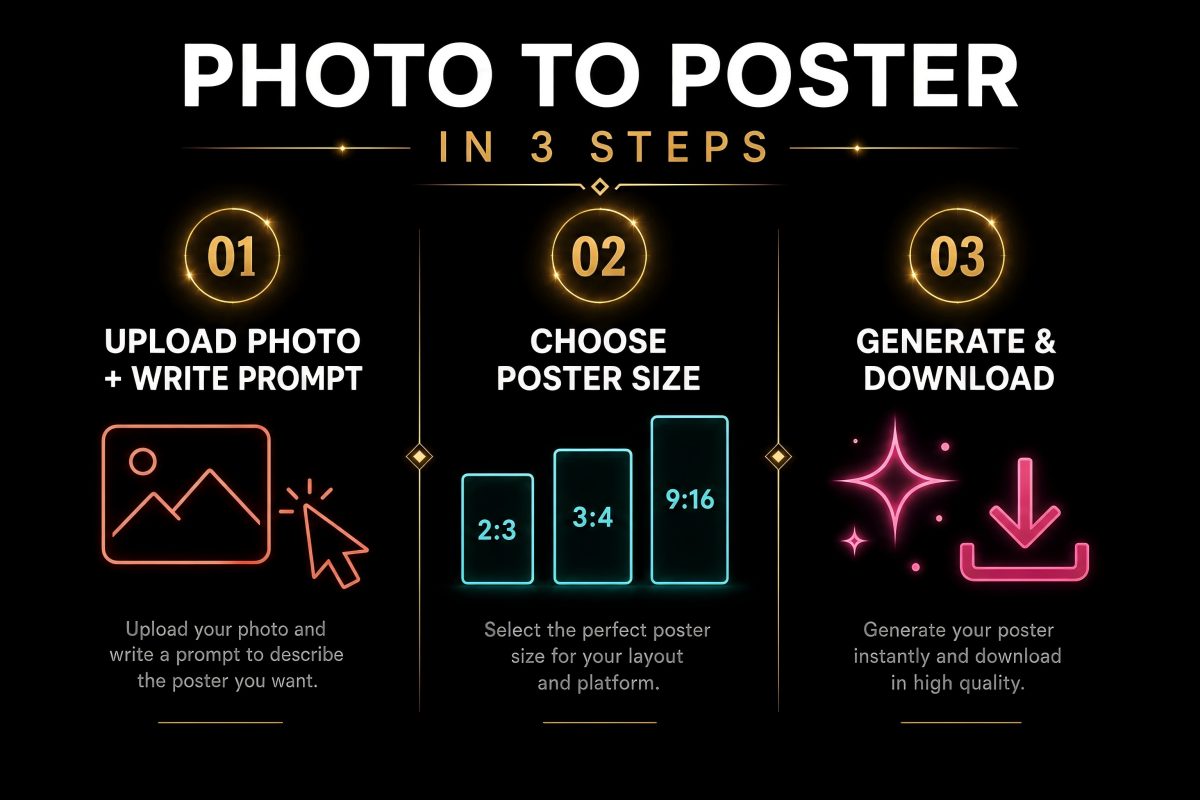
Step 1: Upload Your Photo and Write Your Prompt
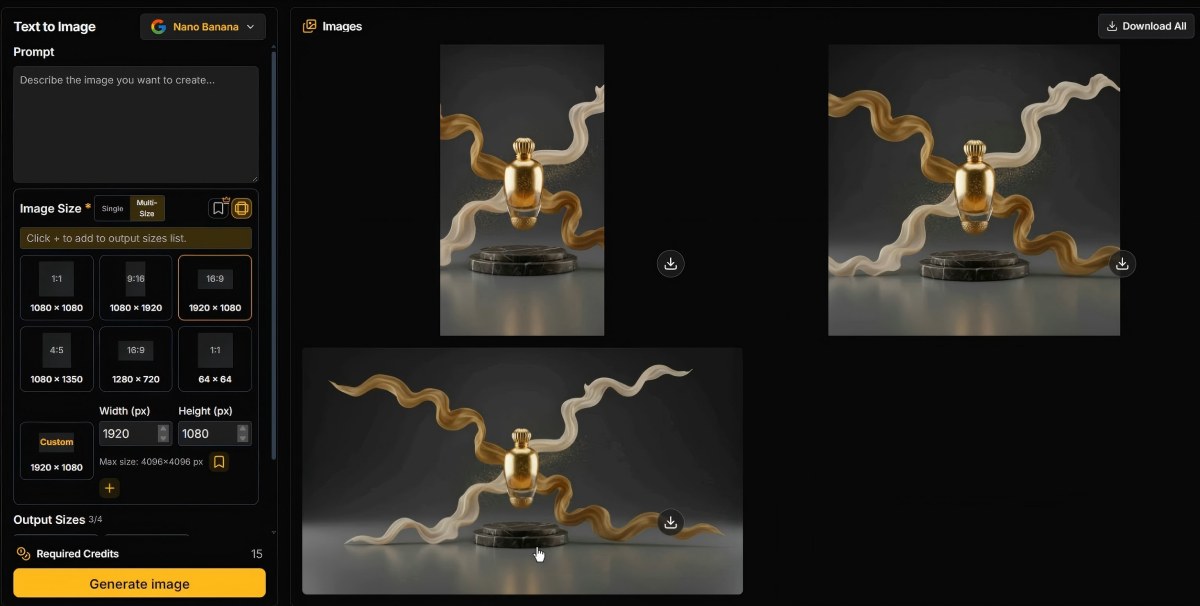
Open the PixExact AI Poster Generator. You will see a prompt box and an image upload area.
First, upload your photo as a reference image. The AI analyzes the visual composition, color palette, subject matter, and overall aesthetic of your uploaded image. It then incorporates these elements into the generated poster design.
Next, write your prompt using the four-part framework:
- Purpose: What is this poster for? (product launch, event, wall art, social media)
- Content: What text should appear? (headline, tagline, date, location, website)
- Style: How should it look? (modern, vintage, cinematic, minimalist)
- Colors: Should the AI match your photo's palette or use specific colors?
The key difference from text-only generation: when you upload a reference image, the AI uses your photo as the visual foundation rather than generating imagery from scratch. Your actual image influences the composition, color harmony, and overall design direction.
Step 2: Choose Your Poster Size
Select from three aspect ratio presets:
| Preset | Pixels | Best For |
|---|---|---|
| 9:16 | 1080 x 1920 | Instagram Stories, TikTok, digital signage, phone wallpapers |
| 2:3 | 1664 x 2496 | Classic poster format, event posters, wall art, print-ready |
| 3:4 | 3072 x 4096 | Large high-res prints, exhibition displays, premium wall art |
Need a specific size? Select Custom and enter any dimensions up to 4096 x 4096 pixels.
For photo posters, the 2:3 and 3:4 presets generally work best because they give portrait-oriented photos room to breathe within the composition. The 9:16 preset is ideal when the poster is destined for social media Stories or vertical digital displays.
Set Number of Images to 4 to see how the AI interprets your photo in different layout variations.
Step 3: Generate and Download
Click Create Poster. The AI produces your design in seconds, using your uploaded photo as the visual anchor.
Review the results. Each variation will feature your photo integrated differently — some may use it as a full background, others as a centered focal element, and others with artistic treatments applied.
If you want adjustments:
- Refine one element of your prompt (change "modern" to "vintage" or "minimalist" to "bold")
- Try a different crop or angle of the same photo
- Generate 4 variations and pick the strongest composition
Download the final poster. Files are high-resolution and ready for printing or digital sharing.
8 Photo Poster Use Cases with Ready-to-Use Prompts
1. Product Photography Poster
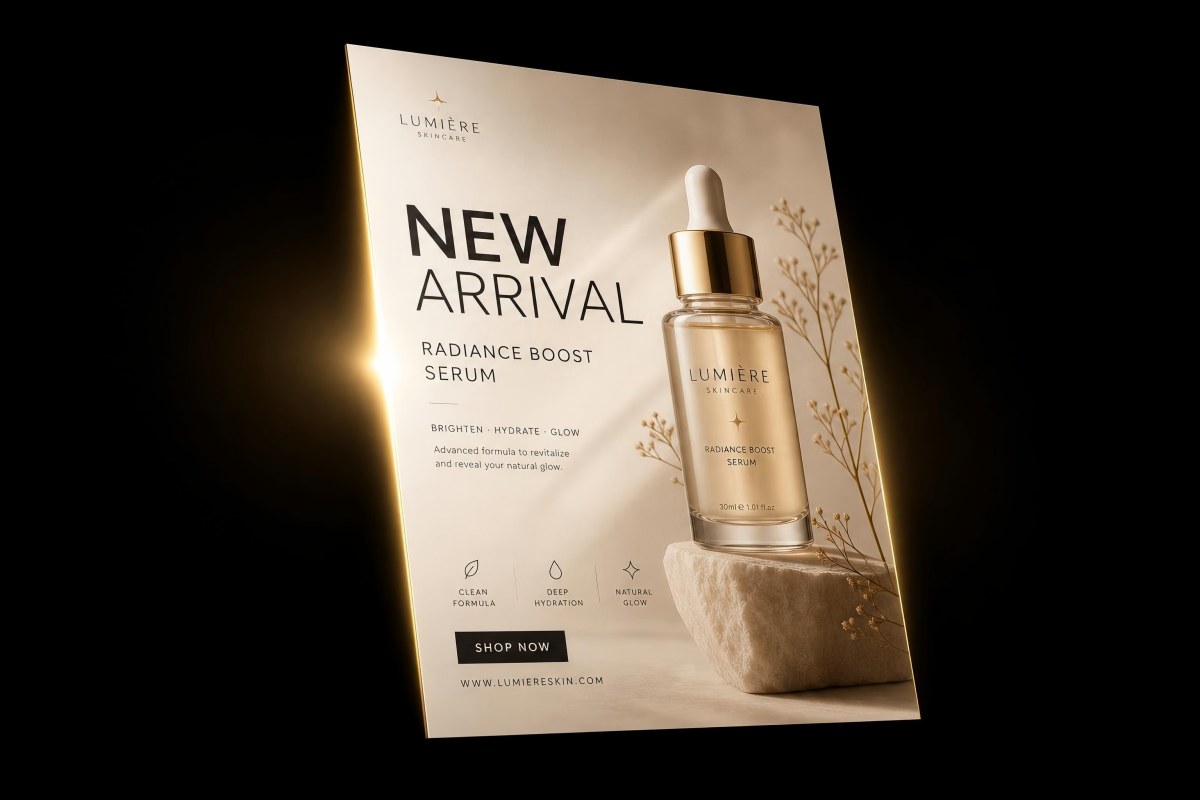
What to upload: A clean product shot — ideally on a white or neutral background, well-lit, showing the product from its best angle.
Recommended size: 2:3 (1664 x 2496 px) for print posters, or Custom 1080 x 1350 px for Instagram feed.
Prompt:
"Create a premium product launch poster featuring my uploaded product photo. Headline: [Product Name] — Now Available. Tagline: [Your Tagline]. Shop at [Website]. Modern and luxurious design with a clean layout, the product as the hero element, subtle gradient background that complements the product colors. Elegant sans-serif typography."
Design tips:
- Use a product photo with a clean, uncluttered background — the AI can build the poster design around it more effectively.
- Mention your brand's color palette in the prompt so the AI creates a cohesive design.
- For e-commerce, add a discount code or launch date to drive urgency.
2. Real Estate Listing Poster
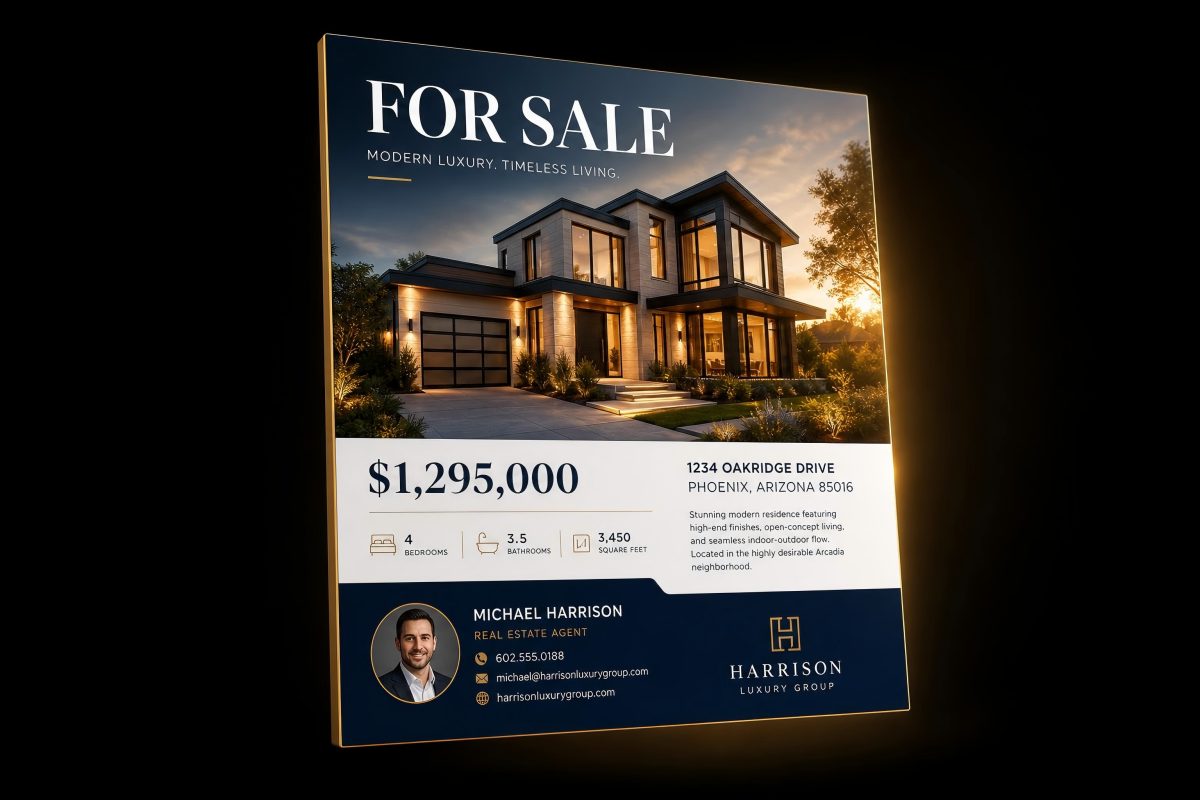
What to upload: The best exterior or interior photo of the property — front facade, kitchen, or living room with good natural lighting.
Recommended size: 3:4 (3072 x 4096 px) for print, or Custom 1080 x 1350 px for social media.
Prompt:
"Design a professional real estate listing poster featuring my uploaded property photo. Headline: [Property Type] for Sale — $[Price]. Address: [Full Address]. Key features: [3-4 features]. Open house: [Date and Time]. Contact [Agent Name] at [Phone]. Clean and elegant layout with the property photo as the centerpiece, white and navy color scheme, modern real estate branding style."
Design tips:
- Choose the photo with the best natural lighting and widest angle.
- Include the price prominently — it is the first thing buyers look for.
- Upload a twilight or golden-hour exterior shot for luxury listings.
3. Food and Restaurant Poster
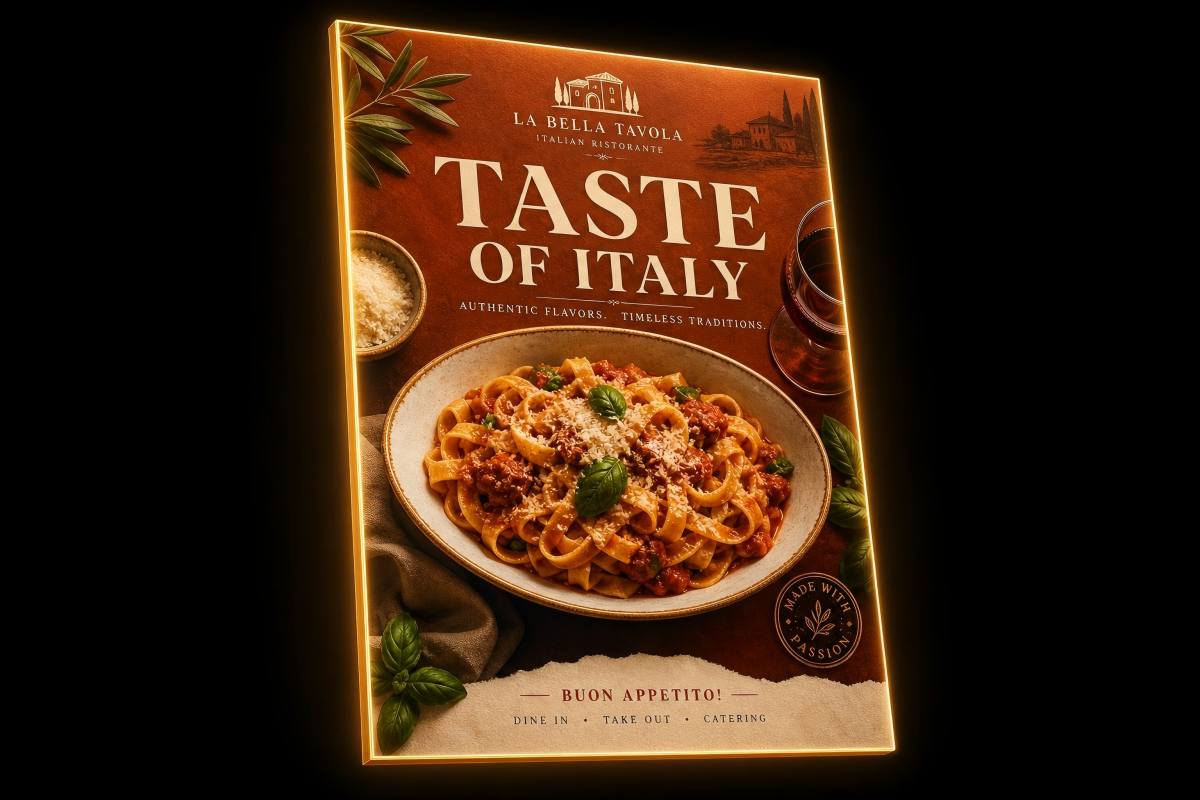
What to upload: An overhead or close-up shot of your signature dish, a beautifully arranged table spread, or a plated meal with natural lighting.
Recommended size: 9:16 (1080 x 1920 px) for Instagram Stories and digital menus, or 2:3 for print posters.
Prompt:
"Create an appetizing restaurant poster featuring my uploaded food photo. Headline: [Restaurant Name] — [Offer or Event, e.g., New Brunch Menu]. Available [Days and Times]. Visit us at [Address]. Warm and inviting design with the food photo as the hero image, earthy warm tones that complement the food colors, elegant typography."
Design tips:
- Use natural lighting in food photos — avoid harsh flash.
- Overhead shots work well for table spreads; 45-degree angles work well for individual dishes.
- Mention specific menu items or offers rather than generic descriptions.
4. Portrait and Graduation Poster
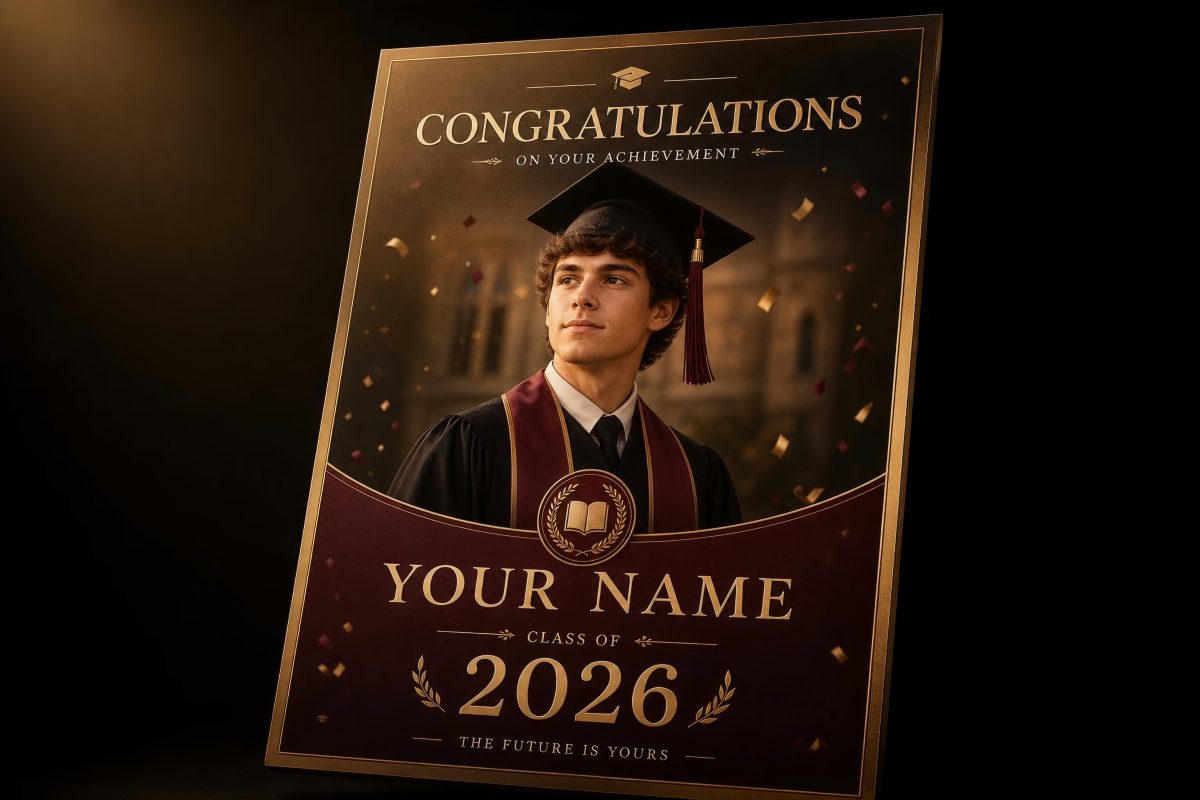
What to upload: A professional headshot, graduation portrait, or milestone celebration photo.
Recommended size: 2:3 (1664 x 2496 px) for framed prints and wall display.
Prompt:
"Design a graduation celebration poster featuring my uploaded portrait photo. Headline: Congratulations, [Name]. [Degree and University]. Class of [Year]. Elegant and celebratory design with the portrait as the focal point, [school colors or preferred colors], subtle confetti or academic-themed accents, formal serif typography."
Design tips:
- Use a high-resolution portrait with good lighting and a clean background.
- Include the school colors in your prompt for a personalized touch.
- For professional headshots, use a more corporate style description.
5. Travel and Destination Poster
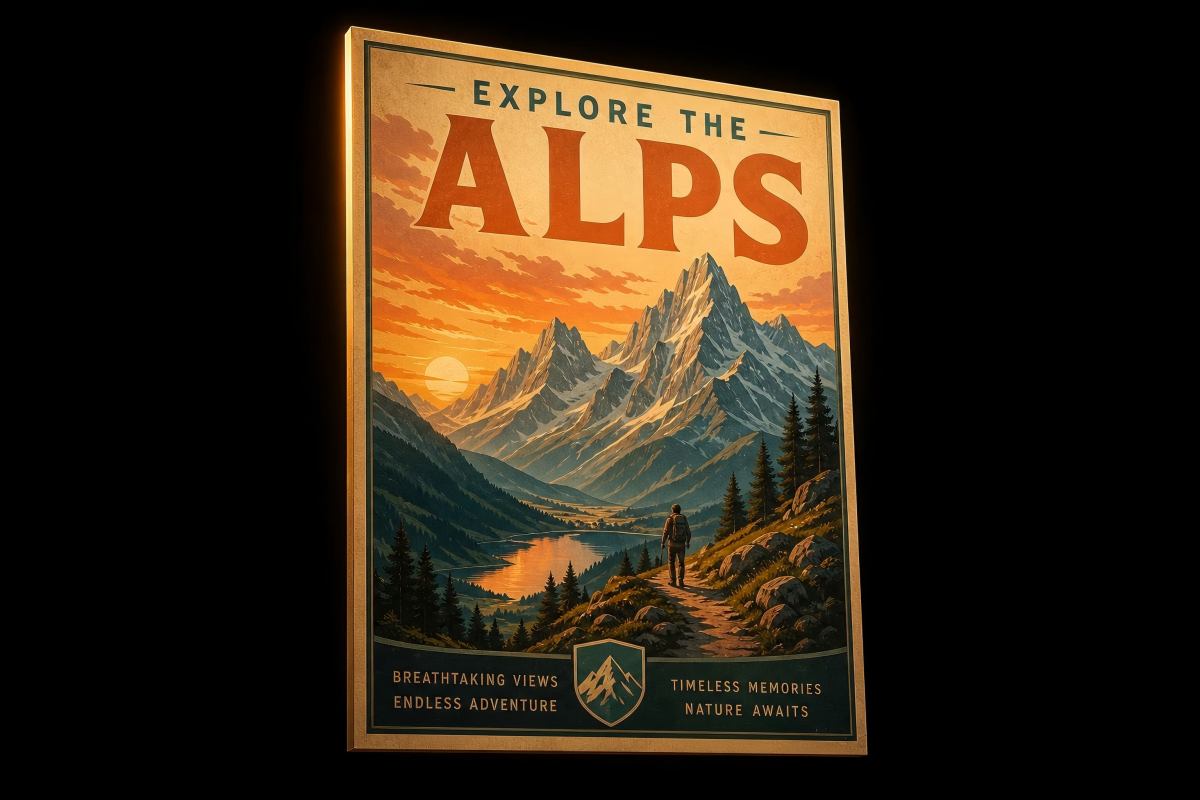
What to upload: A stunning landscape, cityscape, landmark, or scenic travel photo.
Recommended size: 3:4 (3072 x 4096 px) for large wall art prints.
Prompt:
"Create a vintage travel poster inspired by my uploaded landscape photo. Destination: [Location Name]. Tagline: [e.g., Discover the Beauty of Santorini]. Retro travel poster aesthetic with bold display typography at the top, the landscape as the full background, warm color grading, slightly painterly texture. No additional text beyond the destination name and tagline."
Design tips:
- Landscape photos with strong colors and clear focal points produce the best results.
- Specify "no additional text" if you want a clean, art-focused poster.
- The 3:4 preset at 3072 x 4096 px produces wall-art quality at large sizes.
6. Pet Poster
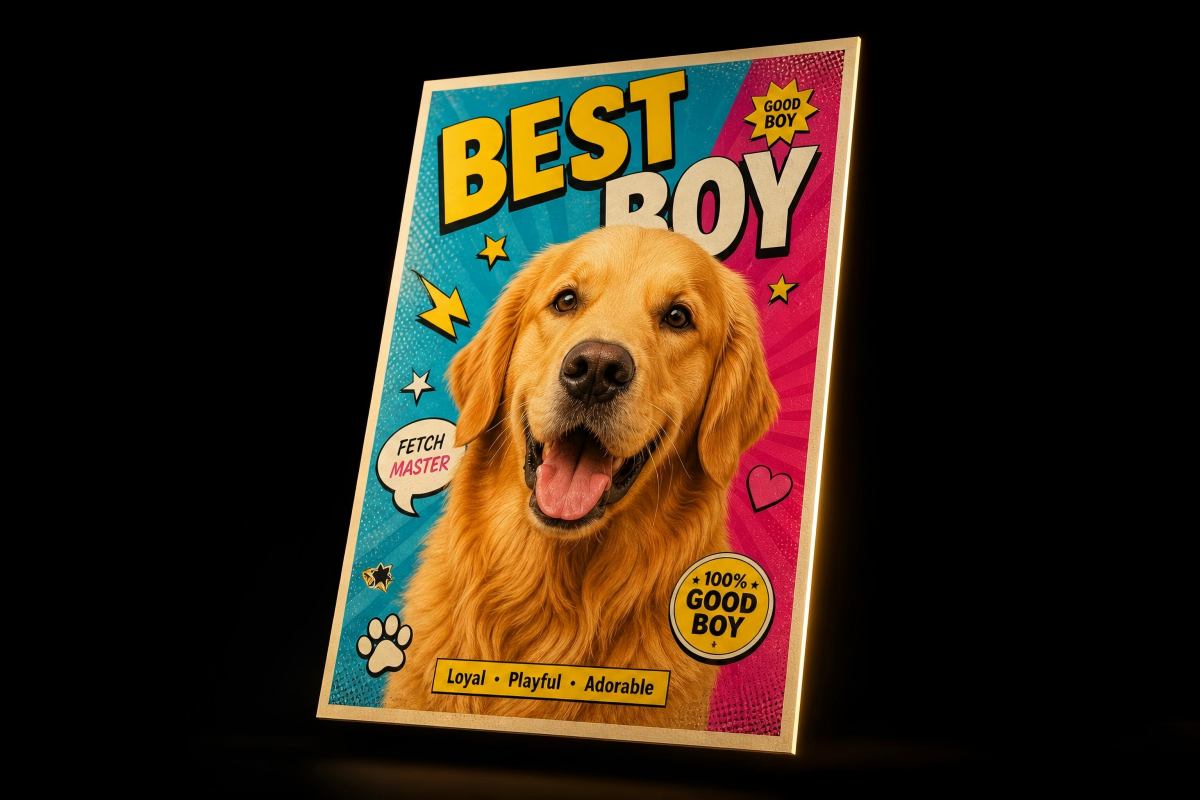
What to upload: A clear, well-lit portrait of your pet — facing the camera, good focus, minimal background clutter.
Recommended size: 2:3 (1664 x 2496 px) for framed prints.
Prompt:
"Create a fun, artistic poster featuring my uploaded pet photo. Style: [pop art / minimalist / watercolor illustration / royal portrait]. Pet's name: [Name] displayed in bold, playful typography. Vibrant and cheerful color palette that complements my pet's coloring. The pet should be the hero of the design."
Design tips:
- Photos with the pet looking directly at the camera create the most engaging posters.
- Try different art styles — "pop art" creates bold, colorful results; "royal portrait" creates humorous, regal compositions.
- Ensure the photo is well-lit with the pet in sharp focus.
7. Wedding and Event Poster
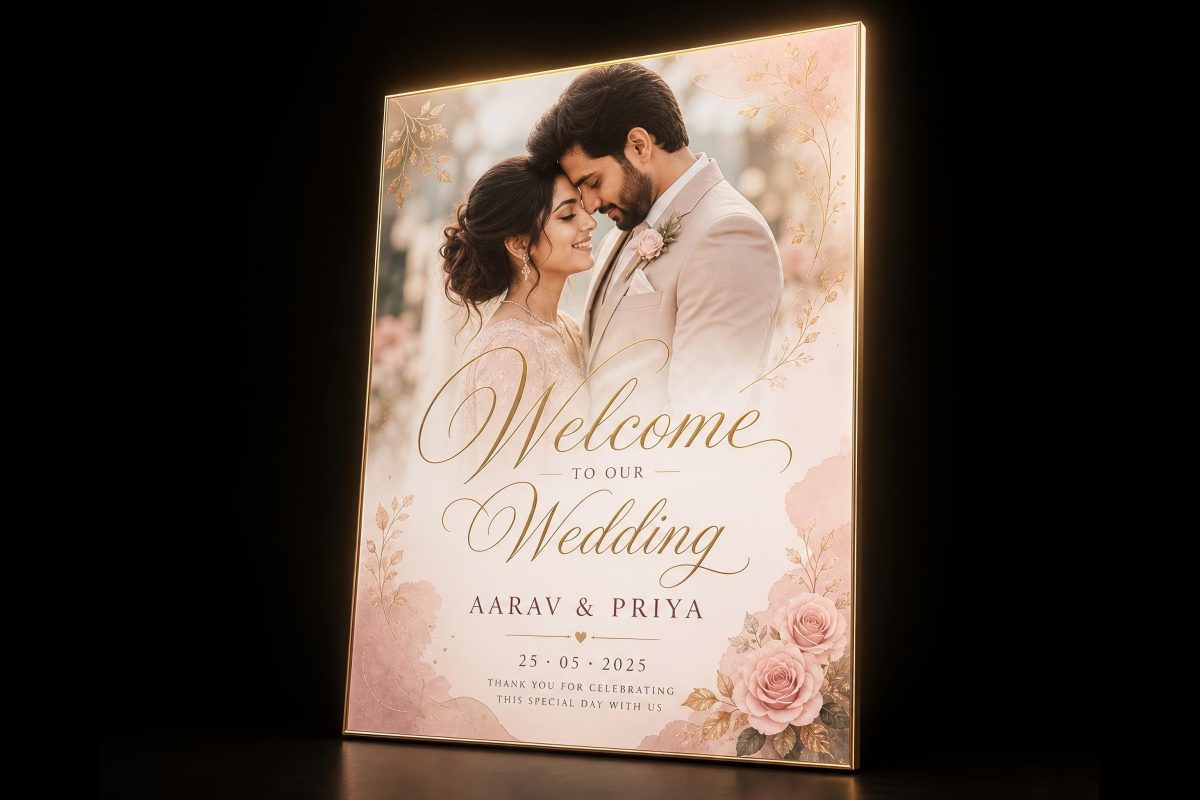
What to upload: An engagement photo, venue shot, or a styled photo representing the event's aesthetic.
Recommended size: 3:4 (3072 x 4096 px) for welcome signs, or Custom 1080 x 1350 px for digital invitations.
Prompt:
"Design an elegant wedding welcome poster featuring our uploaded engagement photo. Text: Welcome to the Wedding of [Names]. [Date]. [Venue Name], [City]. Romantic and sophisticated design with the photo as the centerpiece, soft blush and gold color palette, flowing script typography for the names, clean serif for details."
Design tips:
- Use a photo that matches the wedding's overall aesthetic (outdoor, rustic, modern, classic).
- Specify your wedding color palette in the prompt for a cohesive look.
- For welcome signs, the 3:4 preset at maximum resolution works well for large-format printing.
8. Fitness and Wellness Poster
What to upload: An action shot from a workout, a studio interior photo, or a posed fitness portrait.
Recommended size: 9:16 (1080 x 1920 px) for social media promotion, or 2:3 for gym wall posters.
Prompt:
"Create a high-energy fitness poster featuring my uploaded workout photo. Headline: [Gym/Studio Name] — [Offer, e.g., 7-Day Free Trial]. Classes: [List key classes]. Located at [Address]. Sign up at [Website]. Bold and motivating design with the workout photo as the background, dark overlay with high-contrast white and [accent color] typography, fitness-industry aesthetic."
Design tips:
- Action shots with movement and energy produce more dynamic posters than static poses.
- Use a dark overlay style for text readability over busy fitness photos.
- Include the specific offer or call to action prominently.
Photo Quality Best Practices
Your photo quality directly impacts the final poster. Follow these guidelines:
Resolution
- Minimum recommended: 1500 x 2000 pixels for the reference image
- Ideal: 2000 x 3000 pixels or higher
- Higher resolution photos give the AI more detail to work with and produce sharper final posters
Composition
- Center your main subject in the frame
- Leave some negative space around the subject — this gives the AI room to add text and design elements
- Avoid photos with heavy text or logos already overlaid — the AI may try to incorporate them
Lighting
- Natural light produces the best results for most use cases
- Avoid harsh shadows or blown-out highlights
- Golden hour (early morning or late afternoon) creates warm, flattering tones for portraits and landscapes
File Format
- JPG and PNG are both accepted
- PNG preserves more detail if your original is high-resolution
- Avoid heavily compressed JPGs — compression artifacts reduce output quality
What to Avoid
- Blurry or out-of-focus images — the AI cannot add sharpness that is not there
- Extremely dark or overexposed photos
- Images with watermarks or heavy text overlays
- Very low resolution images (under 800 x 600 pixels)
Photo Poster vs Text-Only Poster: When to Use Each
| Criteria | Photo Poster (Upload Reference) | Text-Only Poster (Prompt Only) |
|---|---|---|
| Best for | Product shots, real estate, food, portraits, travel art | Conceptual art, abstract designs, events without existing photos |
| Visual source | Your actual photo drives the design | AI generates all imagery from scratch |
| Brand consistency | High — your real images anchor the design | Moderate — AI interprets your style description |
| Speed | Same — seconds per generation | Same — seconds per generation |
| When to choose | You have a strong photo you want featured | You want the AI to create everything from imagination |
Both approaches use the same PixExact AI Poster Generator. The only difference is whether you upload a reference image. For a full tutorial on text-only poster creation, see our How to Create a Poster with AI guide.
Choosing the Right Size for Photo Posters
| Use Case | Recommended Size | Why |
|---|---|---|
| Social media Stories | 9:16 (1080 x 1920 px) | Full-screen vertical format for Instagram, TikTok, Facebook |
| Instagram feed post | Custom: 1080 x 1350 px | Optimized 4:5 ratio for maximum feed visibility |
| Standard print poster | 2:3 (1664 x 2496 px) | Classic poster proportions, good for A3 and similar print sizes |
| Large wall art | 3:4 (3072 x 4096 px) | Maximum resolution for large-format printing |
| Photo book or portfolio | Custom: match your book dimensions | Ensures exact fit without cropping |
For a complete reference of standard poster dimensions, see our Poster Size Guide. For social media sizing, see our Instagram Post Size Guide.
Frequently Asked Questions
Can I upload my own photos to an AI poster generator?
Yes. The PixExact AI Poster Generator includes an image upload feature below the prompt box. Upload any photo — a product shot, portrait, landscape, food image, or property photo — and the AI uses it as the visual foundation for your poster design. The AI analyzes the composition, colors, and subject of your photo and builds the poster around it.
What types of photos work best for AI poster generation?
High-resolution photos (1500 x 2000 pixels or larger) with good lighting and a clear subject produce the best results. Product photos on clean backgrounds, well-lit portraits, landscape shots with strong colors, and overhead food photography all work well. Avoid blurry images, heavily compressed files, or photos with existing text overlays.
Is the AI poster generator with photos free?
PixExact gives complimentary credits to every new user upon signup — enough to generate and download several posters with your photos for free. After the complimentary credits, it uses a credit-based system where you pay only for what you generate.
What size should I choose for a photo poster?
It depends on the use case. For social media Stories, use the 9:16 preset (1080 x 1920 px). For classic print posters, use 2:3 (1664 x 2496 px). For large wall art or exhibition displays, use 3:4 (3072 x 4096 px). You can also enter any Custom dimensions up to 4096 x 4096 pixels.
Can I generate multiple poster variations from the same photo?
Yes. Set the Number of Images to 4, and the AI generates four different poster designs using your same photo and prompt. Each variation features a different layout, typography treatment, and composition — making it easy to compare and pick the best one.
How is this different from just adding text to a photo in Canva?
In a template editor like Canva, you manually place text boxes over your photo, choose fonts, adjust sizing, and position every element yourself. With PixExact, you upload your photo, write a text prompt describing what you want, and the AI generates a complete poster — typography, layout, color treatment, and composition all handled automatically in seconds. Every design is unique rather than based on a shared template.
Can I use the photo poster for commercial purposes?
Yes. Posters generated with your own uploaded photos through PixExact are suitable for commercial use — product marketing, real estate listings, restaurant promotions, event advertising, and more. Since you own the original photo and the AI generates a unique design, the output is yours to use commercially.
Start Creating Posters from Your Photos
You have the workflow, the prompts, and the photo tips. Upload your best image and let the AI build a poster around it.
Open the AI Poster Generator — upload your photo, describe your vision, and download a stunning poster in seconds.
Related Guides
- How to Create a Poster with AI: Complete Tutorial (2026)
- Poster Size Guide: Every Standard Dimension for Print and Digital (2026)
- AI Poster Ideas for Events: From Concerts to Conferences (2026)
- AI Advertisement Poster Generator: Create Ads That Stand Out (2026)
- Flyer Size Guide: Standard Dimensions for Print and Digital (2026)
- How to Make a Flyer with AI: Step-by-Step Guide (2026)
- Flyer vs Poster vs Brochure: What is the Difference (2026)
- Instagram Post Size: Exact Dimensions and Best Formats (2026)